How to Fix Netflix VPN Block: 7 Easy Ways That Work
 2026.09.08 08:22
 YT.Shi
Is there anything more frustrating than settling in for a movie night, firing up your VPN, and then seeing Netflix's dreaded "You seem to be using an unblocker or proxy" error instead of the show you wanted to watch?
If you've been trying to figure out how to bypass Netflix VPN block restrictions, you're far from alone. Netflix actively detects and blocks VPN connections, and their detection system has gotten significantly sharper over the past two years. In 2026, they're flagging residential proxies, datacenter IPs, and even some well-known commercial VPN servers within seconds of connection. The cat-and-mouse game between VPN providers and Netflix's engineering team is relentless, and honestly, it can feel like you're always one step behind.
But you don't have to accept defeat. There are real, practical solutions that work right now, and this guide walks you through every one of them. Whether your VPN suddenly stopped working with Netflix last week or you've never managed to get past the block in the first place, you'll find something here that fits your situation.
Why Netflix Blocks VPNs in the First Place
Before jumping into fixes, it helps to understand what you're actually up against. Netflix doesn't block VPNs because they dislike privacy tools. The issue is licensing.
Netflix licenses content on a country-by-country basis. A show available in the UK library might not be licensed for viewers in the US, and vice versa. Content owners (studios, distributors, production companies) require Netflix to enforce these geographic restrictions as part of their contracts. If Netflix can't demonstrate that they're restricting access by region, they risk losing licensing deals worth hundreds of millions of dollars.
So Netflix invests heavily in VPN detection. Their system works by:
1. Maintaining massive databases of known VPN and proxy IP addresses
2. Detecting when hundreds or thousands of users connect from the same IP address (a dead giveaway for shared VPN servers)
3. Identifying datacenter IP ranges, since residential users almost never connect from datacenters
4. Analyzing DNS and WebRTC leaks that reveal your true location
5. Checking for mismatches between your IP location, timezone settings, and browser language
The detection is multi-layered. That's why a trick that worked six months ago might fail today, and why you sometimes need to combine multiple approaches.
Method 1: Switch Your VPN or VPN Server
If Netflix detects your VPN, the simplest fix is to switch servers or use a different VPN. Netflix mainly blocks known VPN IP addresses, so changing your connection can sometimes solve the problem.
Try these steps:
1. Disconnect from your current VPN server.
2. Clear your browser cookies and reopen Netflix.
3. Connect to another server in the same country.
4. If it still doesn't work, try a different VPN provider.
Free VPNs often struggle with Netflix because their limited IP ranges are easy to identify. Reliable VPNs regularly rotate IPs and may offer servers optimized for streaming.
If you frequently encounter Netflix VPN blocks, a dedicated IP can be another option. Since the IP is used only by you, it is less likely to be associated with shared VPN traffic. However, dedicated IPs usually cost extra, so they're better suited to users who need more consistent access.
Method 2: Use an Antidetect Browser for Advanced Bypassing
Sometimes a VPN alone isn't enough because Netflix's detection goes beyond just your IP address. They also look at your browser fingerprint, timezone settings, language preferences, and WebRTC data. If any of these don't match the location of your VPN server, the system flags you.
This is where an antidetect browser becomes genuinely useful. Tools like BitBrowser let you create isolated browser profiles with customized fingerprints, including timezone, language, WebRTC settings, screen resolution, and more. Each profile operates independently, so you can configure one to perfectly match the region you're connecting to via VPN.
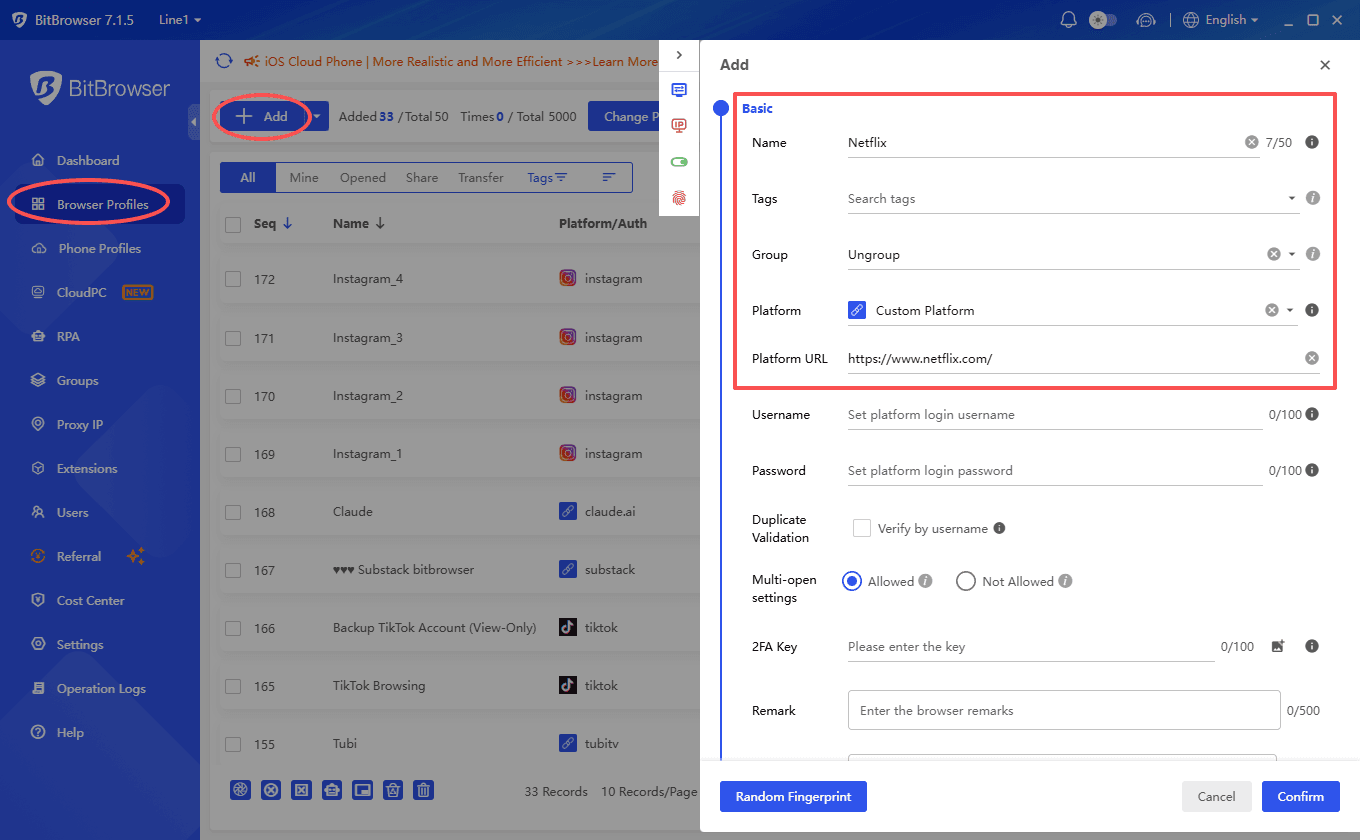
For example, if you're connecting through a UK VPN or proxy server, you'd set your browser profile's timezone to GMT, language to en-GB, and make sure WebRTC isn't exposing your real IP address. Keeping these settings consistent with your connection location can reduce obvious location mismatches that may trigger Netflix's VPN or proxy detection.
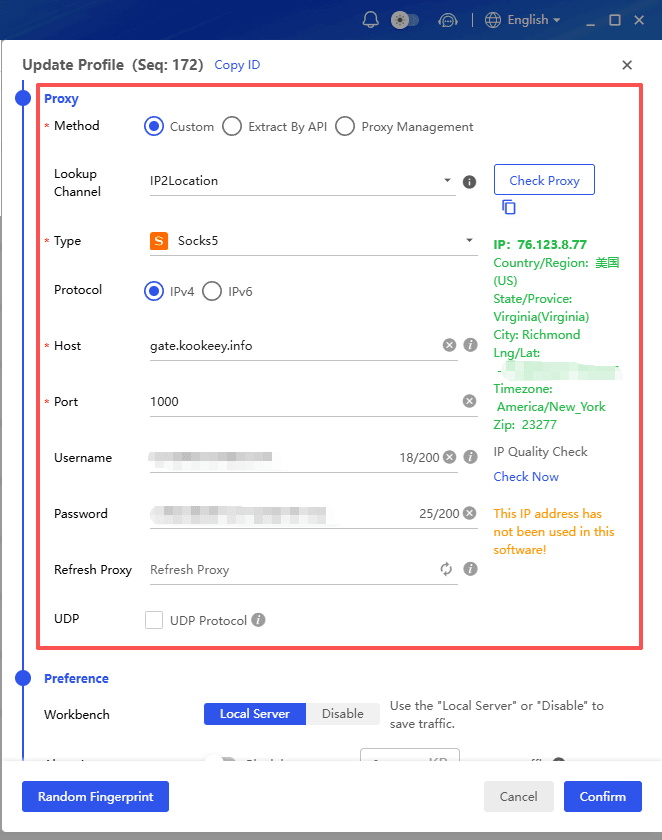
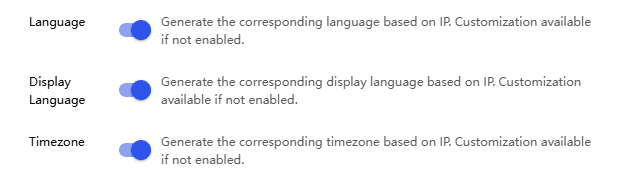
I've found this approach particularly effective when standard VPN connections keep getting detected. The combination of a clean IP from a good VPN plus a matching browser fingerprint from an antidetect browser is much harder for Netflix to flag. It's the same principle that helps people unblock blocked sites in restrictive environments.
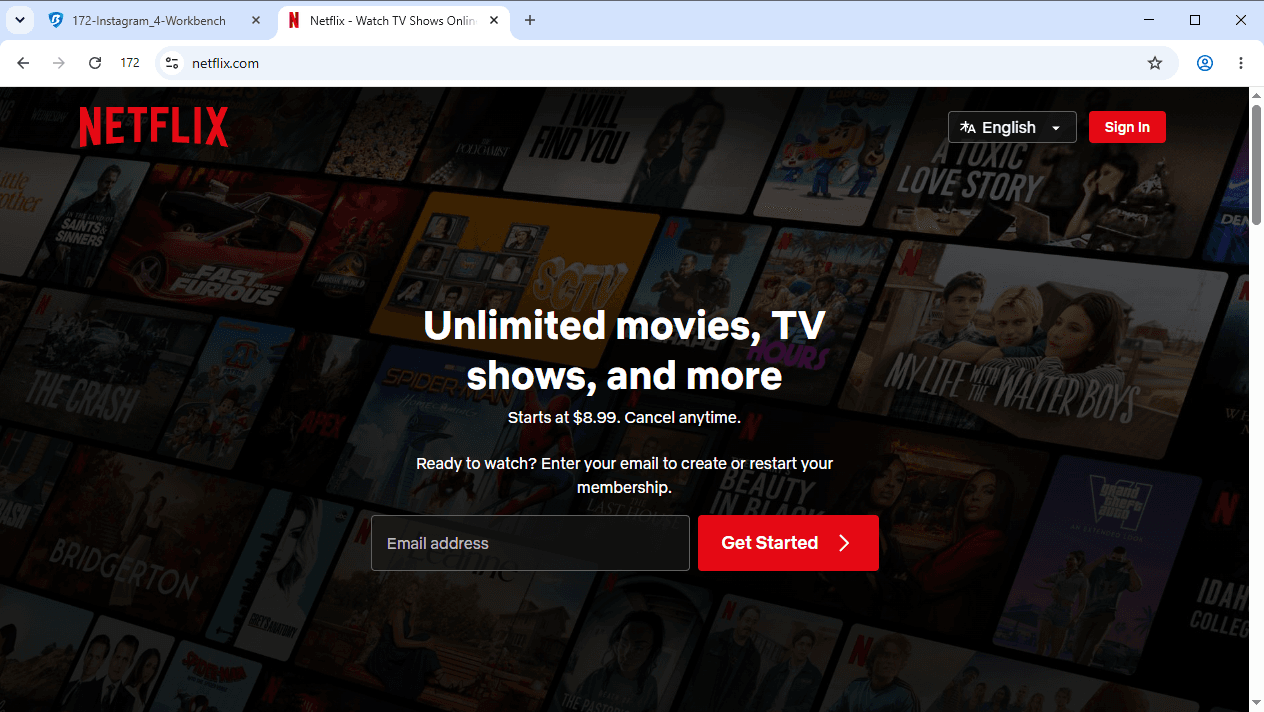
Method 3: Use a Residential Proxy
Residential proxies route your traffic through real residential IP addresses, making your connection look like it's coming from an actual home in the target country. Because these IPs belong to real ISP customers, they're generally harder for streaming platforms to distinguish from typical residential traffic than datacenter IPs.
This is arguably one of the more effective technical approaches, but it comes with caveats. Residential proxies are significantly more expensive than VPNs, often charged per gigabyte of data used. Streaming video eats through data quickly, so costs can add up fast. A single HD movie might use 3 to 5 GB.
If you go this route, look for providers with large, diverse IP pools and make sure they offer IPs in the specific country whose Netflix library you want to access. You can use a residential proxy together with BitBrowser to keep the browser environment consistent with your connection.
For example, you can configure the proxy for a BitBrowser profile and align settings such as timezone, language, and WebRTC with the proxy location. The residential proxy handles the IP side, while BitBrowser helps manage the browser fingerprint and environment.
Method 4: Try a Smart DNS Service
Smart DNS works differently from a VPN. It can route selected requests through a different location without encrypting all of your internet traffic.
The main advantages are:
· Usually less impact on connection speed than a VPN
· Can work on some smart TVs, gaming consoles, and other devices without VPN apps
· Relatively simple to set up
The downside is that Smart DNS doesn't encrypt your traffic or hide your IP address, so it isn't a privacy tool. It's mainly designed for changing the location detected by supported streaming services.
Some VPN services also offer Smart DNS or similar streaming features. However, Netflix can detect and block Smart DNS and proxy services too, so this method may not always work.
If your main goal is streaming rather than privacy, Smart DNS can be worth trying. Just don't expect it to be a guaranteed fix for the Netflix VPN or proxy error.
Method 5: Clear Cookies and Cache Before Reconnecting
This step is so simple that people overlook it, but it matters more than you'd think.
Netflix drops cookies on your browser that include location information. Even after you connect to a VPN server in a different country, those old cookies can tell Netflix where you actually are. The result? You get blocked despite having a clean VPN connection.
Here's what to do:
· Close Netflix completely
· Go to your browser settings and clear cookies and cached data (you can target just netflix.com if you don't want to log out of everything else)
· Connect to your VPN server
· Open a fresh browser window and navigate to Netflix
This alone fixes the problem for a surprising number of people. If you want to take it a step further, consider using a private or incognito browsing window, which starts with a clean slate every time. For a deeper dive into private browsing and how it helps with blocked content, check out this guide on how to browse the internet privately.
Method 6: Disable IPv6 on Your Device
This is a technical fix that catches a lot of people off guard. Many VPNs only tunnel IPv4 traffic. If your device also uses IPv6 (and most modern devices do), your real IPv6 address can leak through to Netflix, revealing your actual location even while the VPN is active.
On Windows:
Open Network and Sharing Center, click on your active connection, go to Properties, and uncheck "Internet Protocol Version 6 (TCP/IPv6)."
On Mac:
Go to System Settings, then Network, select your connection, click Details, then TCP/IP, and set "Configure IPv6" to "Link-Local Only."
On your router:
Log into your router's admin panel (usually 192.168.1.1 or 192.168.0.1) and look for an IPv6 toggle in the network settings. Disable it.
After disabling IPv6, reconnect your VPN and try Netflix again. This fix is especially effective if your VPN was working with Netflix before and suddenly stopped.
Method 7: Try a Different Protocol
VPN protocols determine how your data is encrypted and transmitted. Some protocols are easier for Netflix to detect than others. If you're using the default protocol and getting blocked, switching might help.
Most modern VPNs support several protocols:
· WireGuard is fast and lightweight, and it's become the default for many providers. But its traffic patterns can sometimes be identified.
· OpenVPN (TCP) is slower but harder to distinguish from regular HTTPS traffic, which makes it better at evading detection.
· IKEv2 works well on mobile devices and offers a good balance of speed and stealth.
· Obfuscated/Stealth protocols (offered by NordVPN, ExpressVPN, and others) disguise VPN traffic to look like normal web browsing. These are your best bet if standard protocols keep getting flagged.
You can usually switch protocols in your VPN app's settings menu. Try OpenVPN TCP or an obfuscated option first, then test Netflix.
What to Do When Netflix Catches You Mid-Stream
Sometimes Netflix doesn't block you immediately. You'll start watching a show, and 20 minutes in, the stream cuts out and you get the proxy error message. This happens because Netflix periodically re-checks your connection during playback.
When this happens:
1. Don't panic. Your account isn't in danger. Netflix doesn't ban accounts for using VPNs; they just block the stream.
2. Pause the video and switch to a different VPN server without closing the Netflix tab.
3. If that doesn't work, close the tab, clear cookies, reconnect to a new server, and reload Netflix.
4. Try a server in a different city within the same country. Sometimes the issue is localized to specific server clusters.
Netflix's enforcement is aimed at the connection, not the user. I've never heard of anyone having their account suspended for VPN use, and Netflix's own support documentation confirms they don't penalize accounts for it.
How to Bypass Netflix VPN Block on Different Devices
The device you're using affects which solutions are available to you.
On a laptop or desktop computer, you have the most flexibility. VPN apps, browser extensions, antidetect browsers, Smart DNS, protocol switching, and residential proxies are all options. Start with a quality VPN and work your way through the methods above.
On a smartphone or tablet, VPN apps work well, but you can't easily use antidetect browsers or switch protocols on some mobile VPN apps. Make sure your VPN's mobile app supports server selection and protocol switching. Also check that your phone's DNS settings aren't overriding the VPN (this is a common issue on Android).
On a smart TV or streaming device (Roku, Fire Stick, Apple TV, Chromecast), your best options are either Smart DNS or setting up the VPN directly on your router. Most smart TVs don't support VPN apps natively, so router-level configuration is often the only way. Some VPN providers sell pre-configured routers, which simplifies this considerably.
On gaming consoles (PlayStation, Xbox), Smart DNS is usually the easiest path. You can also share a VPN connection from your computer via a mobile hotspot, though this adds latency.
A Quick Word About Legality
Using a VPN to access Netflix content from another region isn't illegal in most countries. It does technically violate Netflix's Terms of Service, but as mentioned, Netflix doesn't ban accounts for it. The worst that happens is you see the proxy error and can't stream until you fix your connection.
That said, there are a handful of countries where VPN use itself is restricted (China, Russia, North Korea, and a few others). If you're in one of those countries, the legal considerations go beyond just Netflix's terms of service, and you should research your local laws before proceeding.
Putting It All Together
Dealing with Netflix VPN blocks isn't a one-time fix. Netflix keeps updating its detection, so what works today may not work tomorrow.
For a more consistent setup, BitBrowser is a good place to start. You can use it with a VPN or proxy to keep your browser fingerprint, timezone, language, WebRTC, and other settings aligned with your connection.
If that doesn't work, try simpler fixes first, such as switching servers, clearing cookies, or changing protocols. You can also try a dedicated IP or residential proxy. The best approach depends on your specific connection, so test different combinations to find what works.
Frequently Asked Questions
Why does Netflix block VPNs?
Netflix blocks many VPN and proxy connections to enforce regional licensing restrictions.
Why does Netflix say “You seem to be using an unblocker or proxy”?
Your IP may be associated with a VPN, proxy, or datacenter, or Netflix may detect a mismatch between your IP and browser settings.
Can BitBrowser help with Netflix VPN blocks?
BitBrowser can help keep your browser fingerprint, timezone, language, and WebRTC settings consistent with your VPN or proxy connection.
Will switching VPN servers fix the Netflix proxy error?
Sometimes. Netflix may block specific VPN IP addresses, so switching to another server can help if the new IP isn't blocked.
Are residential proxies better than VPNs for Netflix?
Residential proxies use IPs associated with real residential networks, but they can be more expensive and aren't guaranteed to work.
Does clearing Netflix cookies help?
It can remove stored session and location data that may conflict with your current VPN or proxy connection.

 Multi-Account Management
 Prevent Account Association
 Multi-Employee Management
Recommended
See More 



