How to Get a Virtual Phone Number for SMS Verification
 2026.09.16 09:44
 YT.Shi
If you need a phone number to receive an SMS verification code without using your primary mobile number, a virtual phone number can be a practical option. Virtual numbers are commonly used for creating a separate line, signing up for online services, managing business communications, or keeping personal and work-related messages separate.
However, not every virtual number works with every verification service. Some websites and apps block VoIP numbers, temporary numbers, or numbers that have been used too many times. The right choice depends on what you need the number for and whether the service you are signing up for accepts virtual numbers.
What Is a Virtual Phone Number?
A virtual phone number is a phone number that is not necessarily tied to a physical SIM card in the traditional way. Depending on the provider, calls and SMS can be handled through an app, web browser, cloud phone system, or an internet connection.
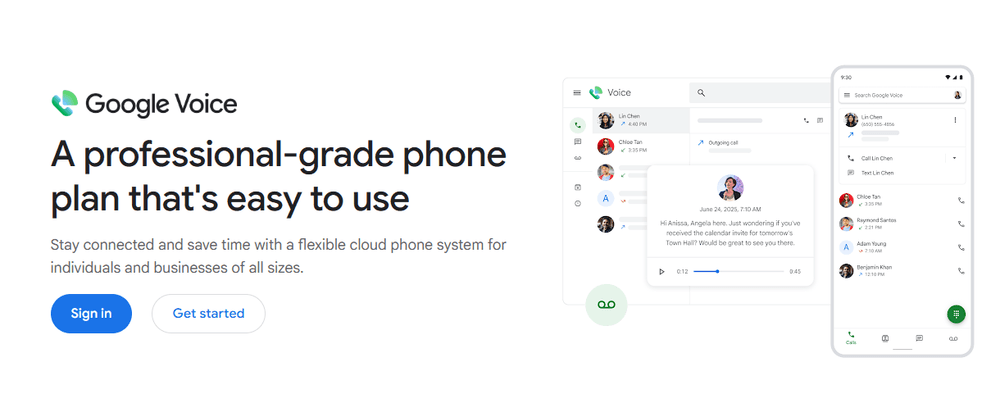
For example, Google Voice provides a number that can be used for calls, texts, and voicemail through its app and web interface. In the US, users can search for an available number by city or area code.
Other services work differently. Some provide temporary or secondary numbers inside an app, while others provide a real mobile number through a second SIM or eSIM. Business phone platforms can also provide local or international numbers with features such as call routing and business messaging.
This distinction matters for SMS verification. A service may support ordinary SMS conversations but still be rejected by a particular website's verification system. Google, for example, notes that some banks and subscription services do not send text messages to Google Voice numbers.
Why Do People Look for Virtual Phone Numbers?
There are several reasons someone may want a virtual number instead of using their primary phone number.
● Privacy: A secondary number lets you avoid giving your personal number to every website, marketplace, customer, or contact.
● A separate line: You can keep work, shopping, dating, side projects, or other activities separate from your main number.
● Online verification: Some services require a phone number when creating an account or enabling two-factor authentication. A virtual number may work if the platform accepts that type of number.
● Business communication: Companies can use local or international numbers without requiring every employee to have a separate physical phone. Business platforms can provide features such as shared inboxes, call routing, voicemail, and SMS management.
● Multiple identities or accounts: People managing several legitimate online accounts may prefer to keep each account associated with a separate phone number and browser environment.
The important point is that a virtual number is not automatically accepted everywhere. Before choosing one for SMS verification, check whether the service you are registering for accepts VoIP, mobile, temporary, or virtual numbers.
How to Get a Virtual Phone Number for SMS Verification
There is no single way to get one. Depending on your budget and the type of number you need, you can use a free calling app, a paid second-number service, a second SIM or eSIM, a business phone provider, or another legitimate SMS-enabled service.
Method 1: Get a Free Virtual Number
If you only need a basic secondary number and the service is available in your country, a free option can be the simplest place to start.
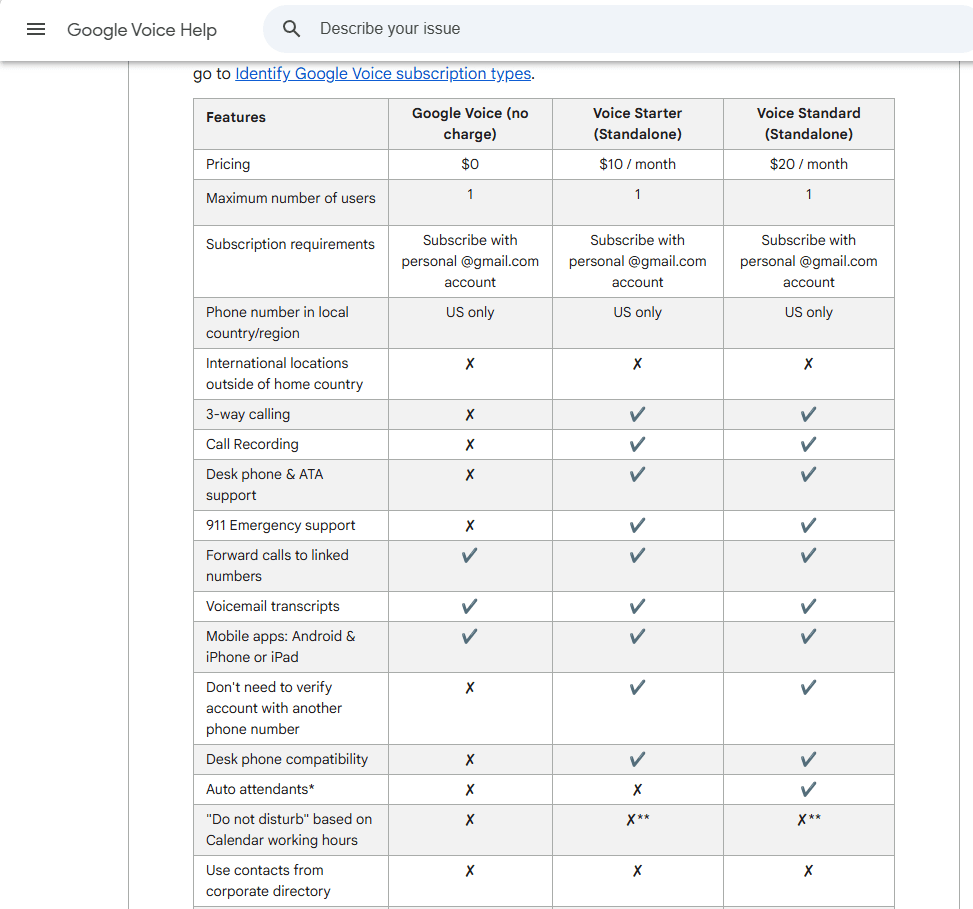
Google Voice is one example. In the US, you can sign in, search for an available number by city or area code, select a number, and use it for calls and texts. Google currently lists a $0 personal subscription option for Google Voice, although availability and features vary by country and account type.
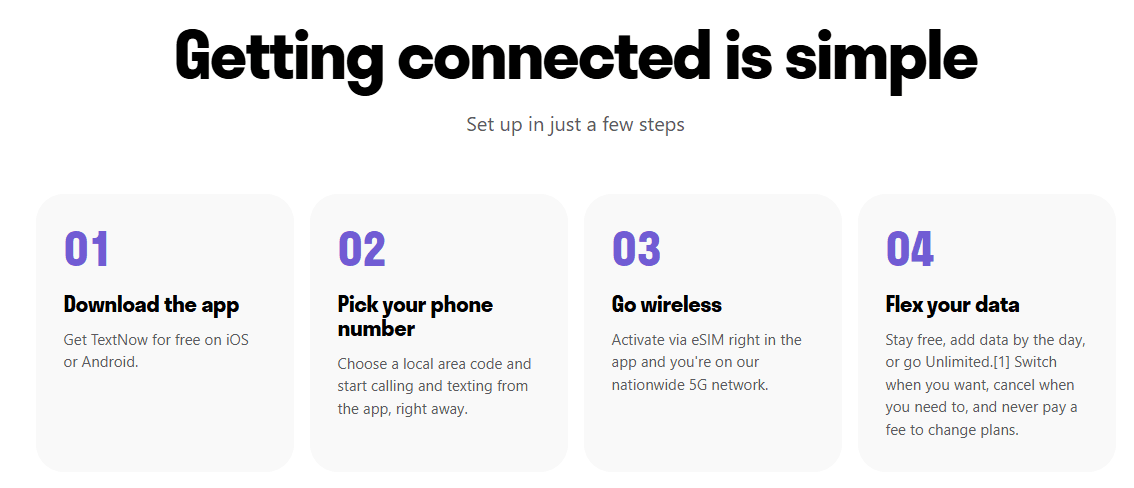
TextNow is another example for users in North America. Its free service provides a phone number and calling and texting over Wi-Fi or a data connection, although the free version is ad-supported. As of August 2026, TextNow says its service is available for download and registration only within North America.
The main advantage is obvious: you can get started without paying for another phone line.
The limitation is SMS verification compatibility. A free VoIP number may work perfectly for ordinary messages but be rejected by a bank, social platform, marketplace, or other service. Google explicitly warns that some websites may not send messages to Google Voice numbers.
So free numbers are best treated as a convenient second line, not as a guaranteed solution for every verification code.
Method 2: Use a Paid Second-Number App
Paid second-number services are another common option. These services let you create an additional number and manage calls and texts from an app.
For example, Burner offers temporary and secondary numbers for calls and texts. Its current offerings include standard virtual numbers as well as Dual SIM numbers that provide a real mobile number tied directly to a compatible iPhone. Burner says its Dual SIM numbers can be used for two-factor authentication because they function like real mobile numbers.
Hushed is another option for secondary numbers. Its SMS capabilities vary by country and number, so the app identifies which numbers support voice, SMS, or MMS when you select a new number.
This type of service can make more sense when you need a number for longer than a single interaction. You can keep the number available for future messages instead of relying on a one-time SMS service.
Still, always check the provider's current verification support. A paid number is not automatically accepted by every website.
Method 3: Add a Second SIM or eSIM
You do not necessarily need a VoIP app to get another phone number.
If your phone supports Dual SIM or eSIM, you may be able to add a second mobile line from a carrier or another mobile service. This gives you a separate number that operates more like a conventional mobile number.
This can be particularly useful when SMS compatibility is important. Some verification systems distinguish between mobile numbers and VoIP numbers, so a genuine mobile line may be accepted where an internet-based number is not.
Method 4: Get a Virtual Number from a Business Phone Provider
If the number is intended for business rather than occasional personal verification, a business phone platform can be a better fit.
Services such as Aircall provide local and international business numbers along with calling and messaging features. Aircall currently supports SMS on eligible numbers and also offers integrations with third-party messaging platforms.
The setup is generally straightforward: create an account, select the country or number type, choose an available number, and configure calling or messaging features.
This approach makes more sense when the number needs to remain active and be shared across a team. It is usually unnecessary if all you need is a one-time SMS.
Method 5: Use a Temporary SMS Number
Another option is a temporary SMS number designed for short-term use.
These services can be useful when you need to receive a single message and do not need to keep the number afterward. However, they have the biggest limitation for account management: you may not control the number long term.
That creates a problem if the account later asks you to verify your identity again, reset a password, or enable two-factor authentication.
For an account you expect to keep, a dedicated number that remains under your control is generally more practical than a disposable number.
You should also check the target platform's terms before using a temporary or shared number. Some services explicitly restrict temporary numbers or require a number that belongs to the account holder.
Perhaps you're still looking for a temporary Gmail address? Check out our guide to creating temporary Gmail accounts.
Managing Multiple Virtual Numbers with BitBrowser
Getting several virtual phone numbers solves only part of the problem if you also manage multiple legitimate online accounts.
Each account can accumulate its own cookies, local storage, browser settings, and other browser-level identifiers. Opening several accounts in the same browser environment can make it difficult to keep those sessions separated.
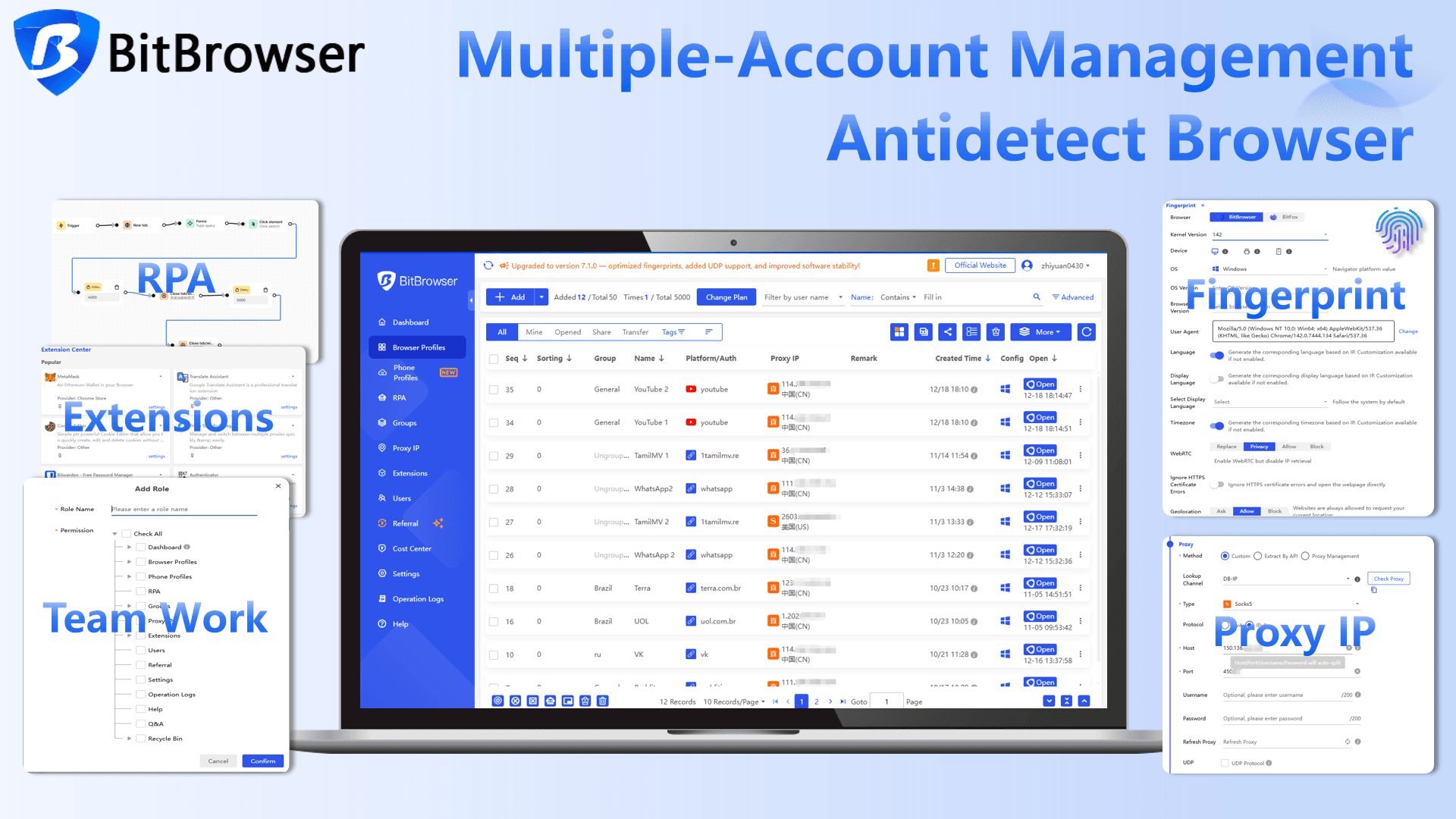
This is where BitBrowser can be useful. Instead of putting every account into one ordinary browser, you can create a separate browser profile for each account and keep its cookies, local storage, and browser fingerprint isolated from the others.
For example, if you have several legitimate accounts that use different virtual phone numbers, you could organize them like this:
● Profile 1: Account A + Virtual Number A
● Profile 2: Account B + Virtual Number B
● Profile 3: Account C + Virtual Number C
You can then assign an independent proxy to each browser profile. BitBrowser supports HTTP, HTTPS, SOCKS5, and SSH proxy configurations, and its proxy management tools allow a different proxy to be assigned to each profile.
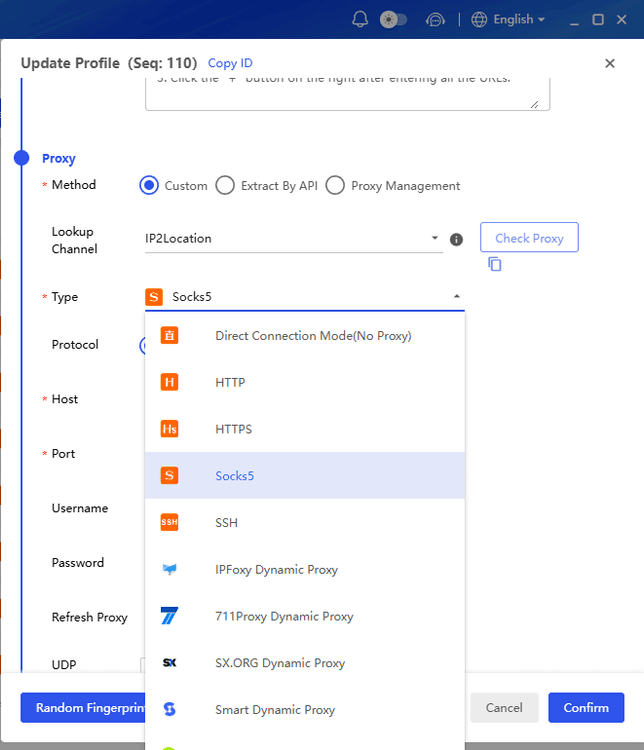
This becomes especially useful when the phone numbers and accounts are associated with different regions. For example, if an account uses a US number, you may want its browsing environment to use a corresponding US IP rather than mixing it with unrelated network locations.
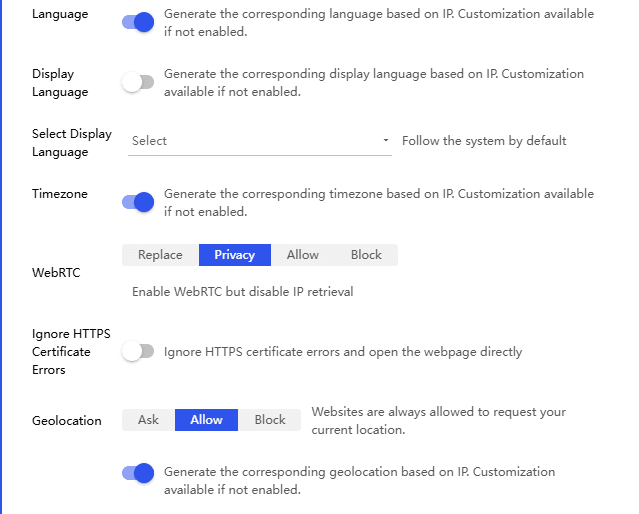
BitBrowser can also automatically match certain browser environment parameters with the proxy IP, including timezone, language, and geolocation-related settings. This helps keep the browser environment internally consistent rather than manually configuring every setting for every profile.
What to Keep in Mind Before Using a Virtual Number
A virtual phone number is useful, but it is not a universal replacement for a mobile number.
Free numbers can have geographic restrictions or limited compatibility. Temporary numbers may disappear or become unavailable later. VoIP numbers may be rejected by services that require a traditional mobile line. Even paid providers cannot guarantee that a particular website will accept their number.
For important accounts, keep control of the number for as long as you need the account. If a service offers an alternative verification method, such as an authenticator app or security key, consider using that as your long-term authentication method instead of depending entirely on SMS.
You should also follow the terms of the service you are registering for. A virtual number can provide a separate communication channel, but it should not be used to misrepresent your identity or circumvent a platform's verification requirements.
FAQ
Can I get a virtual phone number for free?
Yes. Services such as Google Voice and TextNow offer free options in supported markets. Google Voice's personal free option is currently limited to US local numbers, while TextNow's current availability is focused on North America.
Can a virtual phone number receive SMS verification codes?
Some can, but there is no universal guarantee. The number may support ordinary SMS while a particular website blocks VoIP or virtual numbers. Always check the requirements of the service you are trying to verify.
Why won't a website send a verification code to my virtual number?
The service may block VoIP numbers, temporary numbers, recycled numbers, or numbers associated with certain providers. Some services also require a traditional mobile number. Google, for example, notes that some banks and subscription services do not send SMS messages to Google Voice numbers.
Is a second SIM better than a virtual number for SMS verification?
It can be more compatible with services that specifically require mobile numbers. A second SIM or eSIM provides a carrier-based mobile line rather than an app-based VoIP number, although availability and cost depend on your country and carrier.
Can I use one virtual phone number for multiple accounts?
Whether you can do so depends on the platform's rules. Many services associate a phone number with an account or use it as part of their security system, so reusing the same number across accounts may cause verification or account-management problems.
How can I keep multiple accounts separate?
Use a dedicated browser profile for each account, keep account cookies and storage separate, and use appropriate network configurations for each profile. BitBrowser provides isolated browser profiles and supports independent proxy settings, which can make this type of multi-account management easier.
Final Thoughts
Getting a virtual phone number for SMS verification is relatively simple, but choosing the right type of number is the more important part.
A free service can work for a basic second line. A paid virtual number gives you more control and continuity. A second SIM or eSIM can be a better choice when a service requires a genuine mobile number. For businesses, a virtual business phone system provides additional tools for calls, SMS, and team communication.
And if you manage several legitimate accounts with separate phone numbers, keeping the browser environment separated is just as important as keeping the numbers separate. With independent BitBrowser profiles and per-profile proxy settings, you can organize each account with its own cookies, browser environment, and network configuration instead of mixing everything inside one browser.

 Multi-Account Management
 Prevent Account Association
 Multi-Employee Management
Recommended
See More 



