7 Ways to View Instagram Stories Anonymously Without Them Knowing
 2026.11.03 08:07
 YT.Shi
You want to check someone’s Instagram Story, but you’d rather not leave your name on their viewer list. So, can you take a look without them knowing?
There are a few options, from Instagram Plus previews to third-party viewers and a separate account. Here’s how to use them, what each one actually hides, and which popular tricks I wouldn’t rely on.
What Can the Story Owner See?
When you open a Story through ordinary Instagram playback while logged in, the account you use can appear in the owner’s viewer list. Using another device or changing your IP address does not change which account is signed in.
■ Public accounts: Public Stories may be accessible through third-party viewers, depending on the service.
■ Private accounts: A viewing account needs the owner’s approval to access restricted content.
■ Selected audiences: A public account can still share a Story with Close Friends or another restricted audience. A public username does not make every Story public.
Ordinary Stories remain visible for 24 hours unless saved as Highlights. Extending a Story’s display time is a separate Instagram Plus feature.
How to View Instagram Stories Anonymously: 7 Ways Tested
Method 1: Use Instagram Plus for an Anonymous Story Preview
Best for: A quick preview inside the Instagram mobile app.
Instagram Plus includes a feature called Preview stories. Its description says you can get a mini preview without appearing in the viewer list.
What stood out when I checked the subscription screen was the word “mini.” This is an official preview feature, so I would not describe it as unlimited anonymous playback.
How to find and use it
1. Open Instagram on your mobile device and go to your profile.
2. Open Settings and activity.
3. Scroll to Subscriptions and select Instagram Plus.
4. Check the available benefits, price, and renewal terms before subscribing.
5. Return to the Stories row and press and hold an available Story avatar.
6. Select See preview to use the dedicated preview feature.
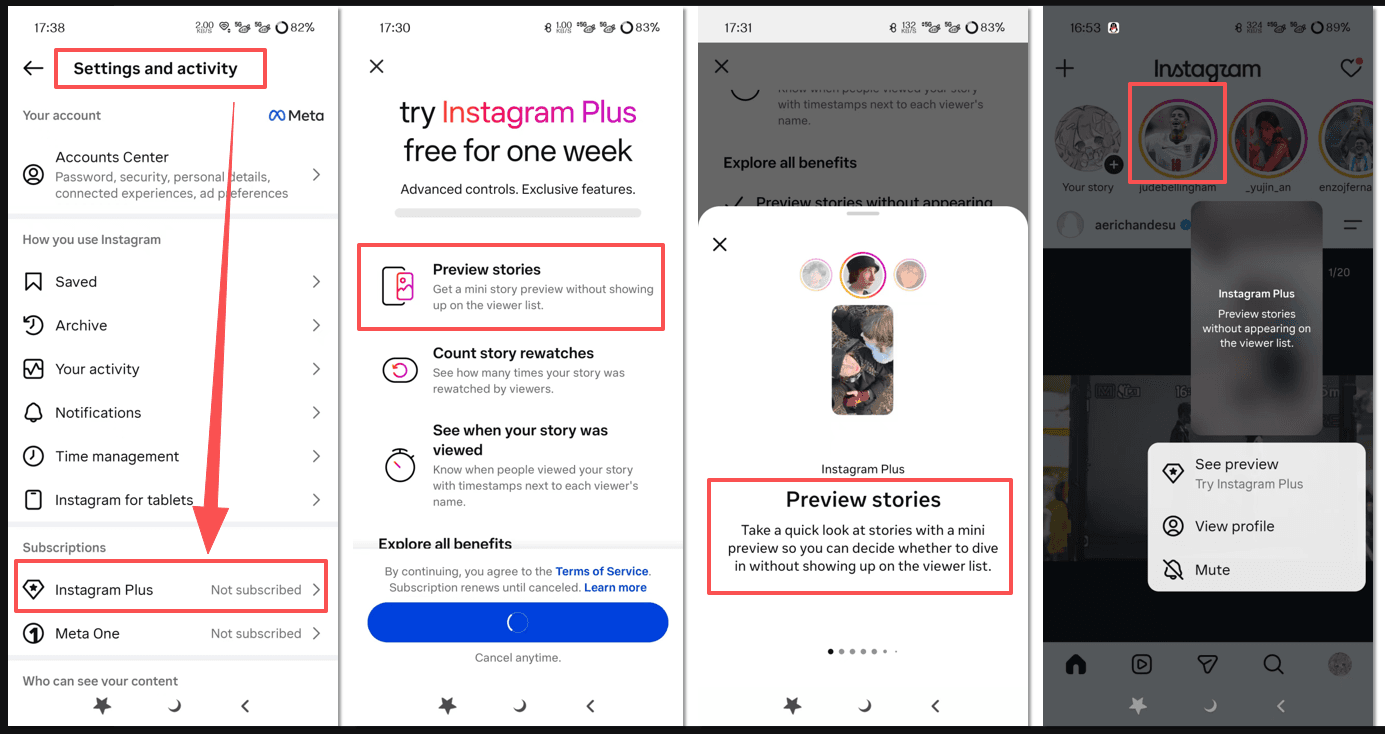
When I checked, tapping See preview brought up Try Instagram Plus, with a one-week free trial. Your account may show a different offer.
You’ll need the Instagram mobile app for this. Plus features aren’t currently available on desktop.
My take: Handy if you just want a quick look from your phone. It’s an official preview feature, so you don’t have to rely on a swipe trick. Just remember that it gives you a mini preview, not full playback.
Method 2: Create a Separate Instagram Account
A separate account is one of the most practical options for ongoing browsing. You can use Instagram normally and watch complete Stories that the account can access.
Your main account stays out of the viewing process, but the separate account remains visible. It is not completely anonymous, and someone may recognize it from its profile or activity.
How to keep it separate from your main account
1. Create the account using a separate email address and a unique password.
2. Choose a username, profile image, and bio that do not repeat your personal profile details. Do not impersonate another person.
3. Skip contact syncing and avoid linking to or following your personal Facebook profile or your main Instagram account.
4. Avoid adding it to shared login arrangements with your personal accounts when separation is your goal.
5. Use a separate anti-detect browser profile for this account.
6. Check the active username before opening a Story.
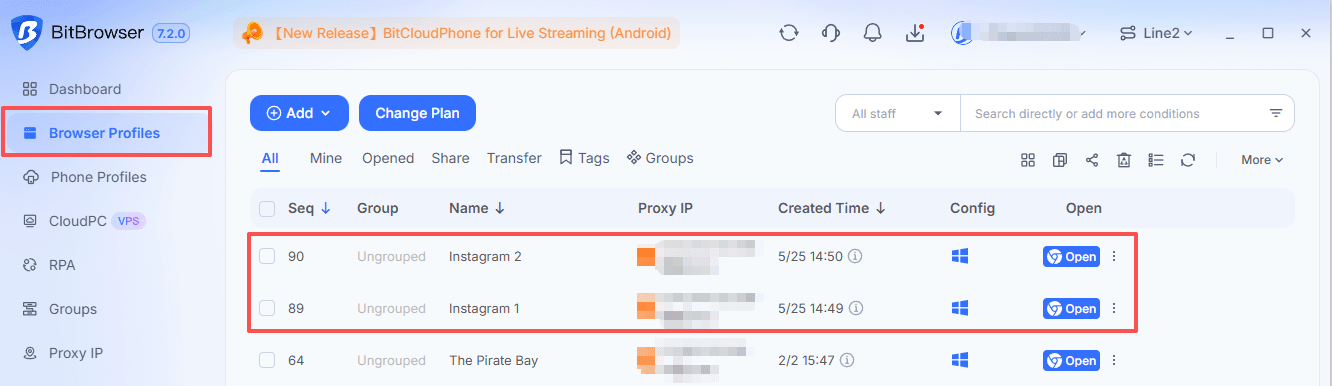
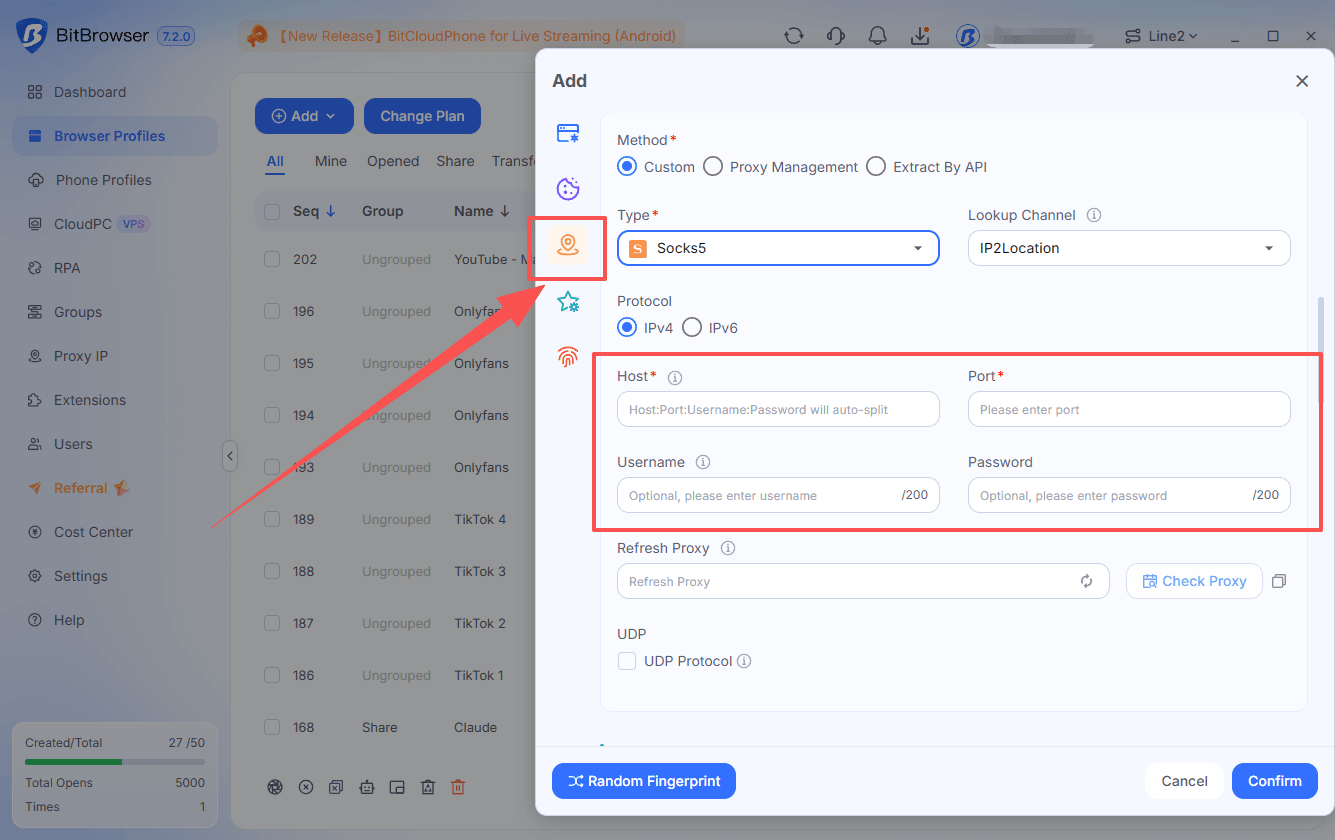
These steps help keep your second account separate from your main one. Use a different username and profile photo, skip contact syncing, and, if you use BitBrowser, assign this profile a different proxy IP from your main account. This helps separate both your account details and browsing environment.
My take: A second account is handy if you check Stories often and want to watch full videos. It takes a little time to set up, but you won’t have to wait for a viewer website to load them.
Method 3: Use a Third-Party Instagram Story Viewer
Best for: Checking available public Stories without signing into Instagram.
An anonymous Instagram Story viewer usually asks for a public username or profile URL, then displays whatever content it can retrieve.
In my separate comparison, I tested 10 viewers and found differences in loading speed, ads, verification steps, and the content returned.
Best 10 Anonymous Instagram Story Viewers
How to use one
1. Copy the exact username of the public account you want to check.
2. Open a viewer website from the comparison.
3. Enter the username or profile link in the supported format.
4. Confirm that the returned profile is the correct one.
5. Open the available Stories within the viewer’s website.
6. Check publication details where available so you do not mistake older results for current content.
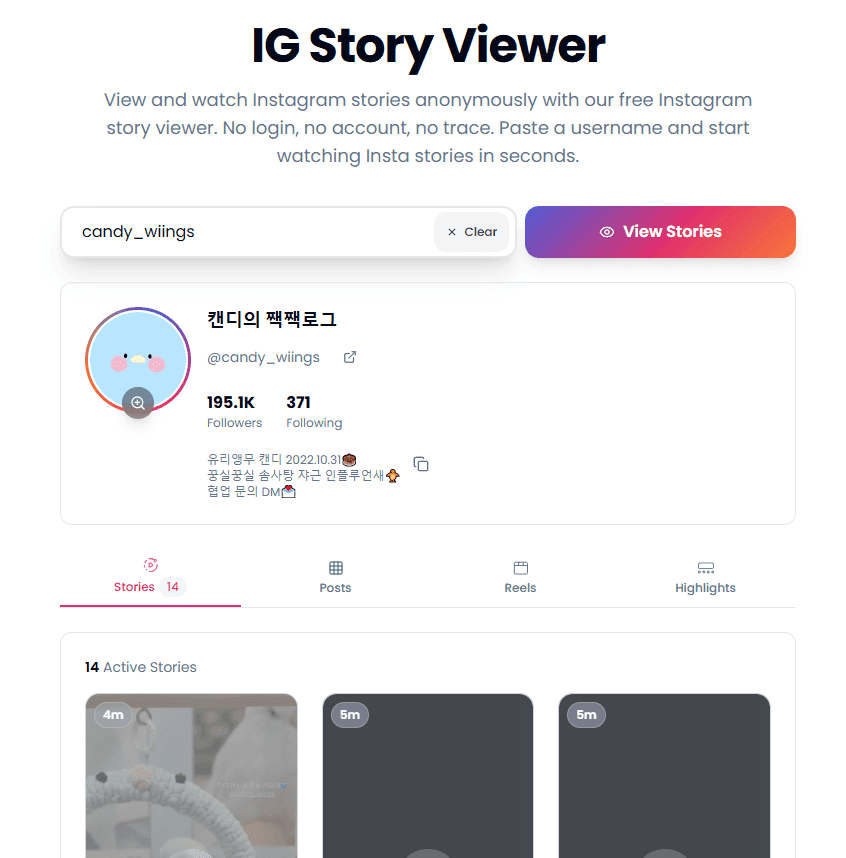
Avoid entering your Instagram password, verification codes, or session cookies. Also watch for buttons that open Instagram itself: if you continue there while logged in, you may be viewing through your own account.
Skip sites that ask you to install an app, complete endless verification steps, or click suspicious download buttons. A site that doesn’t ask for your password isn’t automatically safe.
How anonymous is it?
Since you don’t log into Instagram, your personal username stays out of the process. Some tools use their own accounts to fetch Stories, so a view may still appear under another account.
The viewer site may also collect your IP address and browsing activity. Open these sites in a separate, isolated browser profile to keep their cookies and site data away from your everyday browsing.
My take: Handy for checking public Stories now and then, though results can be hit or miss. If you see “No Stories Found,” try again later or check another tool. It could simply be a loading problem, not a sign that the person hasn’t posted.
Method 4: Open an Incognito Window
Best for: A quick look without using your usual Instagram login.
Don’t want to log out of your main account? Open an Incognito window. It starts separately from your regular browser session. Once you close all Incognito windows, the browser clears that session’s history and cookies.
How to use it
When I tried opening Instagram’s homepage in Incognito, it took me straight to the login page. A better starting point is to find the person’s profile through Google.
1. Open a New Incognito window or New Private Window.
2. Enter https://www.instagram.com/username/ in Chrome’s address bar. Replace username with the person’s Instagram handle.
3. Click the result that leads directly to their profile.
4. Browse whatever public content Instagram lets you see while signed out.
What are the limits?
■ You may hit a login prompt. Incognito won’t get you past it.
■ Websites can still collect information. Incognito doesn’t hide your IP address or stop all tracking.
■ A new window may keep you signed in. Chrome shares one session across its open Incognito windows. Close them all before starting fresh.
■ Downloads stay on your device. Saved bookmarks stay too, and closing the window won’t erase records kept by websites.
Need help finding the setting? Here’s how to turn Incognito mode on and off.
My take: Useful when you want to keep a quick browsing session away from your usual login. Just don’t expect the private window to hide a Story view once you’re signed in.
Method 5: Use a Proxy or VPN for Extra Privacy
Best for: Hiding your usual IP address when using a Story viewer or a separate account.
A proxy or VPN changes the IP address websites see. It takes a little setup and may cost money, so it’s more useful for regular browsing than a quick Story check.
How to use it
1. Connect to a VPN, or add a proxy to your antidetect browser profile.
2. Open your chosen Story viewer or sign into your secondary account.
3. Check which account is active before watching.
The catch: A different IP won’t hide your Instagram username. If you watch from your main account, it can still appear in the viewer list.
My take: An optional extra if you want more privacy while browsing. I wouldn’t set one up just to watch a single Story.
What About Airplane Mode and Half-Swiping?
These tricks appear in many guides, but I would treat them as limited workarounds rather than dependable privacy features.
Method 6: Airplane mode
The trick sounds simple: let Stories load, turn on airplane mode, watch, then close Instagram before reconnecting.
The catch comes when you go back online. Your name can still appear in the viewer list after reconnecting or reopening the app. Closing Instagram first doesn’t guarantee a hidden view. You may also find that some photos or videos haven’t loaded.
My take: I wouldn’t count on this if you don’t want your name to show up.
Method 7: Half-swiping between Stories
This involves opening a neighboring Story and dragging partway toward the one you want to preview, then returning without completing the swipe.
It may show a partial preview, but it is easy to move too far and open the Story normally. It also does not provide dependable playback of a full video or sequence.
This gesture should not be confused with Instagram Plus’s See preview option. The subscription feature has an explicit description about viewer-list visibility; the swipe trick does not offer the same assurance.
Keep Your Main Account Private for Free: Use a Second Account in BitBrowser
For regular viewing, this is my top pick. It’s free and keeps your main account off the viewer list, without an Instagram Plus subscription.
Use one of BitBrowser’s 10 permanently free browser profiles, sign in with a second Instagram account, and watch the Stories it can access. Each profile has separate cookies, login sessions, and configurable browser fingerprints.
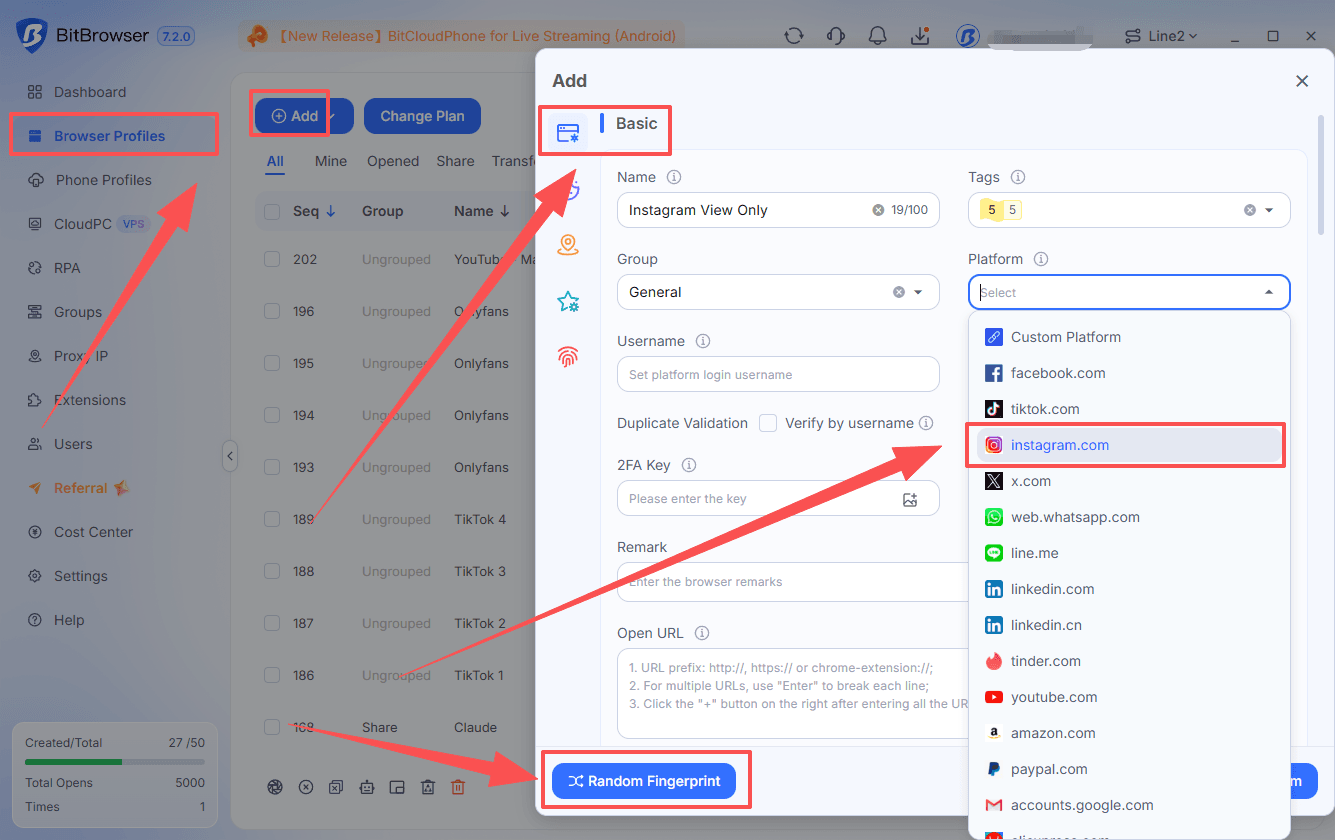
For extra IP privacy, you can also assign a different proxy to that profile. This hides your usual IP from the websites you visit. A proxy may cost extra.
A few things to keep separate
■ Use a different username, photo, and bio.
■ Skip contact syncing and links to your personal accounts.
■ Check that you’re using the second account before watching.
Common Instagram Story Privacy Myths
“They can’t see when I watched or track replays.”
Instagram Plus includes viewer timestamps and Story rewatch counts. However, a replay count doesn’t necessarily reveal who replayed it.
“Highlights become anonymous after 24 hours.”
Don’t assume that. A Story’s display time and the availability of its viewer list are different things. Passing 24 hours isn’t a guarantee of anonymity.
“The viewer list changes order after 50 views.”
There’s no confirmed rule you should rely on. Your position on the list doesn’t prove how often you watch or how interested you are.
Frequently Asked Questions
Will someone know I viewed their Instagram Story?
If you watch while logged in, that account can appear in their viewer list. Using a second account keeps your main username off the list. Instagram Plus’s See preview lets you take a mini preview without appearing.
Can I view Instagram Stories anonymously for free?
Yes. You can try a free viewer for public Stories or use a second account in one of BitBrowser’s 10 free browser profiles. Your main account stays out of the viewing session, but your second account still appears in the viewer list.
Can I watch a private account’s Stories without following it?
You generally need to follow the account and have your request accepted. Third-party viewers cannot unlock private Stories or Close Friends content.
Can I use Instagram Plus Story Preview on a computer?
Not currently. See preview is available through the Instagram mobile app. On desktop, you can use a third-party viewer or a separate account instead.
Can I remove a Story view after accidentally opening it?
There’s no reliable undo button. Logging out, clearing cookies, or turning on a VPN won’t undo the view. Don’t count on blocking and unblocking either. The owner may already have seen your username.
Why does a viewer say “No Stories Found”?
Check the username first. The Story may have expired, been deleted, or been shared with a restricted audience. The viewer may also be slow or temporarily unavailable. “No Stories Found” doesn’t always mean the person hasn’t posted.
Final Thoughts
Instagram Plus works for quick mobile previews, while third-party viewers can help with public Stories without logging in.
For regular viewing, my pick is a second account in a free BitBrowser profile. You can watch full Stories while keeping your main account out of the viewer list. Just keep your profile details separate and check which account you’re using before watching.
A quick reminder: Respect people’s privacy. Don’t use these methods to harass anyone, bypass private-account restrictions, or share their Stories without permission.