How To Rent and Safely Manage Agency Ad Accounts with BitBrowser
 2026.03.23 05:22
 petro
petroAs advertising platforms like Facebook, Google, and TikTok tighten restrictions, many marketers turn to agency ad accounts to scale campaigns and avoid bans. However, renting and managing these accounts comes with risks — including account suspension, fund loss, or access issues.
This guide explains how to rent agency ad accounts safely and how to use BitBrowser to manage them securely and efficiently.
What Are Agency Ad Accounts?
Agency ad accounts are advertising accounts owned by agencies that allow third parties to run ads through them. These accounts often come with:
- Higher trust levels
- Larger spending limits
- Dedicated account managers (in some cases)
- Reduced risk of immediate bans
They are commonly used for:
- Affiliate marketing
- Dropshipping ads
- Scaling campaigns quickly
Risks of Renting Agency Ad Accounts
Before getting started, it’s important to understand the risks:
- Account shutdown without notice
- Loss of ad spend or balance
- Limited control over account ownership
- Shared access leading to security issues
This is why secure environment management (like BitBrowser) is critical.
Why Use BitBrowser?
BitBrowser is an anti-detect browser that allows you to create isolated browser environments, each with its own fingerprint.
Key Benefits:
- Unique browser fingerprints per account
- IP isolation with proxies
- Multi-account management without linking
- Team collaboration features
- Reduced risk of platform detection
Step-by-Step Guide
1. Choose a Reliable Agency Provider
Not all providers are trustworthy. Look for:
- Verified reviews or referrals
- Clear pricing and fee structure
- Replacement/refund policies
- Support availability
Avoid deals that seem “too cheap” — they often come with high risk.
2. Set Up BitBrowser
- Download and install BitBrowser
- Create a new browser profile
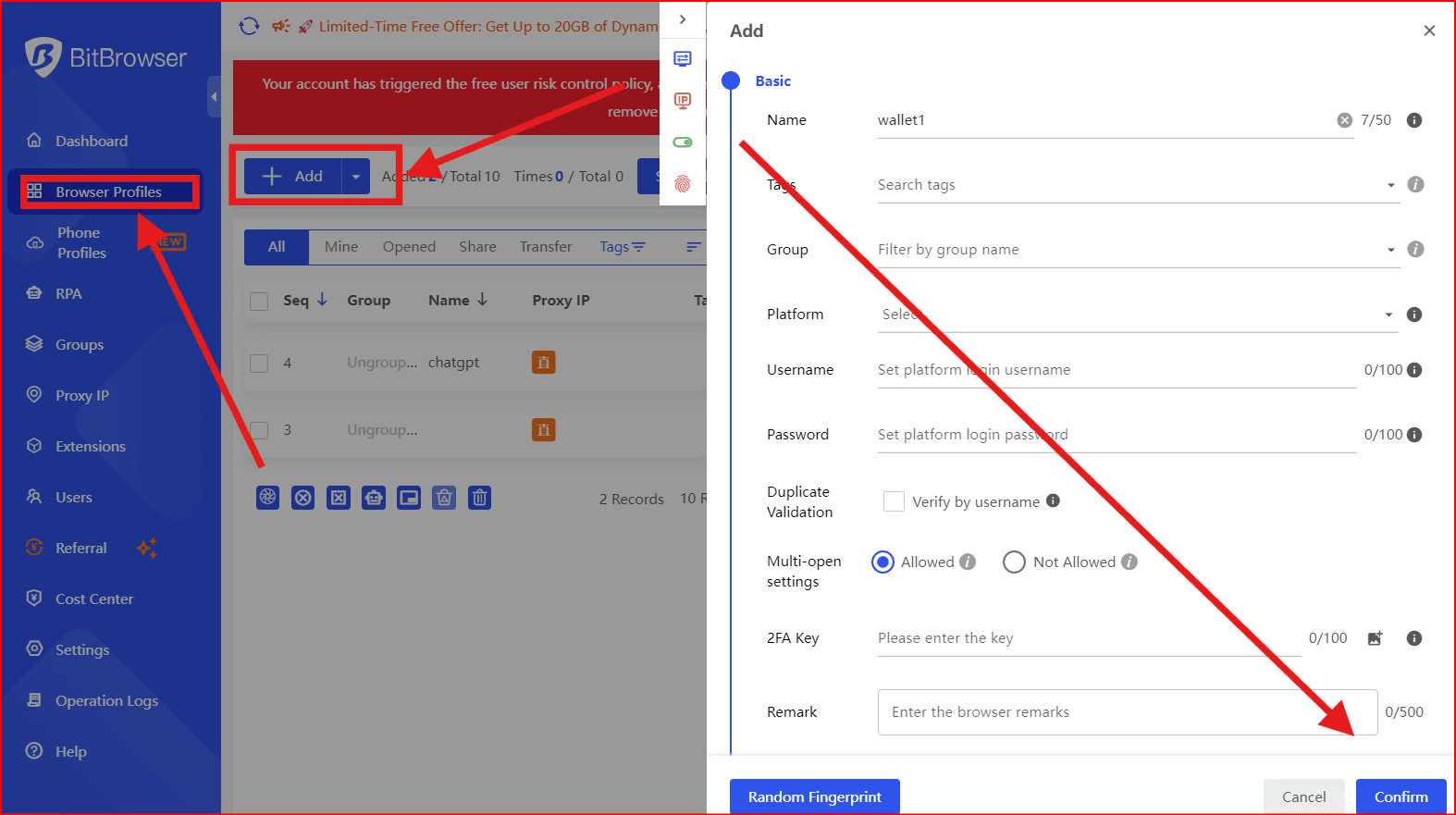
- Assign:
- Unique fingerprint
- Dedicated proxy (residential preferred)
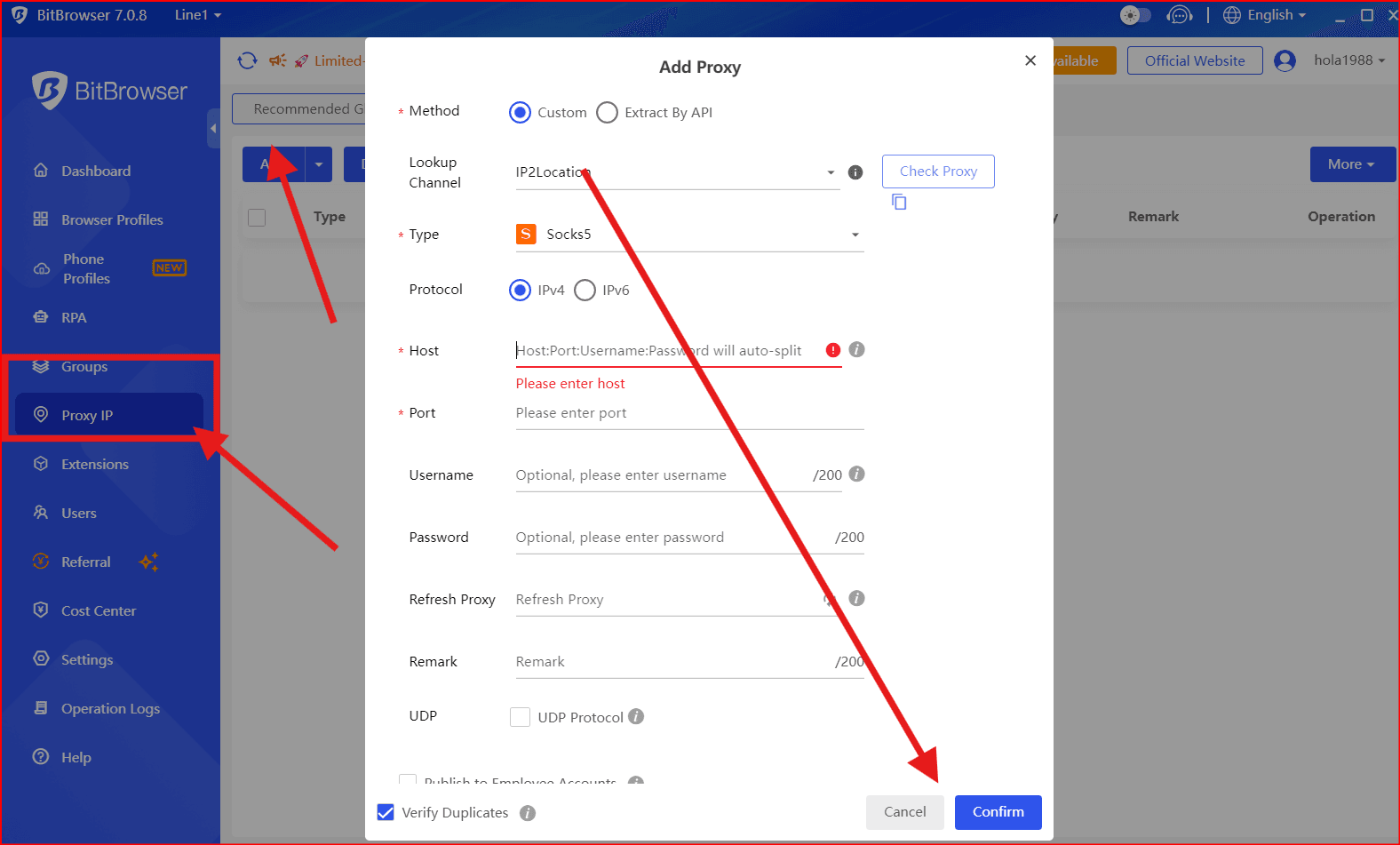
- Save and launch the profile
Each ad account should have one dedicated profile
3. Use High-Quality Proxies
Your proxy setup is just as important as your browser.
Recommended:
- Residential proxies
- Static IPs (if possible)
- Geo-location matching the ad account
Avoid:
- Free proxies
- Datacenter proxies (high detection risk)
4. Access the Agency Ad Account
Once your profile is ready:
- Log into the ad platform inside BitBrowser
- Accept account access (if invited via Business Manager)
- Verify permissions and billing setup
⚠️ Never log into multiple accounts in the same profile.
5. Warm Up the Account
Before launching aggressive campaigns:
- Start with small budgets
- Run low-risk ads
- Avoid policy-sensitive niches initially
This builds trust and stability.
6. Manage Campaigns Safely
Best practices:
- Keep consistent login IP
- Avoid sudden budget spikes
- Follow platform ad policies strictly
- Monitor account health daily
7. Secure Your Access
To prevent losing access:
- Use 2FA whenever possible
- Avoid sharing login credentials
- Communicate only through trusted channels with the provider
Common Mistakes to Avoid
- Logging multiple accounts in one browser
- Changing IPs too frequently
- Running banned or risky creatives
- Ignoring account warnings
- Using low-quality providers
Pro Tips for Scaling
- Use multiple BitBrowser profiles for scaling
- Diversify across several agency accounts
- Keep backup accounts ready
- Track performance per account to avoid overloading one
Conclusion
Renting agency ad accounts can be a powerful strategy — but only if done correctly. By combining a trusted provider, proper operational discipline, and tools like BitBrowser, you can significantly reduce risks and scale your campaigns safely.
Optional Add-On (CTA)
If you’re serious about scaling ads safely:
- Invest in quality tools (BitBrowser + proxies)
- Build relationships with reliable agencies
- Focus on compliance and long-term stability

 Multi-Account Management
 Prevent Account Association
 Multi-Employee Management
Recommended
See More 



