Spotify Unblocked: How to Get Music Playing on School and Work Wi-Fi
 2026.11.14 05:59
 YT.Shi
Looking for a way to unblock Spotify at school or work? If you can’t install the app on your computer, open the Spotify Web Player in your browser. If the player opens but music won’t load, try the same track on your phone using mobile data. If it plays there, the school or office Wi-Fi may be blocking Spotify.
The table below compares seven ways to listen when Spotify is blocked, including a phone hotspot, offline downloads with Premium, and options for when you need to stay on Wi-Fi. If Spotify also fails on your home network, the guide explains how to check for device restrictions and account region issues.
Best Free Unblocked Music Sites That Work at School
Quick Comparison of Effective Methods
| Method | Best for | Main limit |
|---|---|---|
| 1. Mobile data or phone hotspot | A quick test and a fast workaround | Indoor coverage, data caps, battery drain |
| 2. Premium offline downloads | Daily listening on a personal phone or laptop | Needs Premium, a 30 day online check, and personal storage |
| 3. Spotify Web Player | Computers where you cannot install apps | Most filters block the whole spotify.com domain |
| 4. Encrypted DNS over HTTPS | Simple DNS filtering only | Fails against deep packet inspection and SNI filtering |
| 5. Obfuscated VPN | Staying on restricted Wi-Fi | Some networks block VPN traffic too |
| 6. Portable browser with a private proxy | Lab PCs that block installs, only where policy allows | Requires your own server setup and carries policy risk |
| 7. BitBrowser with proxy or VPN | Unlocking Spotify with a matching browser fingerprint and network route | Needs a working proxy or VPN route and carries policy risk |
Why Is Spotify Blocked at School or Work?
Try these four quick checks to see what’s stopping Spotify from playing.
1. Switch to mobile data. Turn off Wi-Fi on your phone and play the same song again. If it plays, your school or work Wi-Fi may be blocking Spotify.
2. Try the web player. On the same computer, open open.spotify.com and play a song. If it works there, you can listen in your browser while the app is having trouble.
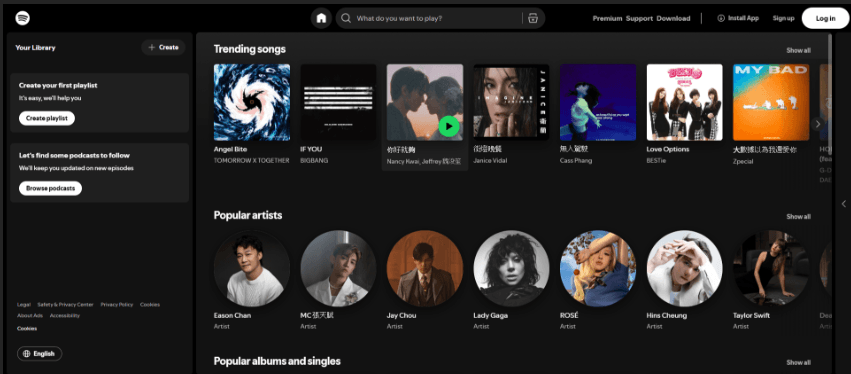
3. Read the error message. If the page says your school or company blocked Spotify, you’ve found the reason.
4. Try your school laptop at home. If Spotify still won’t play, try your personal phone on the same home Wi-Fi. If your phone works but your school laptop doesn’t, the laptop may have a restriction that applies even at home.
How to Get Music Playing on School and Work Wi-Fi
Schools and workplaces block Spotify for practical reasons: bandwidth, classroom focus, content categories that group music streaming with video sites, and policies that only allow approved apps. The fix depends on whether the block is on the network, on the device, or on your account’s country setting.
Method 1. Use your phone’s hotspot
If the Wi-Fi network is causing the problem, you can get Spotify playing in three steps.
1. Turn on your phone’s mobile hotspot.
2. Connect your laptop or tablet to the hotspot.
3. Open Spotify and play a track.
If you have a data limit, choose Normal audio quality in Spotify’s settings.
The limitation is indoor coverage and battery drain. For a study session or a work afternoon, it is often enough.
Method 2. Listen Offline with Spotify Premium
With Spotify Premium, you can download albums and playlists at home, then listen at school or work without Wi-Fi or mobile data. If you are a free user, you can only download podcasts, and you may not see the "Offline Mode" button.
■ Price: $0 for 1 month, then $12.99 per month after. Offer only available if you haven't tried Premium before.
1. Open the playlist and tap the download icon (the downward arrow). When the icon turns green, the playlist is ready to play offline.
2. Check that it’s ready. Before you leave, disconnect from the internet and play a track to check that it works offline.
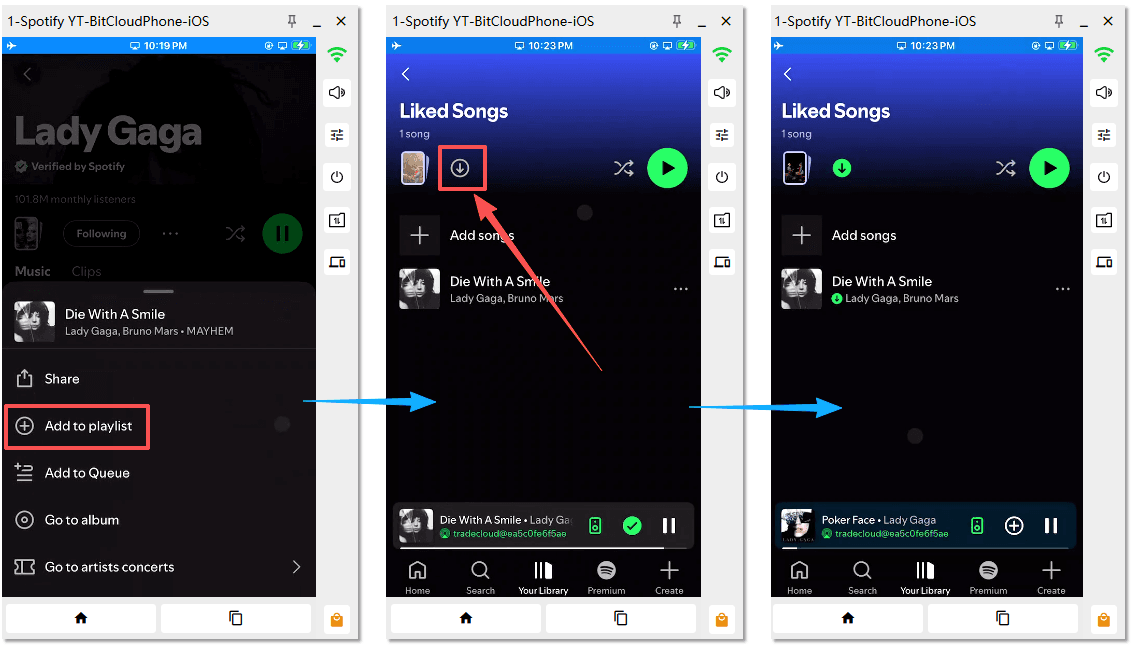
3. Play it from Your Library. Downloads play automatically when you’re offline. If you’re connected to school or work Wi-Fi and want Spotify to play only your downloads, turn on Offline Mode.
Where to find Offline Mode
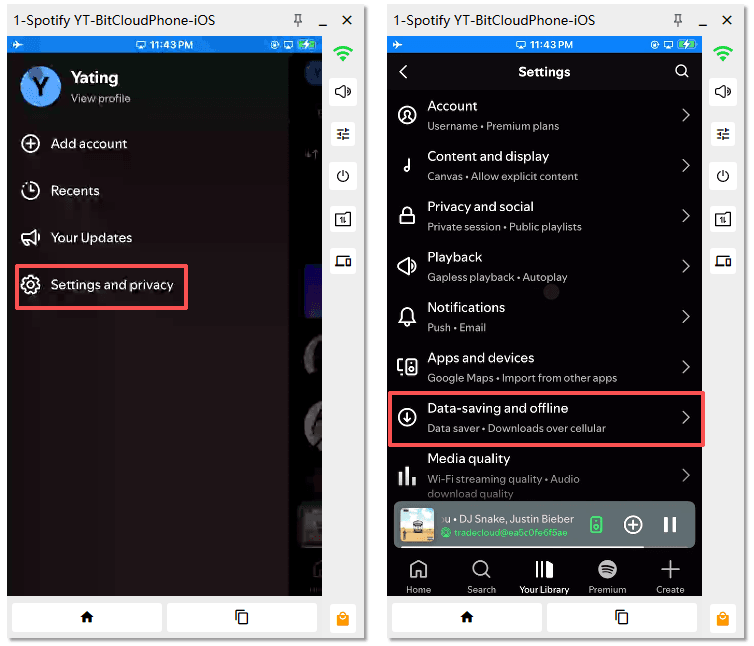
■ Phone or tablet: Tap your profile picture → Settings and privacy → Data-saving and offline → Offline mode.
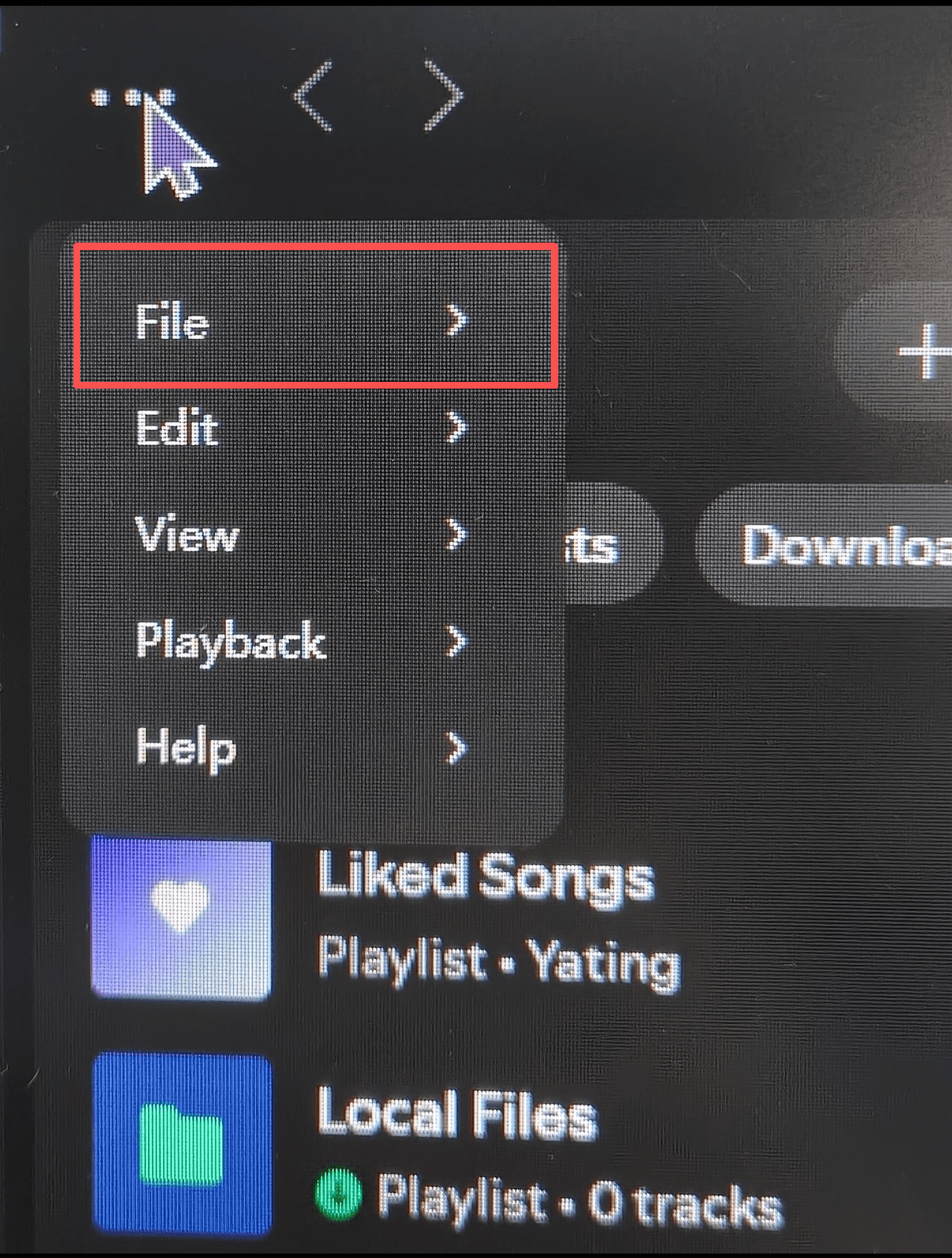
■ Windows: Select … → File → Offline Mode.
■ Mac: In the menu bar, select Spotify → Offline Mode.
Go online in the Spotify app at least once every 30 days to keep your downloads. Premium supports up to 10,000 tracks per device on up to 5 devices.
Spotify's official offline listening guide
Method 3. Try the Web Player
The Web Player uses different addresses from the desktop app. If you can’t install the Spotify app on a school or work computer, try the Spotify Web Player.
It lets you play music directly in your browser. A filter that lists only the app’s addresses may miss the browser version.
1. Open Chrome, Edge, or Firefox.
2. Go to open.spotify.com and sign in.
3. Try to play one track.
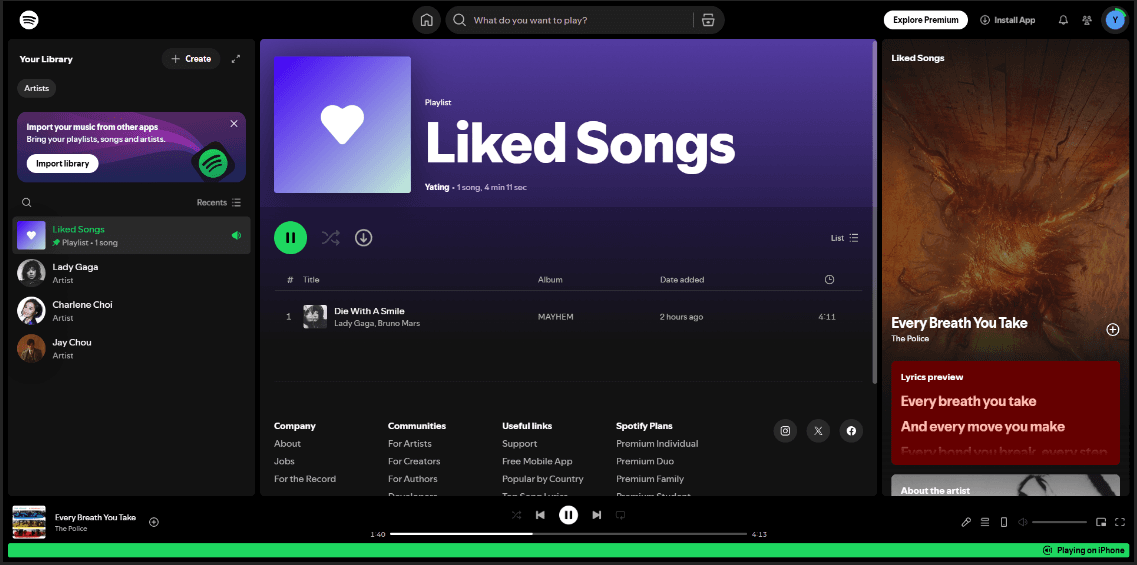
If the player opens but a song won’t play, check the error message. If it mentions protected content, follow the steps for your browser in Spotify’s official Web Player guide.
Spotify's official Web Player help page
If the Spotify Web Player doesn’t work, use it in a BitBrowser profile with an isolated browser fingerprint. Add a proxy in the profile settings or connect your VPN before opening the profile (see Method 7).
Method 4. Try Secure DNS in Your Browser
If your browser says it can’t find open.spotify.com, try changing its DNS provider. This can help when your browser can’t look up Spotify’s address. Choose the option for your browser or device.
■ Chrome on Windows or Mac: Go to Settings → Privacy and security → Security. Under Advanced, turn on Use secure DNS and choose a provider from the list.
■ Microsoft Edge: Go to Settings → Privacy, search, and services → Security and turn on Use secure DNS.
■ Firefox: Go to Settings → Privacy & Security → DNS over HTTPS. Choose Increased Protection and select a provider.
■ Personal Chromebook: In Chrome, go to Settings → Privacy and security → Security → Advanced. Select Manage secure DNS in ChromeOS settings, then turn on Use secure connections to look up sites.
Reload open.spotify.com and try playing a song. If the setting is locked on a school-issued laptop, skip this method.
This is a low effort fix, but it fails against modern firewalls. Campus systems increasingly use deep packet inspection and server name indication filtering, which catches Spotify’s traffic after the DNS lookup has already succeeded.
Method 5. Use a VPN with obfuscation, not a standard VPN
A VPN encrypts your traffic and sends it through a server outside the school or office network. The filter sees an encrypted connection to the VPN server rather than a direct connection to Spotify.
Many school and work networks can detect and block standard VPN connections. Obfuscation can help by making VPN traffic look like regular HTTPS traffic on port 443. Surfshark calls this Camouflage Mode, NordVPN offers Obfuscated Servers, and ExpressVPN applies it automatically on restrictive networks.
1. Install the VPN app before you go to school or work, because the network may block the installer.
2. Open the VPN settings and turn on the obfuscation or stealth option.
3. Connect to a server in your own country if one is available. A nearby server keeps latency low and avoids changing your Spotify catalog.
4. Open Spotify after the VPN is connected.
5. If Spotify still fails, switch to another server. The network or Spotify may have flagged the IP you were using.
A VPN cannot fix a Spotify account country mismatch. It changes your IP address, but it does not change your account’s registered country or your payment method. If Spotify still won’t load with your VPN on, try an anti-detect browser. It lets you match your browser’s time zone to your VPN location.
Method 6. Use a Portable Browser with a Private Proxy
If you can’t install apps on a shared Windows PC, you can run Firefox Portable from a USB drive. Use this option only if your school or workplace allows both USB apps and private proxies.
1. Set it up at home. Put Firefox Portable on your USB drive and launch it from there.
2. Connect your private proxy. In Firefox, search Settings for Network Settings. Open the connection settings and enter the details for a private proxy you control.
3. Test playback before you leave. Open open.spotify.com, sign in, and play a song to check that the setup works.
4. Use it on the shared PC. Plug in the USB drive, launch Firefox Portable, and open the Spotify Web Player.
The proxy handles the network connection. If the PC blocks USB apps or the network blocks your proxy, this method won’t work. Avoid free public proxies and enter your login details only on Spotify’s own site.
Method 7. Unlock Spotify with BitBrowser and a proxy or VPN
BitBrowser is an anti-detect browser. It helps unlock Spotify by changing the browser fingerprint and binding a proxy or VPN route to each browser profile.
Its proxy management supports HTTP, HTTPS, SOCKS5, and SSH, and a VPN can also be used as the network route.
When the proxy IP and the browser fingerprint signals point to the same region, Spotify’s Web Player sees a more consistent environment and is less likely to treat the session as a region mismatch or a suspicious login.
How to set it up
1. Install BitBrowser and create an account on a personal laptop or on a computer where you are allowed to install software. Do this before you go to school or work, because the network may block the installer.
2. Create a browser profile. Give it a name like “Spotify.” Then enter the website address, username, and password. A username and password are not required.
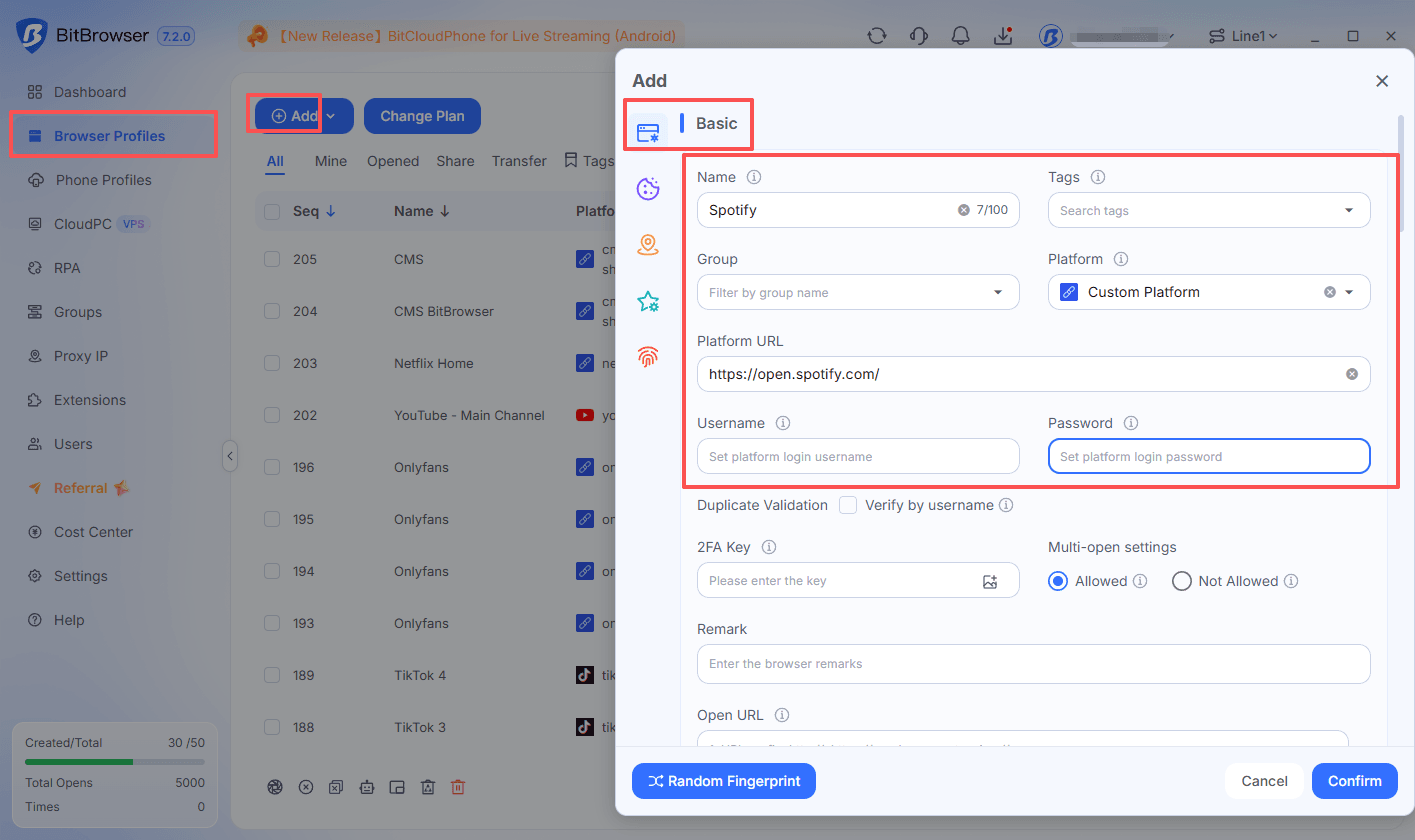
3. In that profile’s Proxy settings, choose one of these two options:
■ If you use a VPN, connect your laptop to the VPN, then select Direct Connection. The profile will use your laptop’s VPN connection.
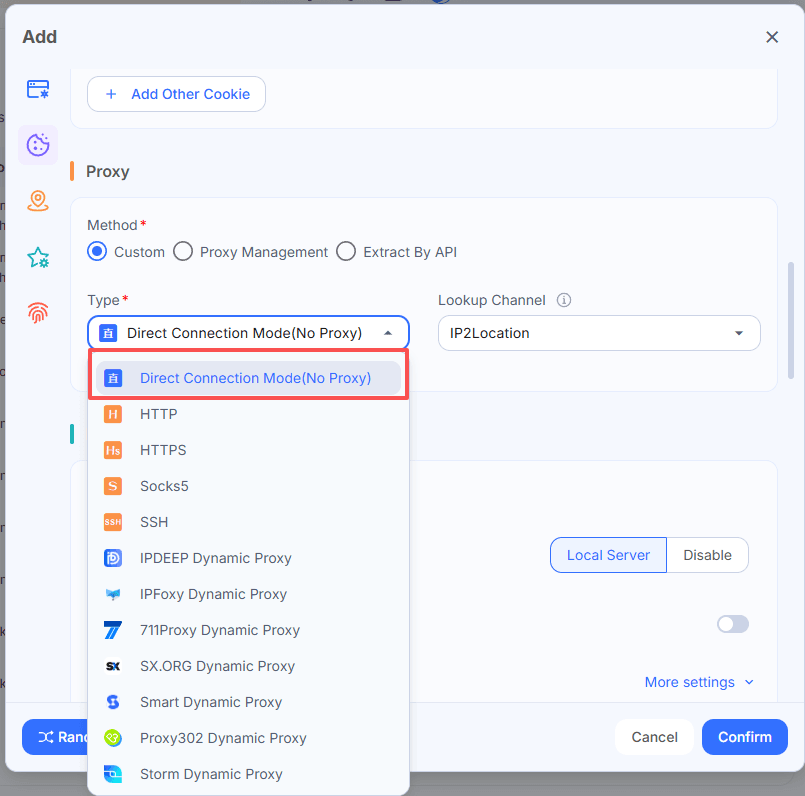
■ If you use a proxy, select the type your provider gave you (HTTP, HTTPS, SOCKS5, or SSH). Enter the server address and port, plus your username and password if required. You’ll need your own proxy details.
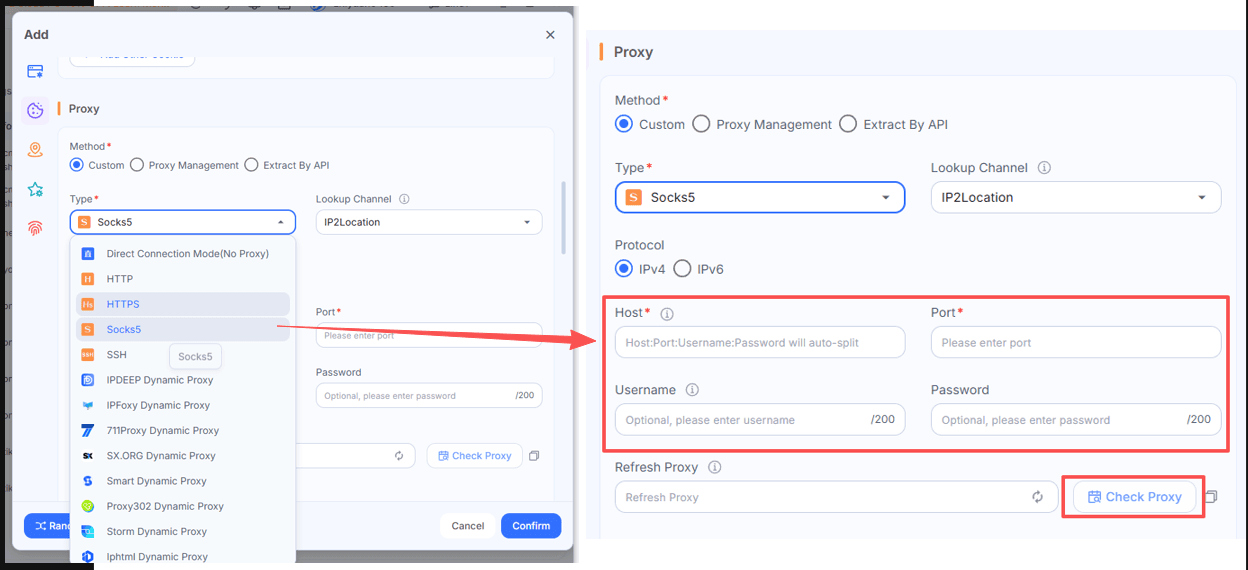
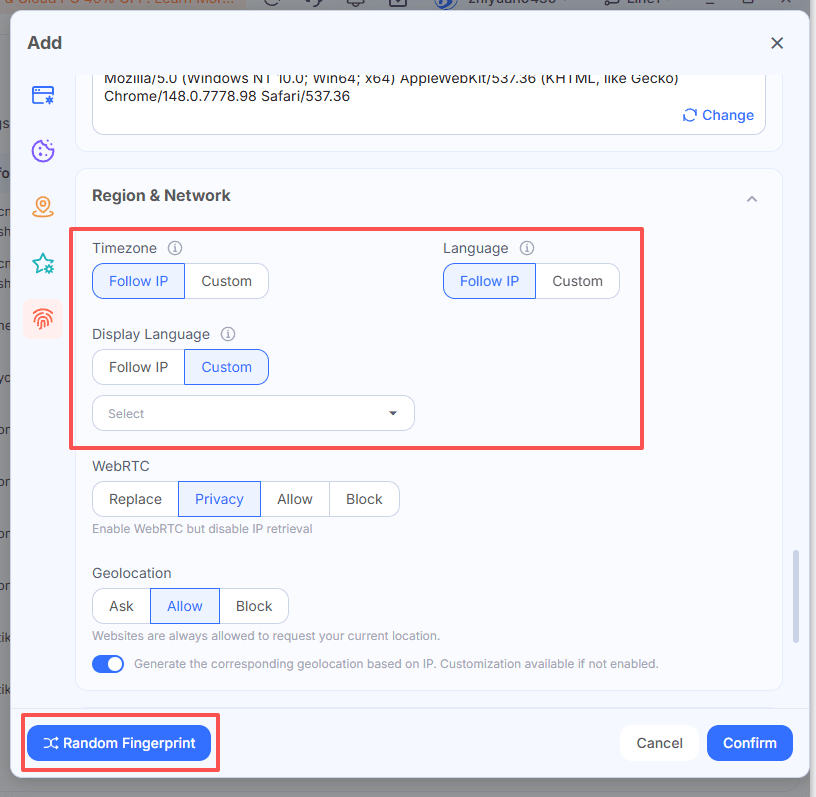
4. Generate a browser fingerprint. In this browser profile, use the one-click option to generate a random fingerprint. Then check that the time zone and language make sense for your VPN or proxy location.
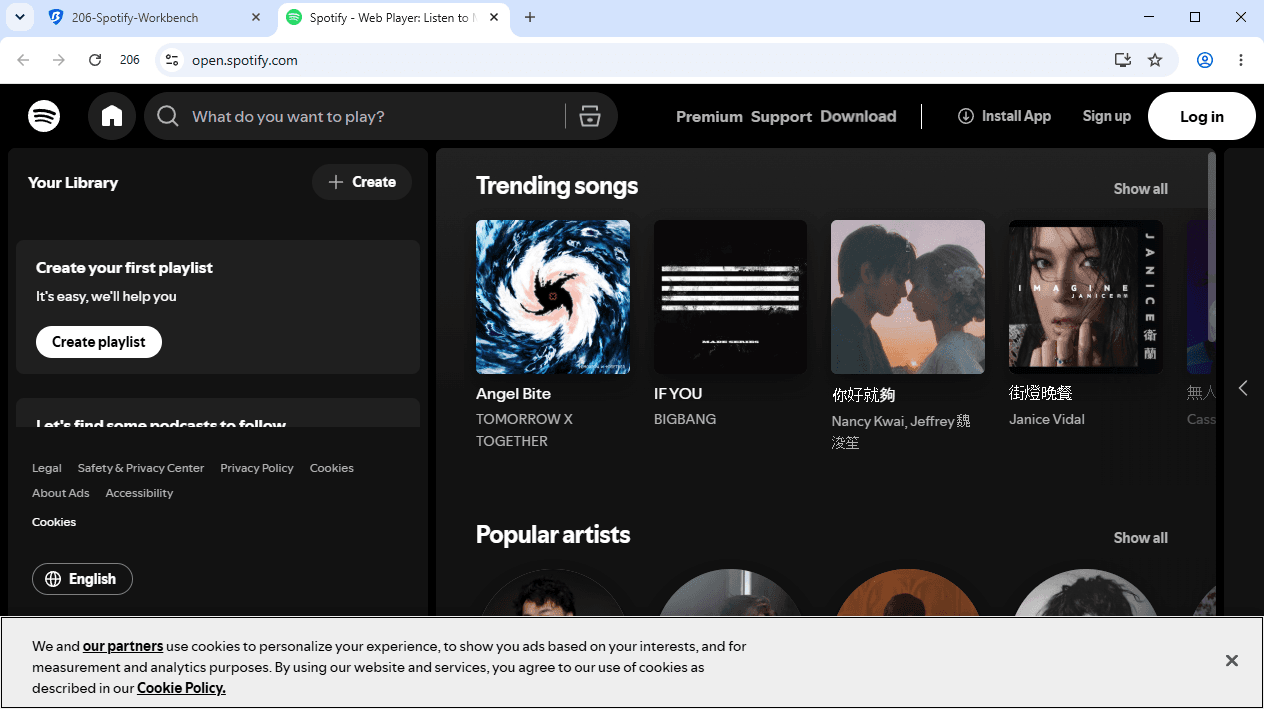
5. Open the Spotify Web Player. Launch the profile in the new window. Sign in on Spotify’s official site and play a song.
Started with 10 free BitBrowser profiles forever
Spotify Not Working After Moving Abroad? Check Your Country Settings
Not every Spotify failure is a network block. If you have moved countries or are using an account registered somewhere else, Spotify’s country setting can stop playback even on an unblocked network.
Spotify ties your account’s country or region to where you signed up. If you move somewhere Spotify is available, you need to update the country in your account. Free accounts can change this under Edit profile on the account page. Premium accounts may also need to update the payment method to one issued in the new country. Spotify’s official country and region settings page explains the current rules.
A VPN cannot fix a country mismatch. It changes your IP address, but it does not change your account’s registered country or your payment method. Spotify is also unavailable in a few countries, including China, Iran, North Korea, and Crimea. There the block covers every network in the country, mobile data included.
If you’re trying the Spotify Web Player abroad with a VPN or proxy, use BitBrowser to match your browser profile’s time zone to the server location. See Method 7 for the setup.
What not to do
Do not use free public web proxies.
Sites that promise “Spotify unblocked” through their own proxy are not Spotify. They run your session through a server you know nothing about, which means the operator can see your login.
Do not install cracked Spotify apps or unofficial APKs.
These are a direct route to account bans, malware, and payment credential exposure.
Do not reset a school managed Chromebook to get around the block.
School Chromebooks re enroll after a reset, and you lose your local files without removing the school’s rules.
Do not rely on DRM conversion tools or discount codes from promotional articles.
They add cost and legal risk, and they are not needed for normal offline listening with Premium.
What’s the Best Way to Unblock Spotify at School or Work?
Start with mobile data or a hotspot. If Spotify plays there, the network is the block, and the hotspot is your shortest path.
■ If you have Premium, download playlists at home and use Offline Mode for the school day.
■ If you must stay on the Wi-Fi, try encrypted DNS for a simple filter.
■ Move to an obfuscated VPN if the network uses deep packet inspection.
■ If you cannot install apps on a lab PC and policy allows it, use the portable browser with a private proxy.
■ If you want a proxy or VPN route paired with a matching browser fingerprint, or need separate Spotify sessions to present as separate device and network identities, use BitBrowser as your unlock method.
Follow your school or employer’s acceptable use policy. Bypassing a filter can break the rules you agreed to, even where using a VPN is legal.
Frequently Asked Questions
Why is Spotify blocked at school or work?
Schools and workplaces may restrict music streaming to save bandwidth or limit distractions. To check, try the same song on your phone using Wi-Fi, then switch to mobile data. If it only plays on mobile data, the Wi-Fi network is likely restricting Spotify.
How can I listen to Spotify at school without a VPN?
Use mobile data on your phone or connect your laptop to your phone’s hotspot. If you have Spotify Premium, you can also download a playlist at home and play it offline at school. On Spotify Free, you can download podcasts for offline listening.
Will a VPN work on a school Chromebook?
It depends on how the Chromebook is managed. If Spotify works on the same Chromebook at home, the school Wi-Fi may be the issue. If your school restricts Spotify or VPN apps on the device itself, those rules can still apply at home.
Can I use the Spotify Web Player if the desktop app is blocked?
Sometimes. Open open.spotify.com, sign in, and try playing a song. If you see a school or company block page, the restriction also covers the web player. If you see a protected content error instead, check your browser settings using Spotify’s Web Player guide.
Can I use BitBrowser with a VPN or proxy to access Spotify?
Yes, if your network allows the connection. With a VPN, connect it first and choose Direct Connection in your BitBrowser profile. With a proxy, enter your provider’s details in that profile instead. Then open the Spotify Web Player. Method 7 covers the full setup.
Can a VPN fix a Spotify country mismatch after I move abroad?
A VPN changes your IP address. Your Spotify account keeps its registered country until you update it. If you’ve moved, check your account’s country setting. Premium users may also need a payment method issued in the new country. Spotify’s country and region settings guide

 Multi-Account Management
 Prevent Account Association
 Multi-Employee Management
Recommended
See More