How to Unblock TamilMV Safely and Access Tamil Movies Online in 2026
 2025.12.20 04:59
 petro
petroAccessing Tamil movies online has become increasingly challenging in recent years, as popular streaming and download sites face frequent blocks and takedowns. One such site that remains a popular choice is Tamil.mv, a platform known for hosting Tamil movie releases. However, many users struggle to open the site due to regional restrictions, ISP blocks, or constantly changing domains.
This 2026 guide explains what TamilMV is, why it’s frequently blocked, whether it's safe to access, and most importantly, how to unblock TamilMV using practical and reliable methods. We’ll also compare solutions like TamilMV proxy sites, VPNs, and advanced tools such as antidetect browsers, helping you choose the safest and most effective option.
What Is TamilMV and Why Is It So Popular?
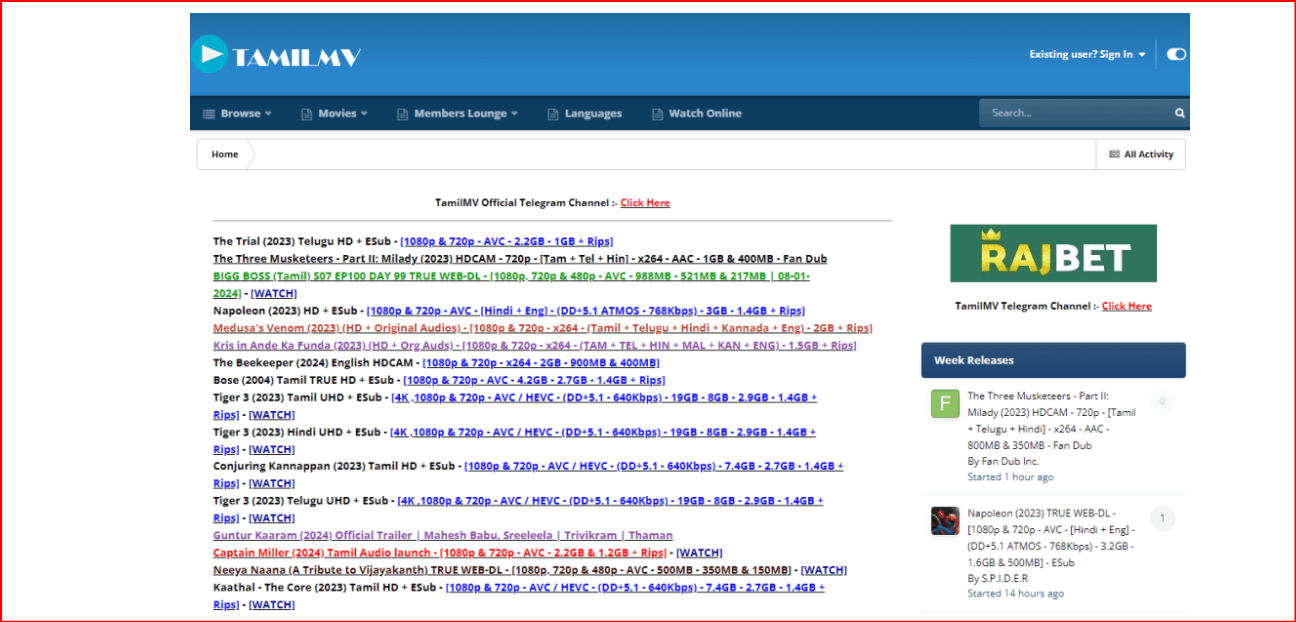
TamilMV (also referred to as Tamil movie mv or Tamil movie download sites) has become a go-to destination for Tamil cinema fans. The site is known for offering fast access to new Tamil movies, web series, and dubbed content, often shortly after their theatrical or OTT release.
Key reasons for TamilMV's popularity:
|
For many users, TamilMV became a popular choice when official platforms delayed releases or restricted content based on geographical regions.
Why Is TamilMV Blocked in Many Countries?
TamilMV is blocked in several countries because it distributes copyrighted content without proper licensing. Governments and ISPs often restrict access to sites that host pirated material, and TamilMV is no exception.
Common reasons for blocking include:
• Copyright infringement complaints from filmmakers and distributors
• Court-ordered ISP blocks at national or regional levels
• Domain seizures or blacklisting by authorities
• Dynamic blocking, where entire IP ranges or mirror domains are restricted
As a result, users may encounter error messages like “This site can’t be reached” or “Access denied” when trying to visit TamilMV.
Is It Safe to Access TamilMV?
While many users search for ways to unblock TamilMV, safety concerns are often overlooked. The site can pose several risks:
• Malware and pop-up ads: Many proxy and mirror sites can expose you to malicious ads and software.
• Phishing attempts: Some websites trick users into clicking on fake download buttons.
• Tracking: ISPs or network administrators may monitor your activity.
• Unstable access: Domains can stop working suddenly due to blocks or takedowns.
Accessing TamilMV without the right precautions may expose your IP address, browsing behavior, and device security. Therefore, it's crucial to choose a safe and reliable method to unblock TamilMV.
How to Unblock TamilMV – 6 Practical Methods
Here are six common methods to unblock TamilMV, from basic solutions to more advanced options.
Method 1 – Using TamilMV Proxy or Mirror Sites
TamilMV proxy sites mirror the original TamilMV content. These proxies allow users to access TamilMV through different URLs, even when the main site is blocked.
Pros:
• Simple to use
• No software installation needed
• Quick access when the proxy is active
Cons:
• Often blocked quickly
• High risk of fake or malicious sites
• Heavy ads and pop-ups
Proxy sites may work temporarily, but they are unreliable and can be unsafe.
Method 2 – Changing DNS Settings
Switching to public DNS services like Google DNS or Cloudflare DNS can sometimes bypass ISP-level blocks.
Common DNS options:
• Google DNS (8.8.8.8 / 8.8.4.4)
• Cloudflare DNS (1.1.1.1)
Pros:
• Easy setup
• May improve browsing speed
Cons:
• Ineffective against deep packet inspection
• Doesn’t hide your IP address
• Limited success in heavily restricted regions
DNS changes may help bypass mild restrictions but are unlikely to work in highly censored regions.
Method 3 – VPNs: When They Work and When They Don’t
VPNs are one of the most popular solutions for unblocking TamilMV. They route your traffic through different servers, masking your IP address.
Pros:
• Encrypts internet traffic
• Bypasses many geo-blocks
• Widely available
Cons:
• Free VPNs may log data
• Many VPN IPs are blacklisted by streaming sites
• May experience slower speeds
VPNs can work but the success rate depends on server quality and detection systems.
Method 4 – Using a Web-Based Proxy Tool
Web proxies allow you to access TamilMV directly through your browser without installing any software.
Pros:
• Quick and simple
• Ideal for one-time access
Cons:
• Slow speeds
• Poor compatibility with media downloads
• Exposure to tracking and ads
Web-based proxies are not recommended for frequent or long-term use.
Method 5 – Tor Browser (Optional, Advanced Users)
Tor routes traffic through encrypted nodes, providing strong anonymity.
Pros:
• High level of privacy
• Difficult to trace
Cons:
• Very slow speeds
• Many sites block Tor traffic
• Poor experience for media downloads
Tor is best for privacy-focused browsing, not for streaming or downloading Tamil movies.
Method 6 – Using an Antidetect Browser for Stable Access
Antidetect browsers isolate browser fingerprints, cookies, and IPs. These tools create distinct, consistent browser profiles that are harder to track or block.
Pros:
• Stable access, even when domains change
• Prevents fingerprint tracking
• Works well with proxies or residential IPs
• Reduces frequency of blocks
Cons:
• Requires setup
• Best for advanced users
Antidetect browsers offer the most reliable long-term solution for accessing TamilMV safely in 2026.
Comparison: TamilMV Proxy vs VPN vs Antidetect Browser
Here's a quick comparison of TamilMV proxy sites, VPNs, and antidetect browsers:
| Feature | TamilMV Proxy | VPN | Antidetect Browser |
|---|---|---|---|
| Ease of Use | High | Medium | Medium |
| Stability | Low | Medium | High |
| Privacy Protection | Low | Medium | High |
| IP Masking | Limited | Yes | Yes (Advanced) |
| Block Resistance | Very Low | Medium | Very High |
| Best for Long-Term Use | No | Sometimes | Yes |
Why Antidetect Browsers Are the Best Solution for TamilMV Access
Many modern blocks focus on tracking user behavior via browser fingerprints, not just IP addresses. Antidetect browsers solve this by:
• Creating isolated environments for each browser session
• Maintaining consistent digital fingerprints
• Preventing cross-session tracking
• Allowing flexible proxy integration
This makes antidetect browsers far more effective than proxy solutions, especially when TamilMV's domains change frequently.
How to Use BitBrowser to Access TamilMV More Reliably
BitBrowser is a powerful antidetect browser that allows users to create isolated browser profiles with unique fingerprints. Here's how to set it up for reliable access to TamilMV:
Step-by-Step Setup:
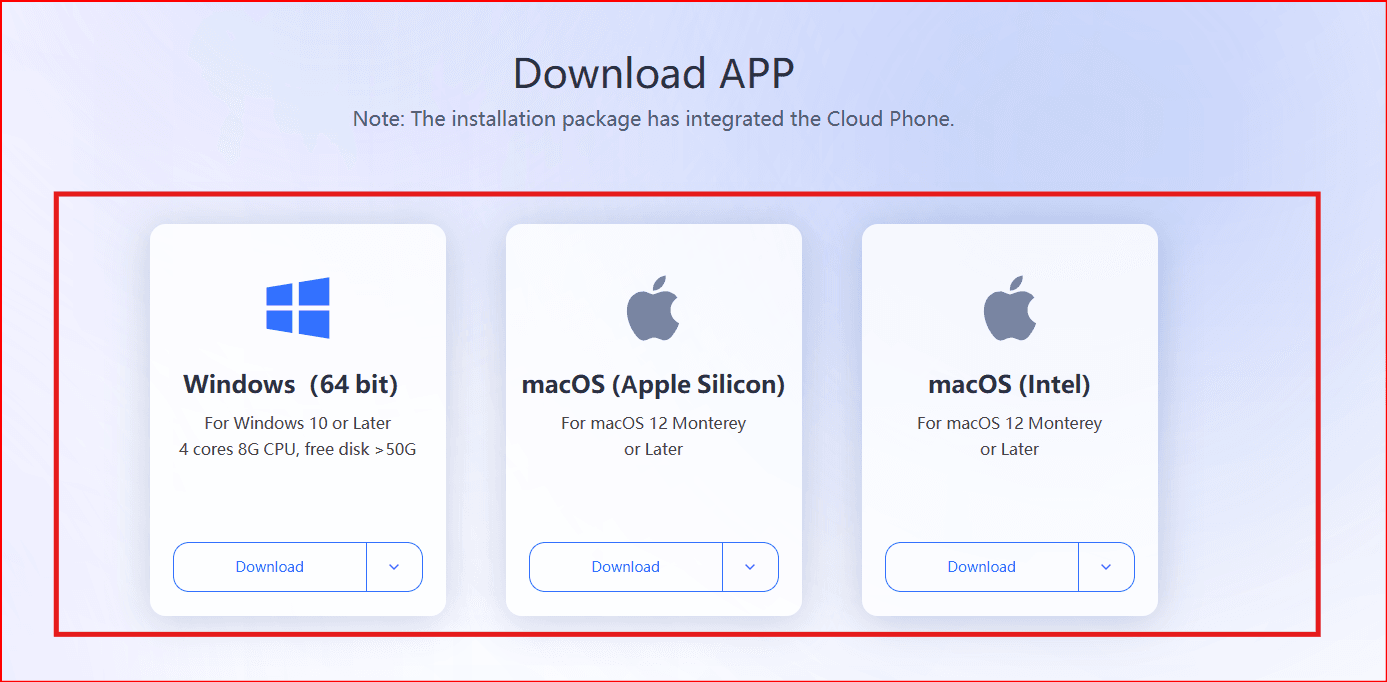
1. Install BitBrowser
Download and install BitBrowser on your desktop system.
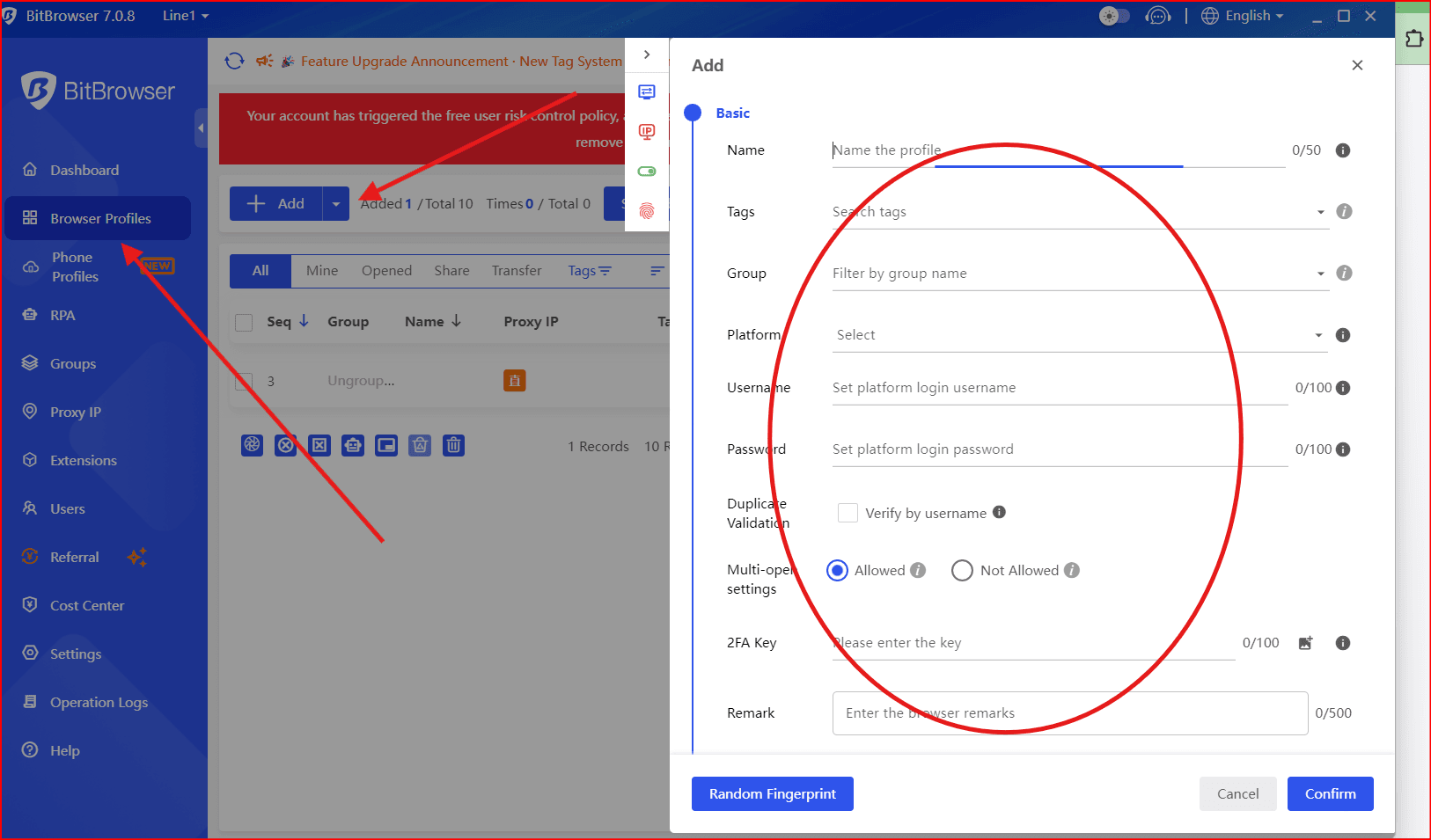
2. Create a New Browser Profile
Set up a new profile with a unique browser fingerprint.
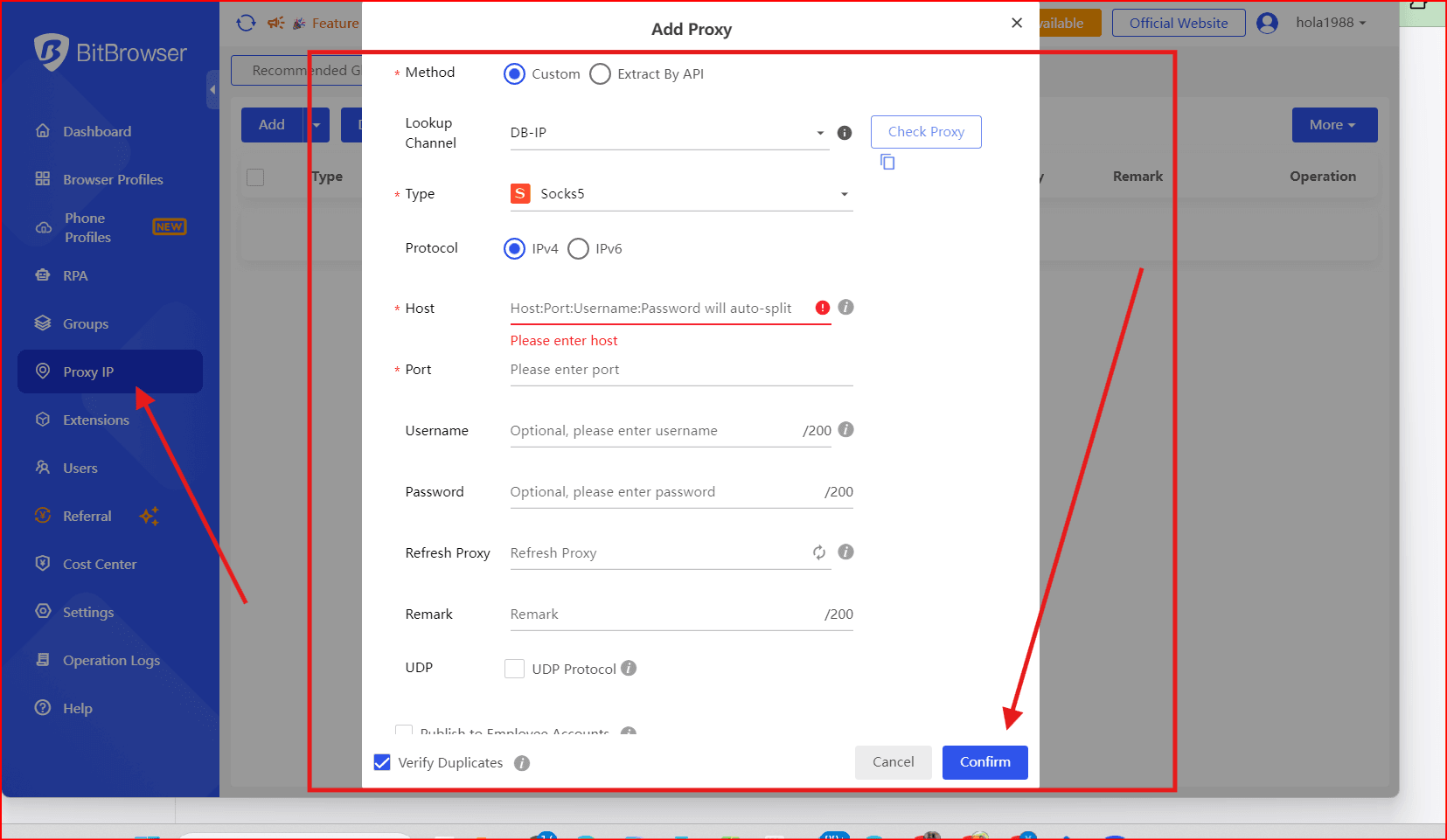
3. Configure Proxy or IP Settings
Use a residential or ISP proxy like brightata on noscks net for enhanced stability.
4. Enter the TamilMV Link
Choose "Other" in the dropdown menu and input the latest TamilMV proxy link.
5. Customize Browser Environment
Adjust timezone, language, OS, and screen settings to match the proxy location.
6. Launch the Profile
Open TamilMV within the isolated profile.
7. Save Cookies and Session Data
This ensures consistent access even if domains change.
By using BitBrowser, you reduce detection risks and minimize the need to constantly search for new unblock methods.
You may also want to read:
• What is TamilMV? How to Access TamilMV in 2026? (Updated Jan. 2026)
• Best Unblocked YouTube Sites in 2026
• How to Safely Access Kickass Torrents in 2026 (Unblocked & Secure Guide)
Conclusion
TamilMV remains popular due to the high demand for Tamil movie content, but accessing it safely has become more complex. While proxies and VPNs may offer temporary access, they are not foolproof against modern detection systems.
For reliable, private, and long-term access in 2026, antidetect browsers, like BitBrowser, provide the most stable solution. Regardless of the method you choose, always prioritize privacy, security, and awareness of local laws when accessing TamilMV or similar platforms.

 Multi-Account Management
 Prevent Account Association
 Multi-Employee Management
Recommended
See More 



