How to Install and Register TikTok on BitCloudPhone: A Step-by-Step Guide
 2025.11.21 14:55
 YT.Shi
TikTok has exploded into one of the world's most influential social media platforms, with over a billion active users creating, sharing, and engaging with short-form video content daily. If you're a marketer, e-commerce professional, or social media manager, you know that managing multiple TikTok accounts efficiently can make or break your digital strategy.
Traditional methods of multi-account management often lead to account bans, detection issues, and operational headaches. BitCloudPhone offers a game-changing solution as a cloud-based Android emulator specifically designed for TikTok multi-account management. This platform allows you to run multiple TikTok accounts simultaneously without the risks associated with physical devices or unreliable VPNs.
This guide teaches you how to install and register TikTok on BitCloudPhone, step by step. You’ll learn to use authentic overseas details and manage multiple accounts securely. By following it, you can run TikTok smoothly while keeping your accounts safe and genuine.
Challenges in TikTok Multi-Account Management
Managing multiple TikTok accounts can be challenging due to various restrictions and detection methods employed by the platform. Here are some of the key challenges you may face:
1. Geo-restrictions and IP Blocking
Geo-restrictions and IP blocking are significant barriers when trying to access content or manage accounts from different regions on TikTok. The platform actively monitors IP addresses to enforce regional content policies, blocking access when it detects users connecting from restricted locations.
2. Risks Associated with Traditional VPNs
When relying on standard VPN services to bypass geo-restrictions, you expose your accounts to certain risks:
· Instability: Many VPN services have inconsistent connection quality, which can lead to frequent disconnections. This instability can trigger red flags in TikTok's security algorithms and result in account restrictions or bans.
· High detectability: TikTok has sophisticated detection systems in place that can identify VPN traffic patterns. If the platform detects that you're using a VPN, it may impose penalties on your accounts.
3. Device Fingerprinting as a Defense Mechanism
One of TikTok's most effective defenses against multi-account operations is device fingerprinting. The platform collects various data points from devices to identify and link accounts:
· IMEI spoofing detection through hardware identifier verification
· MAC address spoofing identification via network adapter analysis
· Time zone spoofing recognition through cross-referencing location data
· Patterns in device model, operating system version, and screen resolution
· App installation timestamps and usage behavior metrics
When you operate multiple accounts on a single physical device, TikTok's systems can quickly identify this pattern and impose penalties.
4. Account Association Ban Pattern
The account association ban pattern occurs when TikTok links multiple accounts through shared device fingerprints. This can result in mass suspensions of all associated accounts. It's important to note that TikTok has the ability to blacklist your device entirely, making it difficult or impossible to create new accounts in the future.
The Solution: Using Cloud Phones for Managing Multiple TikTok Accounts
Cloud phones change the way you handle multiple TikTok accounts by creating separate device environments that work independently from each other. Each virtual phone instance operates with its own unique device fingerprint, including authentic IMEI numbers, MAC addresses, and carrier information. This separation ensures that TikTok's detection algorithms perceive each account as coming from a completely different physical device, significantly lowering the risk of account association and potential bans.

Benefits of Cloud Phones
The advantages of cloud phones go beyond just isolation:
· You can access genuine overseas device environments without having to buy physical hardware or deal with international shipping.
· Each virtual device can be set up to match specific geographic regions, including local time zones, language settings, and mobile carrier profiles.
· This authenticity makes your accounts look like legitimate local users instead of suspicious foreign operators.
Simplifying Multi-Account Management
For marketers and e-commerce professionals, managing multiple accounts at scale becomes incredibly easy:
· You can create dozens or even hundreds of virtual phones from a single computer.
· Each virtual phone runs its own TikTok instance with unique settings.
· This scalability eliminates the need for device farms and the costs associated with maintaining physical hardware.
BitCloudPhone: The Ultimate Cloud Phone Solution for TikTok Users
When you're searching for the best cloud phone for TikTok multiple accounts, BitCloudPhone stands out with its comprehensive feature set designed specifically for serious TikTok marketers and e-commerce professionals. This platform goes beyond basic emulation to deliver enterprise-grade capabilities that address every challenge in TikTok multi-account management.
1. Real Device-Level Simulation Capabilities
BitCloudPhone excels at mimicking authentic mobile devices through advanced fingerprint emulation. The platform replicates genuine device identifiers including IMEI and MAC addresses, making your virtual phones indistinguishable from physical devices.
You get access to dynamic matching with over 600 global mobile carriers, ensuring each virtual phone profile carries authentic carrier information that matches your target region. This level of detail is exactly what you need when learning how to register a new TikTok account on cloud phone without triggering platform detection systems.
2. One-Click New Phone Feature for Quick Environment Reset
Managing multi TikTok accounts becomes significantly safer with BitCloudPhone's one-click new phone feature. You can instantly generate a fresh device environment with completely new parameters, eliminating any digital traces that might link your accounts together.
This rapid reset capability means you can create isolated environments for each TikTok profile in seconds rather than hours.
3. Multi-Account Synchronized Management Tools
BitCloudPhone features include powerful synchronized operations that transform how you manage multiple accounts:
· Bulk post scheduling across dozens of accounts simultaneously
· Team permission controls enabling collaborative workflows
· Synchronized actions for consistent engagement patterns
· Centralized dashboard for monitoring all account activities
4. Additional Key Features Beneficial for TikTok Users
You gain access to proxy IP configuration for maintaining stable, region-specific network environments for each account. The platform supports ADB and ROOT permissions, allowing you to run custom automation scripts tailored to your specific TikTok marketing strategies.
Step-by-Step Guide to Installing and Registering TikTok on BitCloudPhone
Getting started with BitCloudPhone requires just a few straightforward steps. You'll find the process intuitive whether you're managing your first TikTok account or scaling up to dozens of profiles.
1. Accessing BitCloudPhone Platform
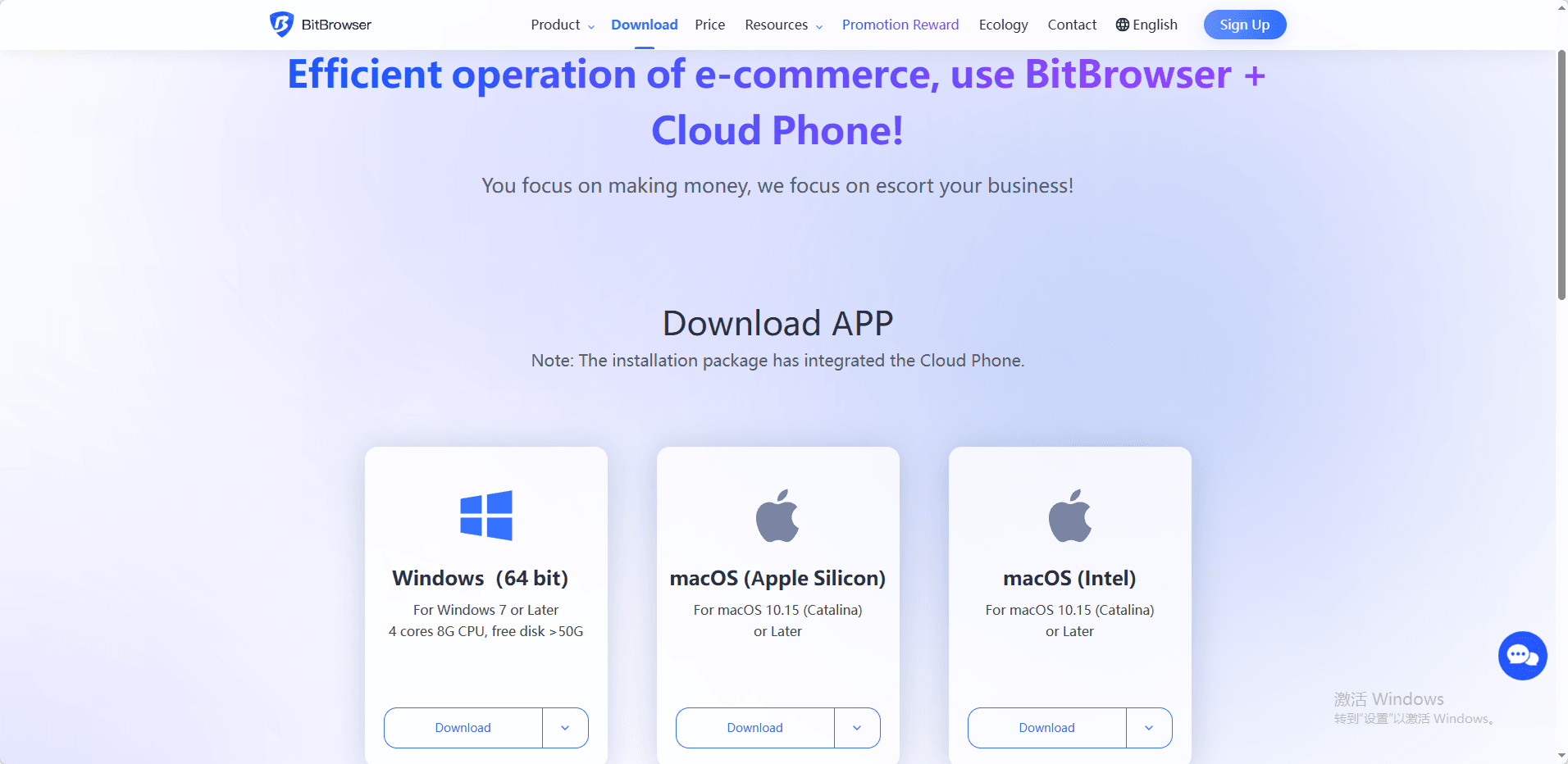
BitCloudPhone login begins with navigating to the official website through your preferred web browser. You can access the platform from Chrome, Firefox, Safari, or Edge on both Windows and Mac systems. The browser access method offers flexibility since you're not tied to a specific device.
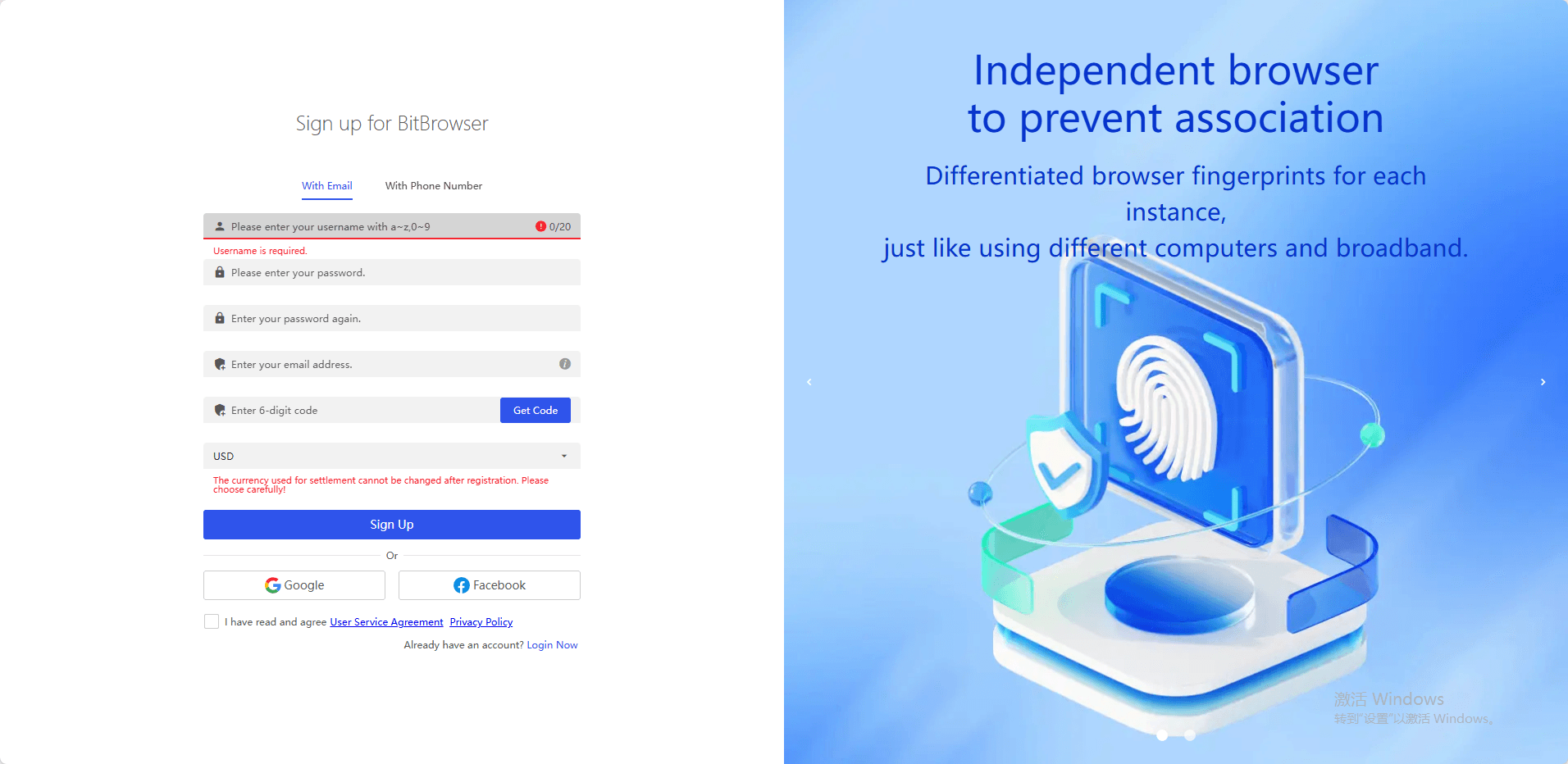
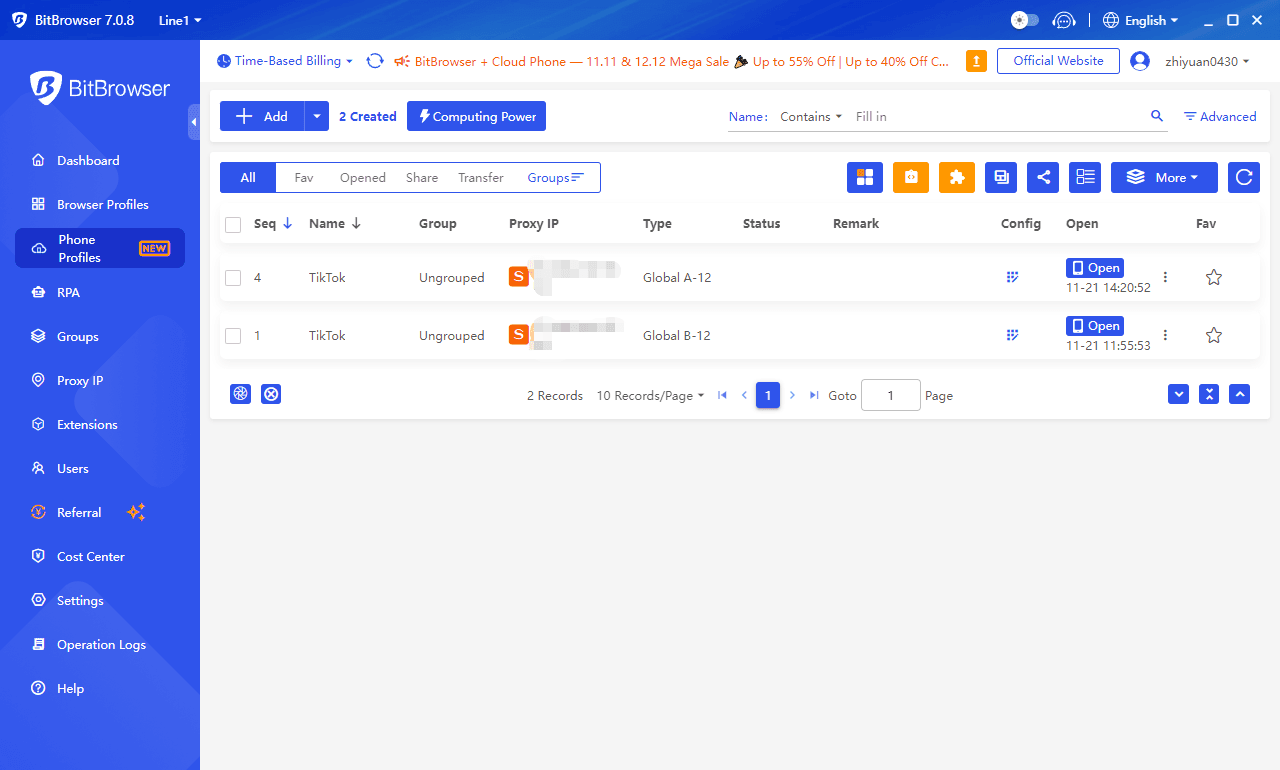
After creating your account, you'll download BitBrowser and land on the dashboard where all your virtual phone management happens. The interface displays your existing phone profiles, available credits, and quick-access buttons for creating new devices.
Before diving into how to install TikTok, you need to ensure your account has sufficient credits to create or activate virtual phone instances.
2. Creating or Selecting a Virtual Phone Profile
The BitCloudPhone TikTok tutorial starts with setting up your virtual device environment.
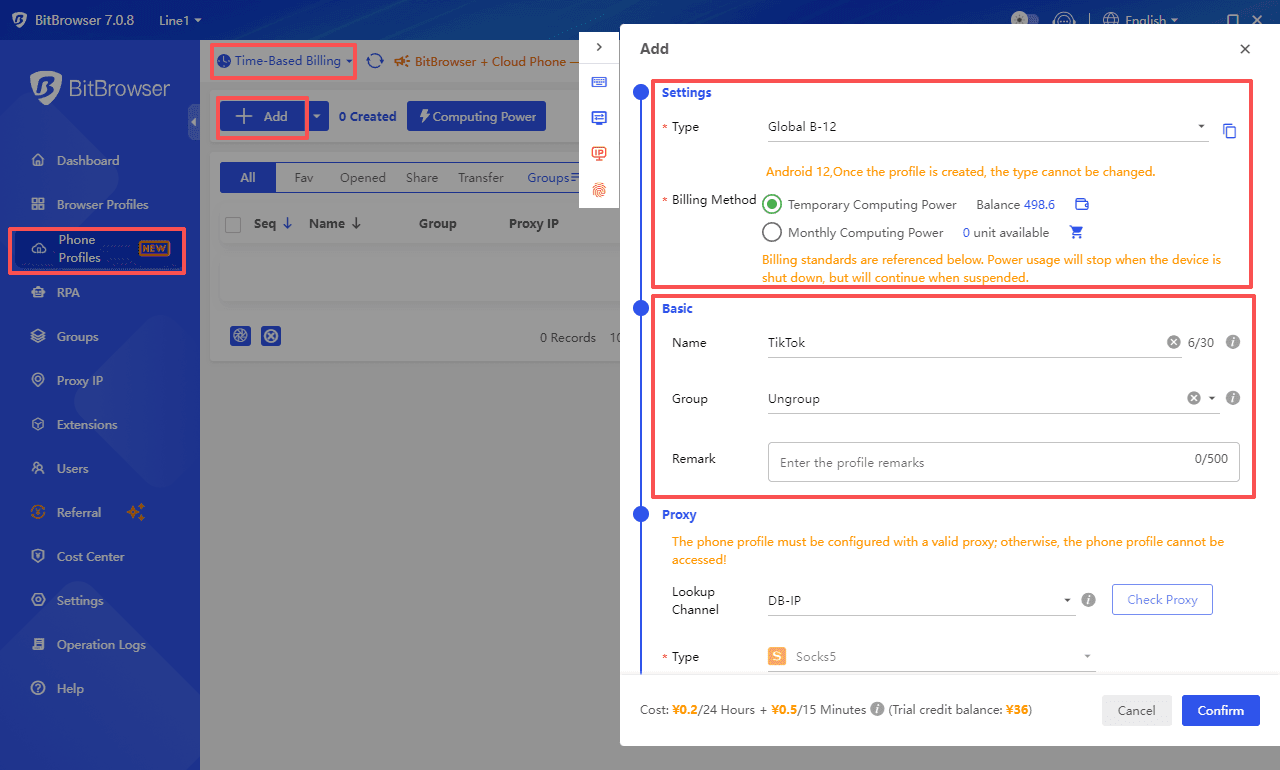
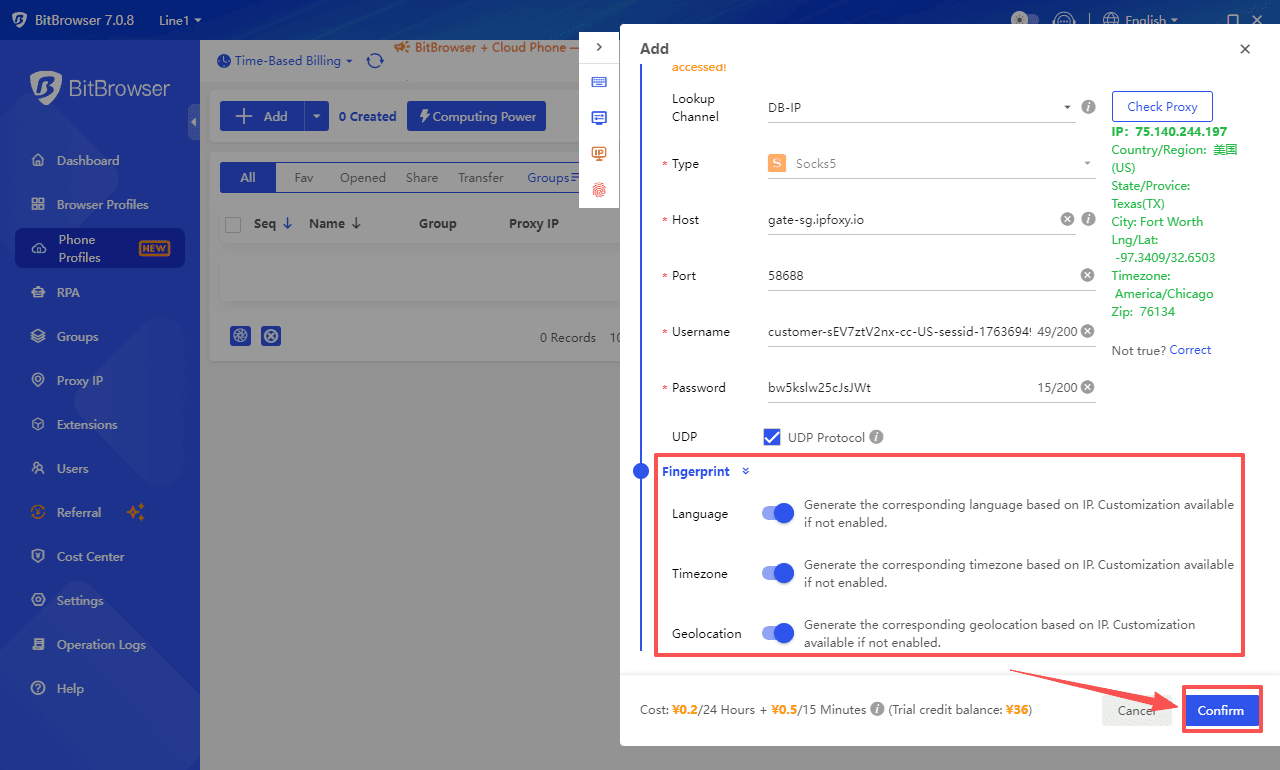
Find [Phone Profiles] in the left-side menu on the client. Click the billing mode dropdown menu in the upper left corner and select [Time-Based Billing].
Click the [Add] button to start the creation process in the popup window on the right.
Type: Once the profile is created, the type cannot be changed.
Billing Method: Temporary Computing Power; Monthly Computing Power.
Temporary Computing Power: To use the account balance, ensure that the balance is sufficient. If it is insufficient, click the recharge icon to top up.
Monthly Computing Power: You need to purchase monthly computing power. If the monthly computing power is 0, click the purchase icon to proceed with the purchase.
In the basic settings, fields such as name, group selection, and remarks can be customized.
3. Configuring Network Settings Including Proxy IP
Network stability directly impacts your TikTok account's performance and safety. Navigate to the network settings within your virtual phone profile. You'll find options to configure proxy IPs that match your target region's network characteristics.
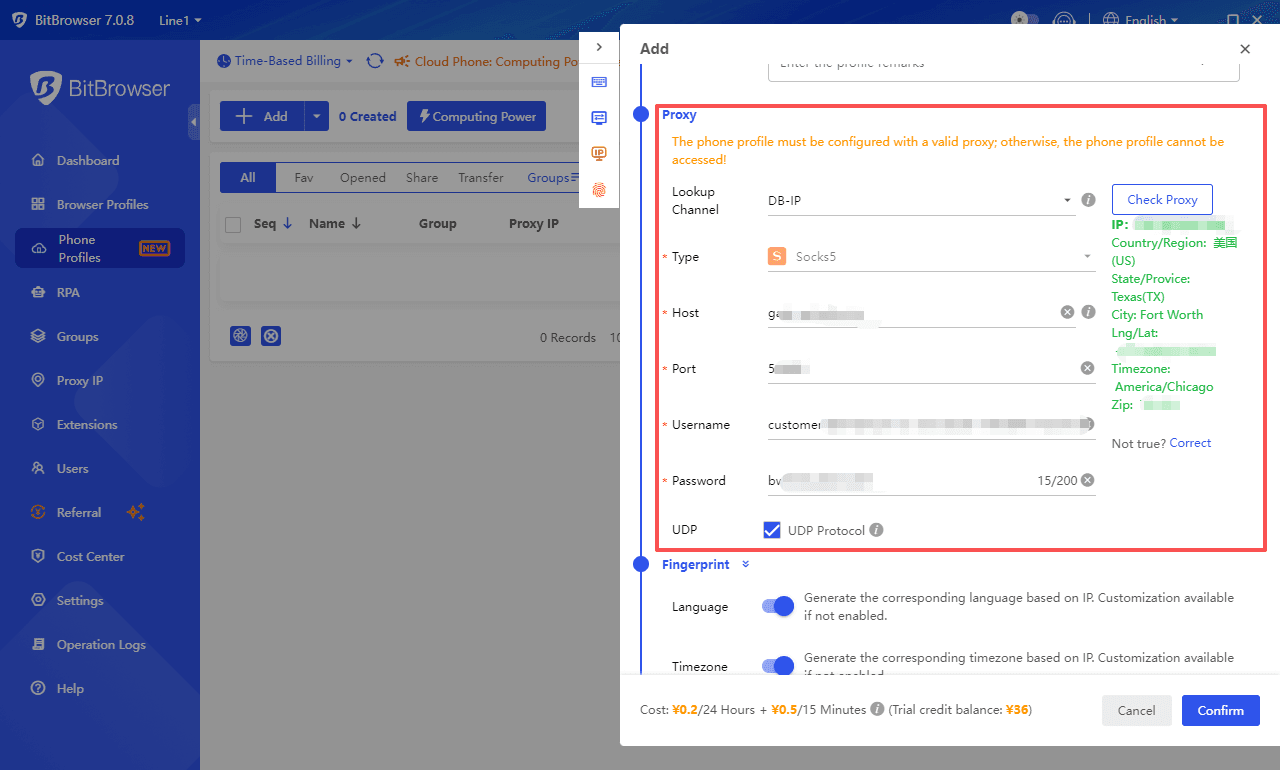
The phone profile must be configured with a valid proxy; otherwise, the phone profile cannot be accessed.
Fill in the following fields in order: host, port, Username, and password. After completing the input, click [Check Proxy] in the upper right corner. If the detection is successful, you can use it normally.
This step-by-step TikTok installation on cloud phone process demands attention to network configuration since TikTok actively monitors connection patterns.
At last, you'll see configuration options that determine how authentic your virtual device appears:
· Language settings: Select the primary language matching your target audience
· Time zone configuration: Align with the geographic region you're targeting
· Location parameters: Choose the country and city for your virtual device
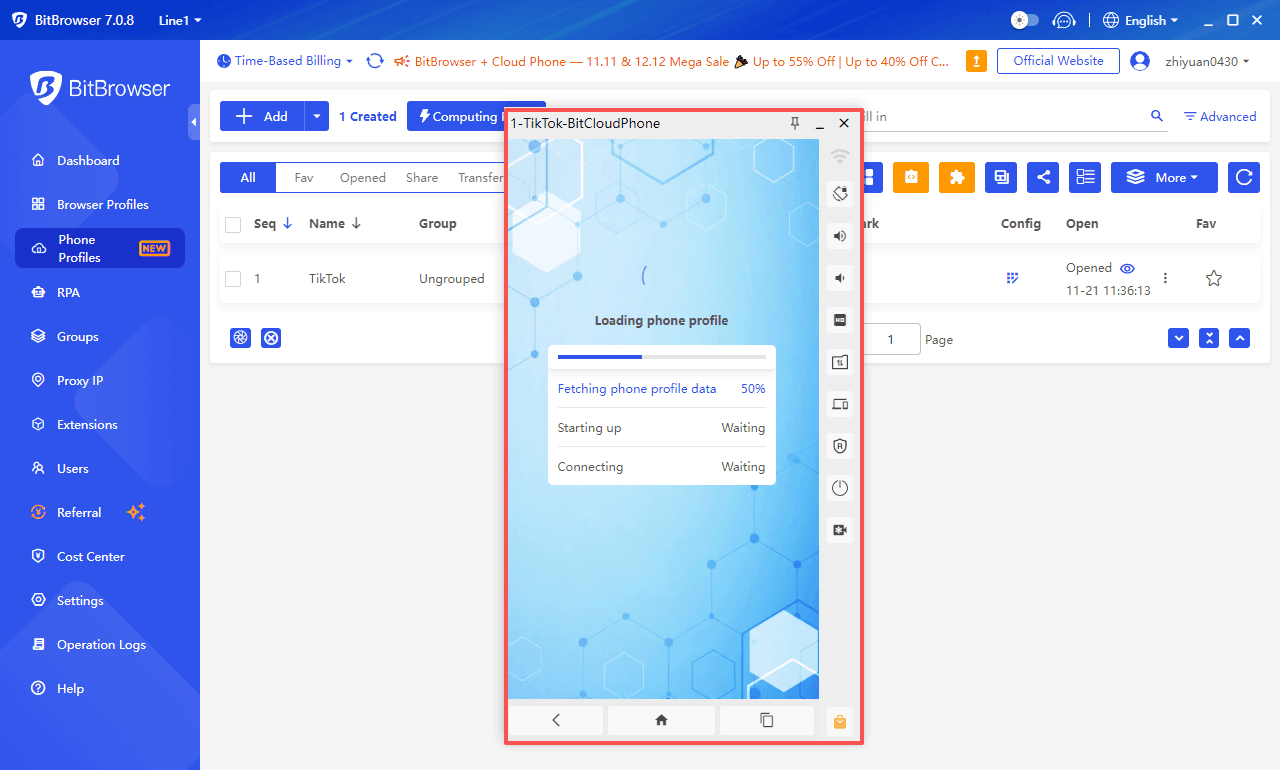
4. Downloading and Installing
Once you've successfully set up your virtual device and network settings, it's time to download and install the TikTok app.
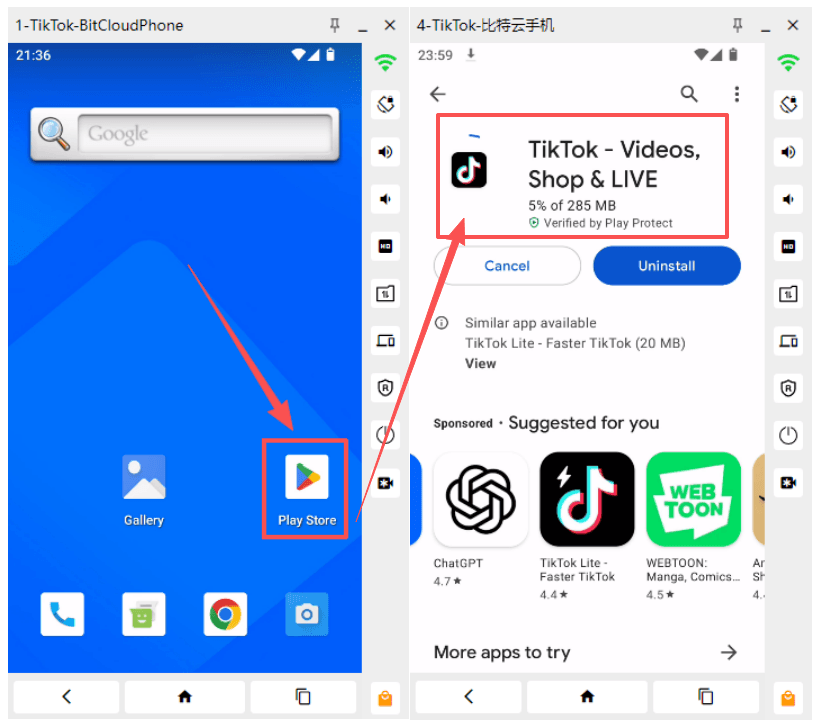
Open the Google Play Store on your cloud phone and search for "TikTok". Select the official TikTok app from the search results and click on "Install". The installation process may take a few minutes, depending on your internet connection speed.
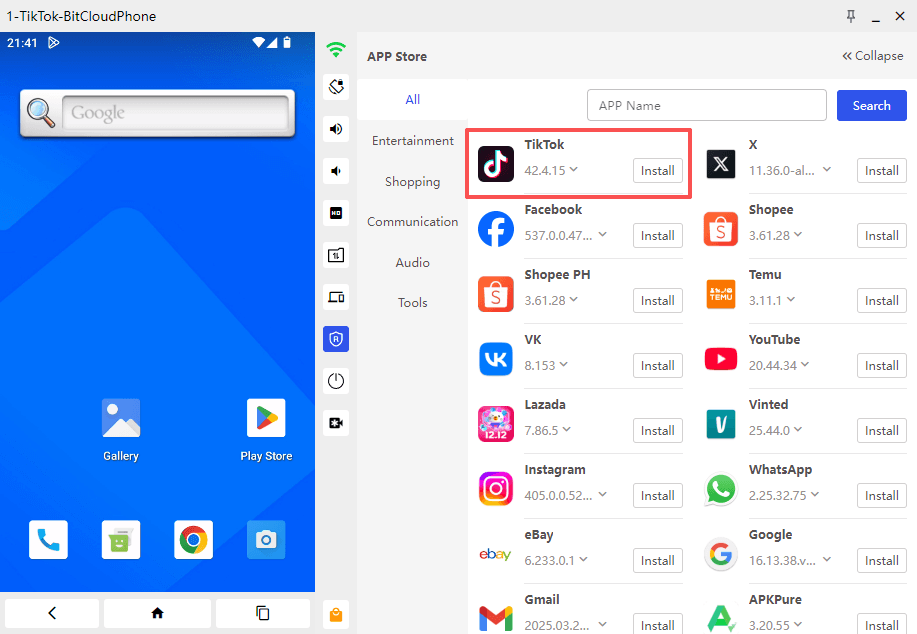
The most direct and convenient way is to use the BitBrowser Cloud Phone's Built-in App Store. This store integrates commonly used software that has undergone security reviews, covering multiple categories such as social networking, office work, and e-commerce. You only need to search for "TikTok" to achieve one-click installation and subsequent version management.
After the installation is complete, you can open the app and proceed with logging in or creating a new account. Remember to adhere to TikTok's guidelines and community standards to ensure a positive experience on the platform.
By following these steps, you'll have a fully functional TikTok account running on your cloud phone, ready for content creation, engagement, and audience building
5. Registering a New TikTok Account on BitCloudPhone
Starting the Registration Process Within the Virtual Phone Environment
Once you've successfully installed TikTok on your BitCloudPhone virtual device, you can begin the TikTok sign-up process cloud phone by launching the app from your virtual home screen. The registration interface appears identical to what you'd see on a physical Android device, presenting you with several sign-up options including phone number, email, or third-party social media accounts.
You'll want to select your preferred registration method based on your account management strategy. For most TikTok multi-account operations, email registration provides the most flexibility and scalability. The virtual phone environment handles all authentication processes seamlessly, allowing you to receive verification codes and complete the sign-up without any additional configuration.
Key Registration Details
· Date of Birth: Set your date of birth to an age of 18 or above. TikTok imposes strict feature limits on underage users. If the age is set too low, you may lose access to essential functions such as livestreaming and direct messaging.
· Password Requirements: Your password must be 8–20 characters long and include uppercase letters, lowercase letters, numbers, and special symbols (e.g., !@#$%).
· Username: Choose a username that aligns with the cultural norms of your target market. Avoid sensitive words and ensure it is unique within the platform to support a strong brand identity.
6. Managing Multiple Accounts Safely on BitCloudPhone
BitCloudPhone's isolation architecture allows you to operate multiple TikTok accounts without cross-contamination. Each virtual phone profile maintains its own unique device fingerprint, preventing TikTok from linking your accounts through hardware identifiers.
The one-click new phone feature becomes invaluable when scaling your TikTok operations. You can instantly generate a fresh device environment with completely new parameters between account registrations. This approach eliminates the association risks that plague traditional multi-account setups where users attempt to manage multiple profiles on a single physical device.
Conclusion
You now have the full BitCloudPhone tutorial at your fingertips. Cloud phones make TikTok management safer and more scalable. With authentic device fingerprints, isolated environments, and no need for physical devices, BitCloudPhone helps reduce account bans and streamlines bulk operations.

 Multi-Account Management
 Prevent Account Association
 Multi-Employee Management
Recommended
See More