How to Create Multiple TikTok Accounts with Virtual Numbers and Cloud Phones in 2026
 2026.10.30 07:31
 YT.Shi
Managing multiple TikTok accounts can be useful for running different content projects, business profiles, or regional accounts. However, creating and maintaining several accounts requires more than just separate usernames. You also need to plan for phone verification, account access, and a reliable mobile environment.
One practical setup is to use virtual phone numbers for SMS verification and cloud phones to run separate TikTok environments. This allows you to manage multiple mobile accounts from one computer without relying on a collection of physical phones.
In this guide, we'll explain how virtual number verification works, walk through the process of creating TikTok accounts with BitCloudPhone, and cover practical ways to manage multiple accounts.
Get Started with BitCloudPhone
Why Use Virtual Numbers for Multiple TikTok Accounts?
TikTok allows users to sign up with different methods, including a phone number or email address. If you choose phone registration, TikTok may send an SMS verification code to confirm access to the number.
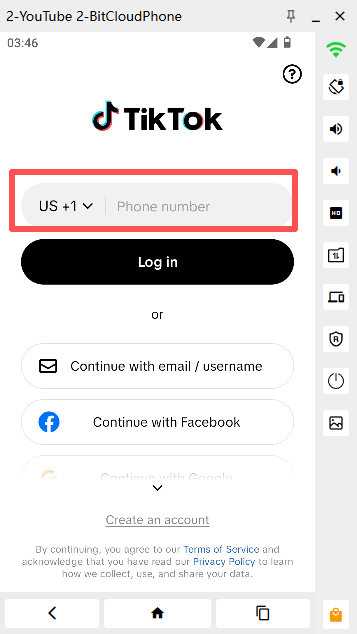
For people managing multiple accounts, virtual phone numbers can provide an alternative to using a separate physical SIM card for every registration. A virtual number is a phone number provided through an online service rather than a traditional SIM card installed in your device.
Depending on the provider and number type, you may be able to receive SMS verification codes through its website or application. This can make the registration process easier to manage when you do not have access to several physical phone numbers.
Before choosing a virtual number, keep a few points in mind:
▸ Number availability: Check whether the provider offers numbers that can receive SMS messages from TikTok.
▸ Previous usage: A number that has already been used for a TikTok account may not be available for another registration.
▸ Number validity: Check how long you can access the number and whether you can receive messages again later.
▸ Account recovery: Consider whether you will still have access to the number if TikTok asks you to verify your account in the future.
Virtual number services are not guaranteed to work with every platform or registration attempt. TikTok may reject certain numbers, including numbers that are unsupported or have been used before. Always check the provider's terms and TikTok's current registration requirements.
What You Need Before Creating Multiple TikTok Accounts
Before starting the registration process, prepare your phone numbers, account information, and cloud phone environments. Having these ready can make it easier to complete each setup without mixing up account details.
1. Virtual Phone Numbers
Prepare a virtual number if you plan to register through SMS verification. Choose a provider that clearly explains its supported countries, number availability, message delivery, and access period.
Keep a record of which number is associated with each account. This is particularly important if you manage several profiles and may need to recover access later.
2. Account Information
Prepare a unique username, password, and other required registration details for each account. If you use email registration for some accounts, make sure you can access those email addresses.
It is also worth keeping account information in a secure password manager or another protected record. Do not rely on temporary notes that may be lost when you switch devices.
3. BitCloudPhone
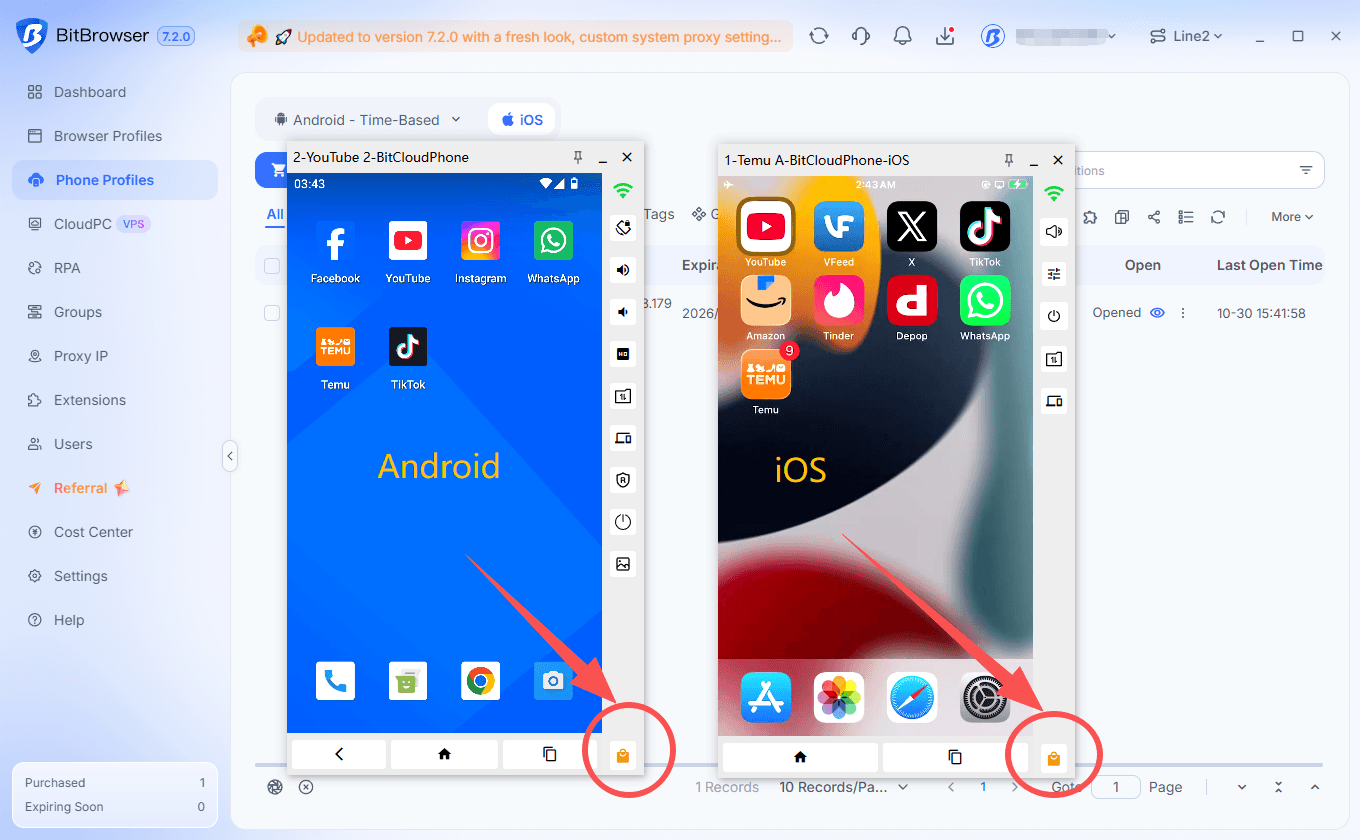
BitCloudPhone provides cloud-based mobile environments that you can access and manage from a computer. Instead of purchasing and maintaining several physical phones, you can create multiple cloud phone profiles and use them for different mobile workflows.
Each cloud phone provides its own mobile environment, allowing you to install TikTok and maintain separate app data and login sessions across devices.
BitCloudPhone also supports app installation through its built-in app store, Google Play, or APK files, depending on the available installation method.
How to Get a Virtual Number for TikTok Verification
The exact process depends on the virtual number provider, but most services follow a similar workflow. You select an available number, check that it supports SMS reception, and use it when TikTok asks for a phone number during registration.
1. Choose a virtual number service that provides SMS-capable numbers.
2. Check the available countries and select a number supported by the provider.
3. Review the number's validity period, message reception rules, and any usage restrictions.
4. Obtain the number and keep the number details available for the registration process.
5. When TikTok requests phone verification, enter the number in the registration screen.
6. Return to the number provider's interface and check for the incoming SMS code.
7. Enter the verification code in TikTok if the message arrives and the number is accepted.
If the code does not arrive or TikTok rejects the number, check the provider's instructions before trying again. Repeatedly requesting codes may trigger temporary verification limits.
Find a high-quality virtual phone number provider
How to Create Multiple TikTok Accounts on BitCloudPhone
Once your virtual number and account information are ready, you can set up your cloud phone environments. The following steps use BitCloudPhone as an example.
Step 1: Open BitCloudPhone
Log in to your BitBrowser account and open the BitCloudPhone section. From there, you can access your existing cloud phone profiles or create new ones.
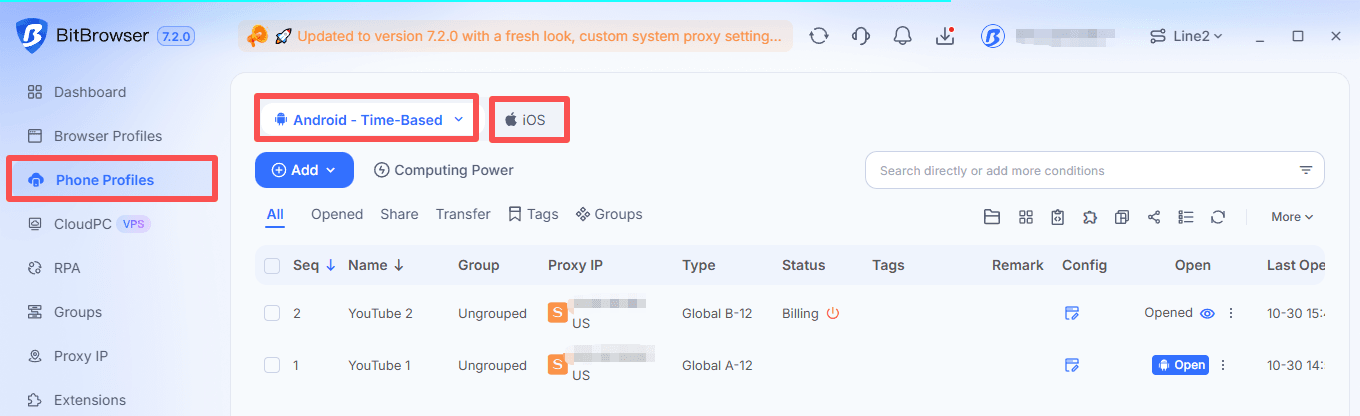
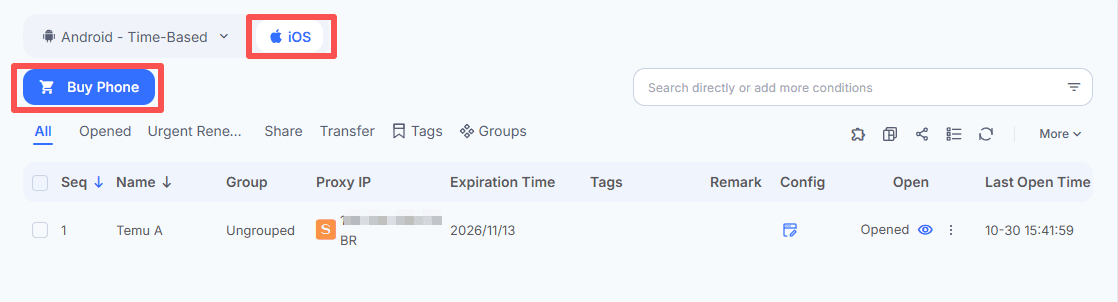
Step 2: Create a Cloud Phone Environment
Create a new cloud phone profile for the TikTok account you want to manage. Configure the available device and environment settings according to your workflow.
If you plan to manage several accounts, create separate cloud phone environments rather than installing every account into the same mobile environment. This makes it easier to keep app data, login sessions, and daily operations separate.
For Android cloud phones:
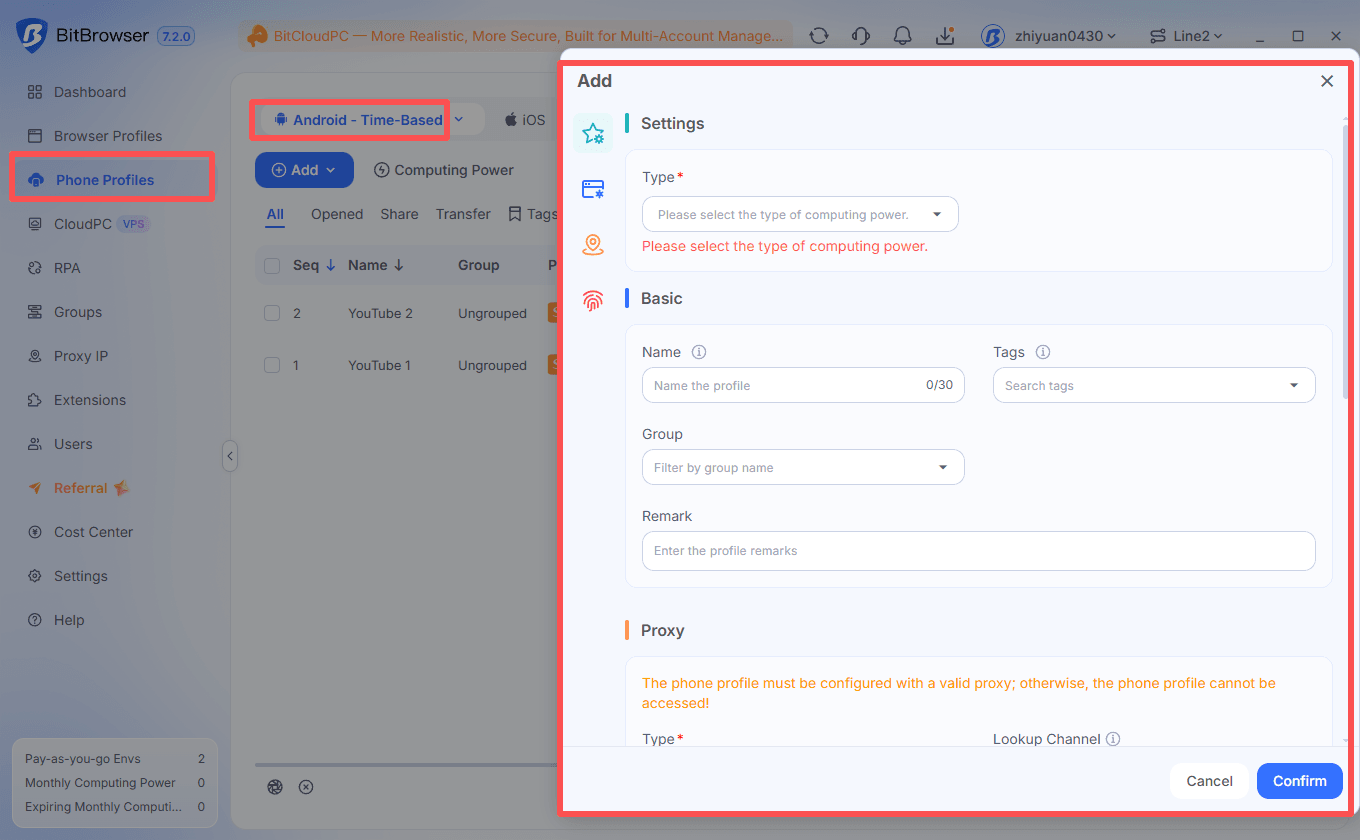
For iOS cloud phones:
Step 3: Configure the Proxy
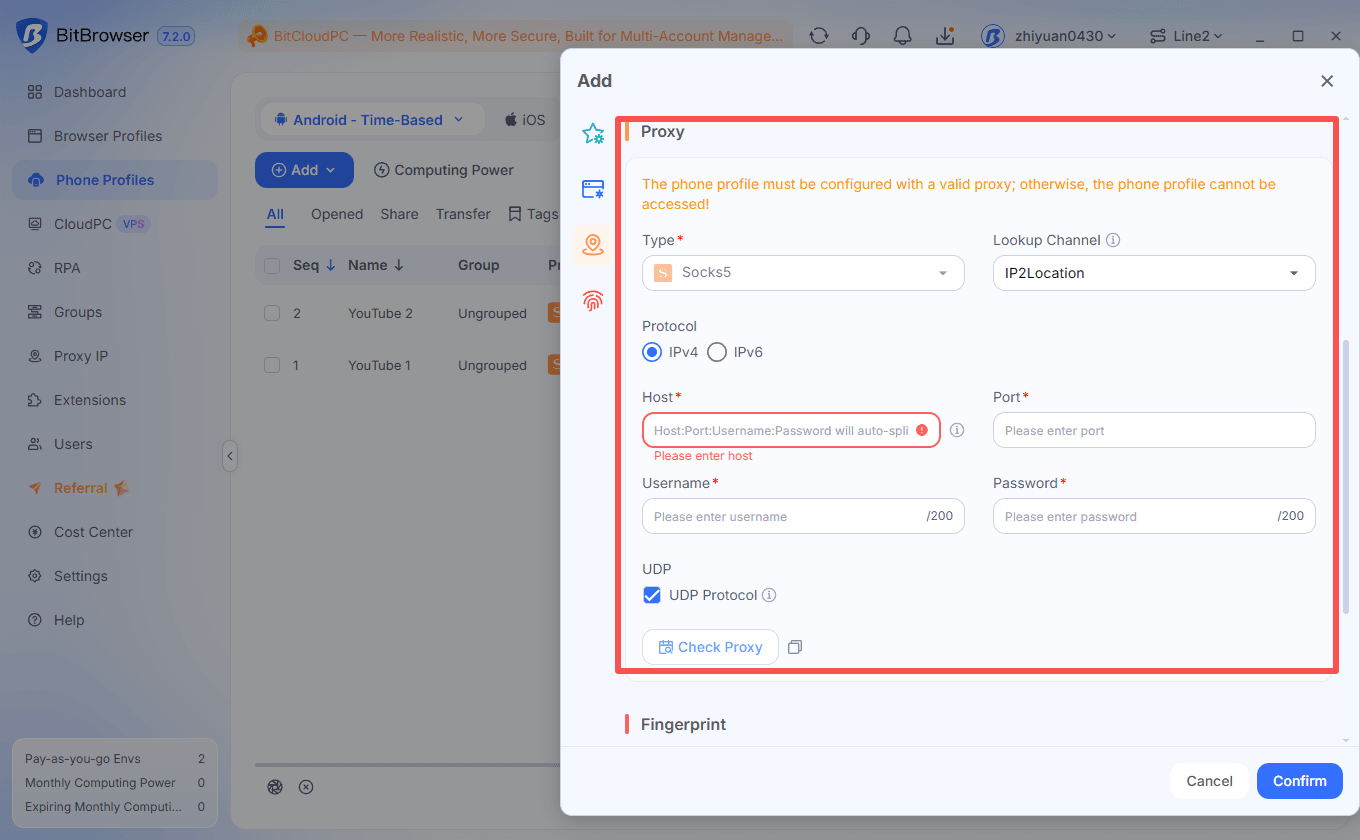
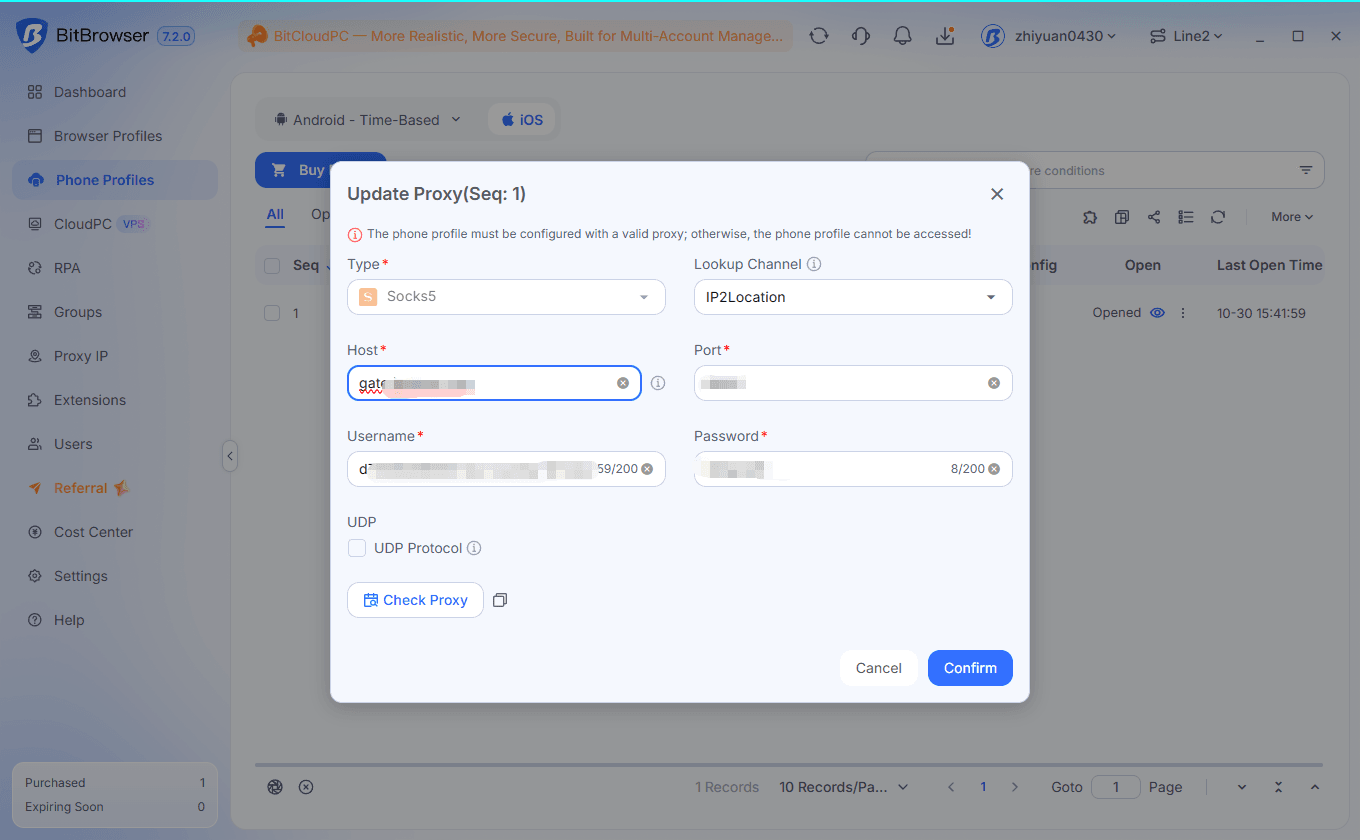
If your workflow requires a proxy, configure the network settings for the cloud phone before starting it. BitCloudPhone supports proxy configuration, allowing you to assign network settings to individual cloud phone environments.
Check that the proxy information is entered correctly and that the connection is working. Choose a network configuration that is consistent with your actual operating location and the requirements of the services you use.
Android:
iOS:
Step 4: Start the Cloud Phone
After saving the environment settings, start the cloud phone. Once it is running, you can access its mobile interface from your computer and use it much like a regular Android / iOS device.
Step 5: Install TikTok
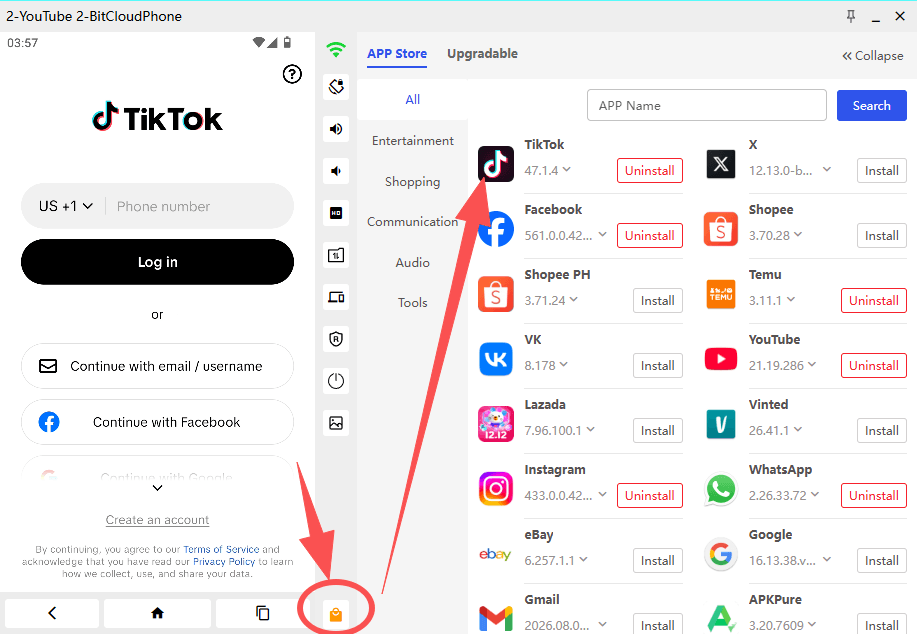
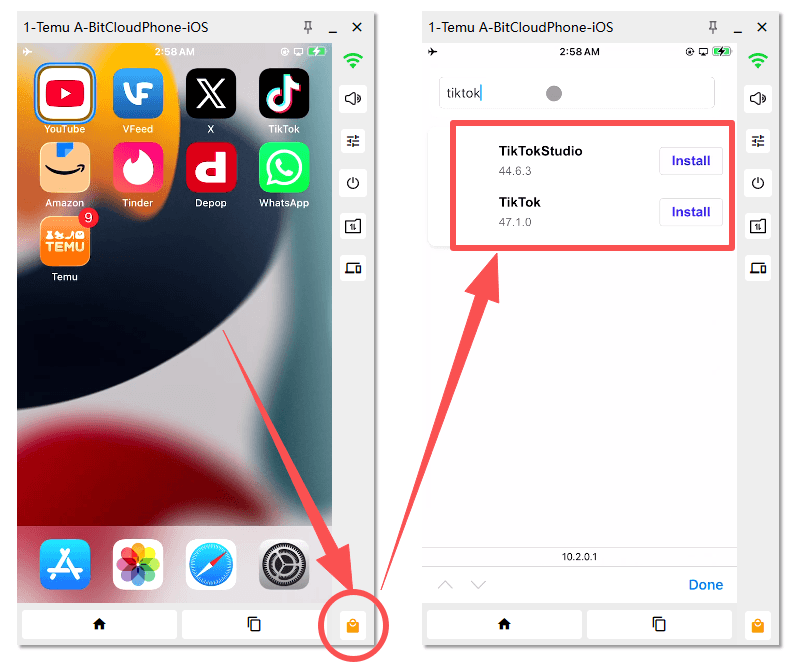
Open the app store available in the cloud phone and search for TikTok. You can also use Google Play or install an APK file when supported and appropriate for your environment.
Complete the installation and open TikTok. Make sure you are using the official app and keep it updated to a supported version.
Step 6: Start the TikTok Registration Process
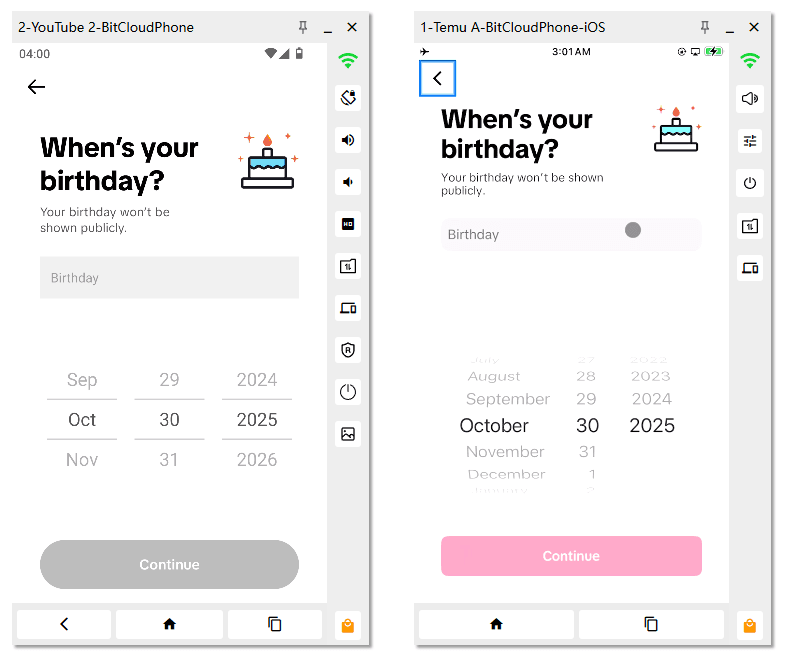
Open TikTok and select the sign-up option. Follow the registration prompts and choose phone registration if you intend to use a virtual number.
Enter the required date of birth and other account information accurately. TikTok's available registration methods and eligibility requirements may vary by region.
Step 7: Complete SMS Verification
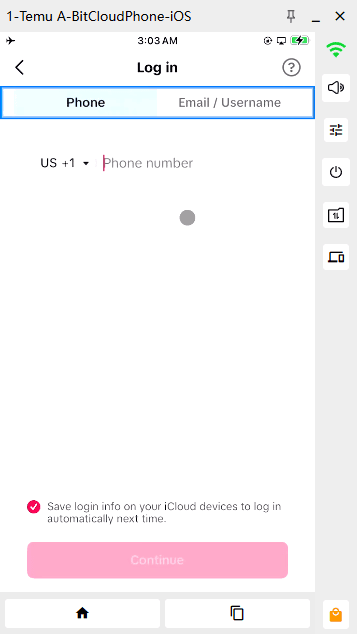
Enter your virtual phone number in the registration screen. If TikTok accepts the number, it will send a verification code to that number.
Open the virtual number provider's interface, retrieve the incoming code, and enter it in TikTok. If the number is unsupported or the message does not arrive, follow the provider's troubleshooting instructions or use another registration method offered by TikTok.
Step 8: Finish Account Registration
After successful verification, follow the remaining prompts to complete the account setup. Choose a username, set a strong password where required, and review the account's security settings.
If you use an email address as an additional recovery method, make sure it is accessible and protected. Keep a secure record of the account's login and recovery information.
Step 9: Create Additional TikTok Accounts
To create another account, repeat the setup process in a separate cloud phone environment. Install TikTok, complete the registration steps, and use the phone number or email method available for that account.
You can repeat this process for additional accounts, subject to TikTok's account, age, and registration requirements. Keep each account's login details and recovery information clearly documented.
Using separate cloud phone environments helps keep mobile app data and sessions distinct. It does not guarantee that TikTok will treat accounts as unrelated or prevent all forms of account association.
What If TikTok Verification Codes Do Not Arrive?
SMS verification does not always work on the first attempt. A code may be delayed, a number may be unsupported, or the registration process may be temporarily limited.
▸ Check the number format: Confirm that you selected the correct country code and entered the complete phone number.
▸ Check the provider's message inbox: Some services display incoming SMS messages in a separate dashboard. Refresh the page and check the provider's instructions.
▸ Confirm number compatibility: Not every virtual number can receive TikTok verification messages. Check whether the number type is supported.
▸ Avoid repeated requests: Requesting codes too frequently may lead to temporary limits. Wait before trying again.
▸ Try another supported registration method: If phone verification is unavailable, check whether TikTok offers email or another sign-up option in your region.
If you can no longer access the phone number or email linked to an existing account, consult TikTok's account recovery instructions for the available recovery options.
How BitCloudPhone Helps Manage Multiple TikTok Accounts
Creating accounts is only the first part of a multi-account workflow. You may also need to switch between profiles, publish content, check notifications, and keep account activity organized.
BitCloudPhone provides several features that can make these mobile workflows easier to manage from one computer.
Separate Mobile Environments
Each cloud phone runs as an individual mobile environment. You can install TikTok separately in different cloud phones and maintain distinct app data and login sessions.
This is useful when different accounts belong to separate content projects, brands, or teams. Instead of repeatedly logging in and out on one device, you can open the corresponding cloud phone environment for each workflow.
Manage Multiple Cloud Phones from One Computer
BitCloudPhone lets you manage multiple cloud phone environments through one interface. You can start the devices you need, switch between them, and handle different mobile tasks without keeping several physical phones on your desk.
This can be especially useful for small teams or creators who need to maintain several TikTok profiles as part of their daily work.
Independent Proxy Configuration
BitCloudPhone supports proxy settings for individual cloud phone environments. This gives users more flexibility when assigning network connections to different mobile workflows.
If you use proxies, make sure the configuration is valid and consistent with your actual operating requirements. A proxy does not guarantee account security or prevent a platform from associating accounts through other information.
Built-in App Installation
You can install TikTok and other commonly used mobile applications inside your cloud phone environments. Depending on the device and app, installation is available through the built-in app store, Google Play, or APK files.
This makes it easier to prepare each cloud phone for a specific workflow without repeatedly configuring a physical device.
Synchronization and RPA Automation
For repetitive mobile operations, BitCloudPhone supports synchronization and RPA automation. These features can help reduce repeated manual actions across supported workflows.
For example, RPA can be used to automate repeatable actions such as tapping, typing, and scrolling. Before using automation with TikTok, review the platform's rules and make sure your workflow complies with its policies.
Learn more about BitCloudPhone RPA automation.
Team Collaboration
When several people are involved in account operations, managing access becomes important. BitCloudPhone provides team management capabilities that can help organize access to cloud phone environments.
You can use these capabilities to structure mobile workflows across team members, depending on the permissions and account configuration available in your plan.
Best Practices for Managing Multiple TikTok Accounts
A consistent setup can make multiple-account management easier, but account security and platform compliance should remain priorities.
▸ Keep account details organized: Record each account's username, login method, linked phone number, and recovery information in a secure location.
▸ Use strong, unique passwords: Avoid reusing the same password across multiple accounts. A password manager can help you keep credentials organized.
▸ Maintain recovery access: Do not depend entirely on temporary numbers. Keep an accessible recovery email or another supported recovery method where possible.
▸ Enable account security features: Review TikTok's security settings, including two-step verification and logged-in devices.
▸ Keep environments consistent: Use clearly separated cloud phone profiles for different workflows and avoid switching account information carelessly between them.
▸ Follow TikTok's rules: Make sure your accounts and content comply with TikTok's terms, community guidelines, and applicable regional requirements.
TikTok also recommends reviewing account security settings and checking which devices are logged in. You can read its Security Checkup guidance for more information.
Frequently Asked Questions
Can I create multiple TikTok accounts with virtual numbers?
Virtual numbers may be used for SMS verification when TikTok accepts the number. However, not every virtual number is supported, and a number that has already been used may not be available for another registration. Check TikTok's current registration requirements and your provider's terms.
Can I use one phone number for multiple TikTok accounts?
TikTok's phone number requirements may limit how a number can be linked to accounts. Do not assume that one number can be reused for several registrations. Check the current instructions shown during sign-up and use a separate supported registration method when needed.
Can I manage multiple TikTok accounts on one computer?
Yes. You can use a cloud phone service such as BitCloudPhone to access and manage multiple mobile environments from one computer. Each environment can have its own TikTok installation and login session.
Does BitCloudPhone support TikTok?
BitCloudPhone supports installing mobile applications through available app installation methods, including its built-in app store, Google Play, or APK files where supported. You can install TikTok in a cloud phone environment and use it through the mobile interface.
Can each BitCloudPhone profile use a different proxy?
BitCloudPhone supports proxy configuration for individual cloud phone environments. You can configure network settings for different profiles according to your workflow. A proxy does not guarantee that accounts will not be associated by a platform.
Can I automate TikTok actions with BitCloudPhone?
BitCloudPhone supports synchronization and RPA features for repeatable mobile operations. The actions you automate should comply with TikTok's terms of service and applicable platform policies.
What should I do if I lose access to the virtual number linked to my TikTok account?
If you can no longer receive messages at the linked number, check whether you have another recovery method connected to the account. TikTok may offer recovery options depending on your account settings. See its account recovery instructions for guidance.
Conclusion
Creating multiple TikTok accounts involves more than completing the registration form. You need to consider phone verification, account recovery, and how each account will be accessed and managed over time. Virtual numbers can provide an alternative for SMS verification, although their compatibility with TikTok depends on the number and the platform's current requirements.
For ongoing multi-account workflows, cloud phones offer a way to run separate mobile environments from one computer. With individual cloud phone profiles, app installations, proxy settings, and supported automation features, BitCloudPhone can make it easier to organize and manage multiple TikTok accounts without maintaining a separate collection of physical devices.