Best Android Cloud Phones in 2026: Top 10 Tested & Compared
 2026.10.28 07:04
 YT.Shi
Choosing an Android cloud phone isn’t just about hardware specs. That’s something I only really understood after actually using these services. In real use, app compatibility, device availability, multi-device management, and the actual cost of keeping devices running often matter more.
This is my own hands-on review, not a spec-sheet roundup. I personally tried 10 Android cloud phone services and related platforms. Some were smooth; some were frustrating. Each has its strengths, and the right pick depends on whether you need to manage multiple accounts, keep apps running for long periods, or test Android apps remotely.
Quick Comparison: Best Android Cloud Phones I Tested
| Cloud phone | Best for | Pricing model | What to consider |
|---|---|---|---|
| BitCloudPhone | Multi-account management and mobile automation | $0.03 per profile per 24 hours, plus $0.07 per 15 minutes of computing | Computing time and proxies cost extra |
| GeeLark | Social media workflows and bulk operations | Pay-as-you-go or $29.90/month per device for rental | Some features require paid plans |
| Multilogin Cloud Phone | Combining mobile apps with browser profiles | Free plan; paid plans from $7.08/month with annual billing | Mobile usage and proxy allowances vary by plan |
| GoLogin Cloud Android | Browser profiles with cloud Android access | Subscription-based plans | Included cloud phone usage varies by plan |
| VMOS Cloud | Flexible cloud Android environments | Standard devices from $4.99 per 30 days; per-minute options available | Pricing varies by device type |
| DuoPlus | Large-scale mobile workflows | Separate device-resource and startup-time charges | Device resources and running time add to the cost |
| MoreLogin Cloud Phone | Browser and mobile workflows with synchronization | $0.006/minute, capped at $1.50/day per device, or monthly rental | Proxy and other services may cost extra |
| Hippo Cloud Phone | Managing multiple cloud phones | From HKD 88 per 30 days for R9 | Entry-level plans use older Android versions |
| Redfinger | Long-running cloud phone sessions | VIP from $0.99/day or $10.95/month; KVIP from $12.95/month; SVIP from $15.95/month | Prices may vary by region and device configuration |
| Genymotion Cloud | Android development and automated testing | $0.06 per running virtual device per minute, or monthly plans | Primarily designed for development and testing |
1. BitCloudPhone (Best Overall for Multi-Account Workflows)
39W3BLZIIF
LYHNNKWXAI
TVAVCNKTRP
Best for: Multi-account management, social media marketing, e-commerce operations, mobile app automation, and team workflows.
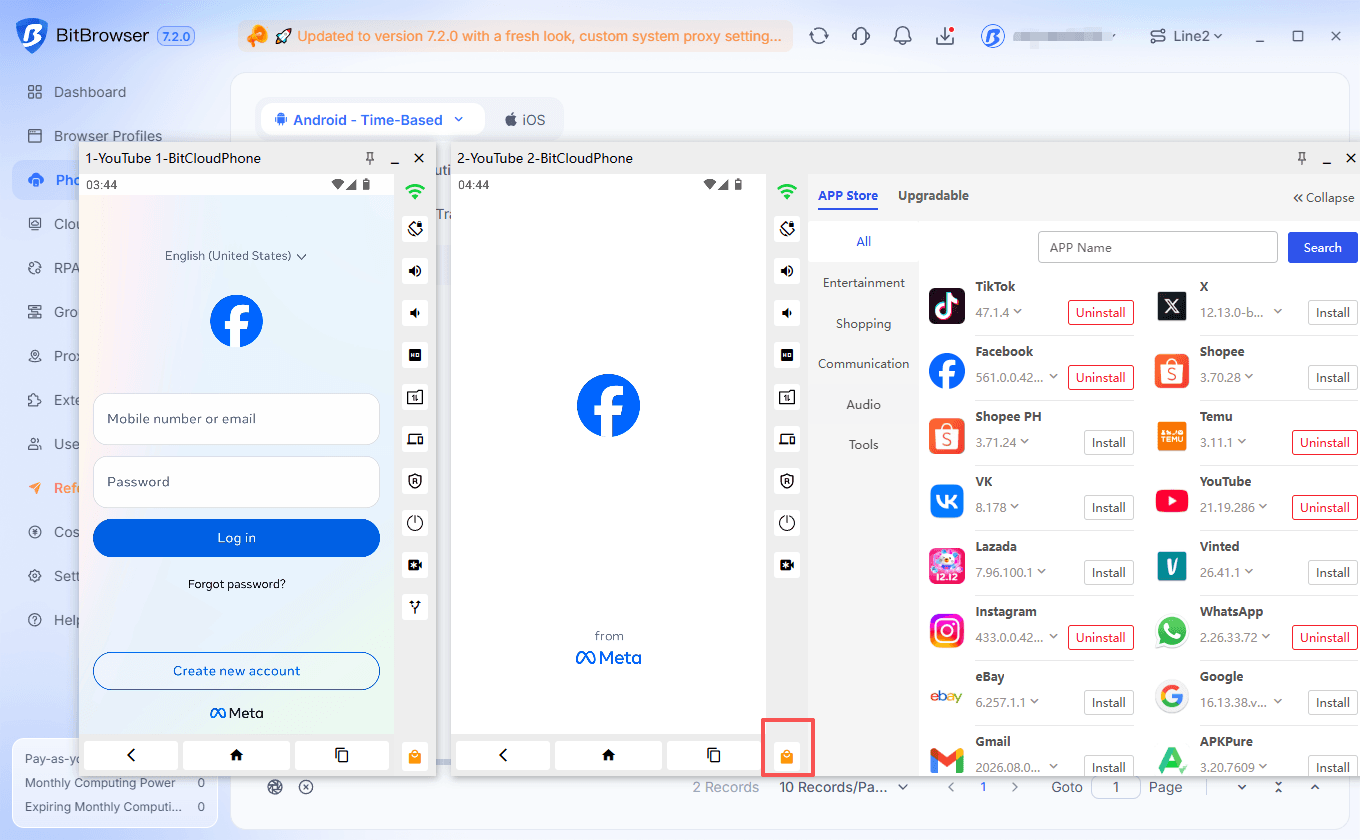
BitCloudPhone is the one I’d try first if your main problem is keeping several mobile app environments organized. It sits inside the BitBrowser ecosystem, so if you already manage browser profiles there, you avoid juggling a separate tool. In my use, that was the real advantage.
What I liked was how much routine work stayed in one place. Setting up environments, sorting profiles, and repeating the same task across phones felt less fragmented than with tools that only give you a remote Android screen. The automation side helps with repetitive jobs, and results depend on your configuration.
The part that mattered most was isolation. Each phone environment feels like a separate device with its own mobile parameters, so switching between accounts does not feel like you are cutting corners on separation. That gave me more confidence when managing multiple Facebook accounts than tools that just hand you a remote Android screen.
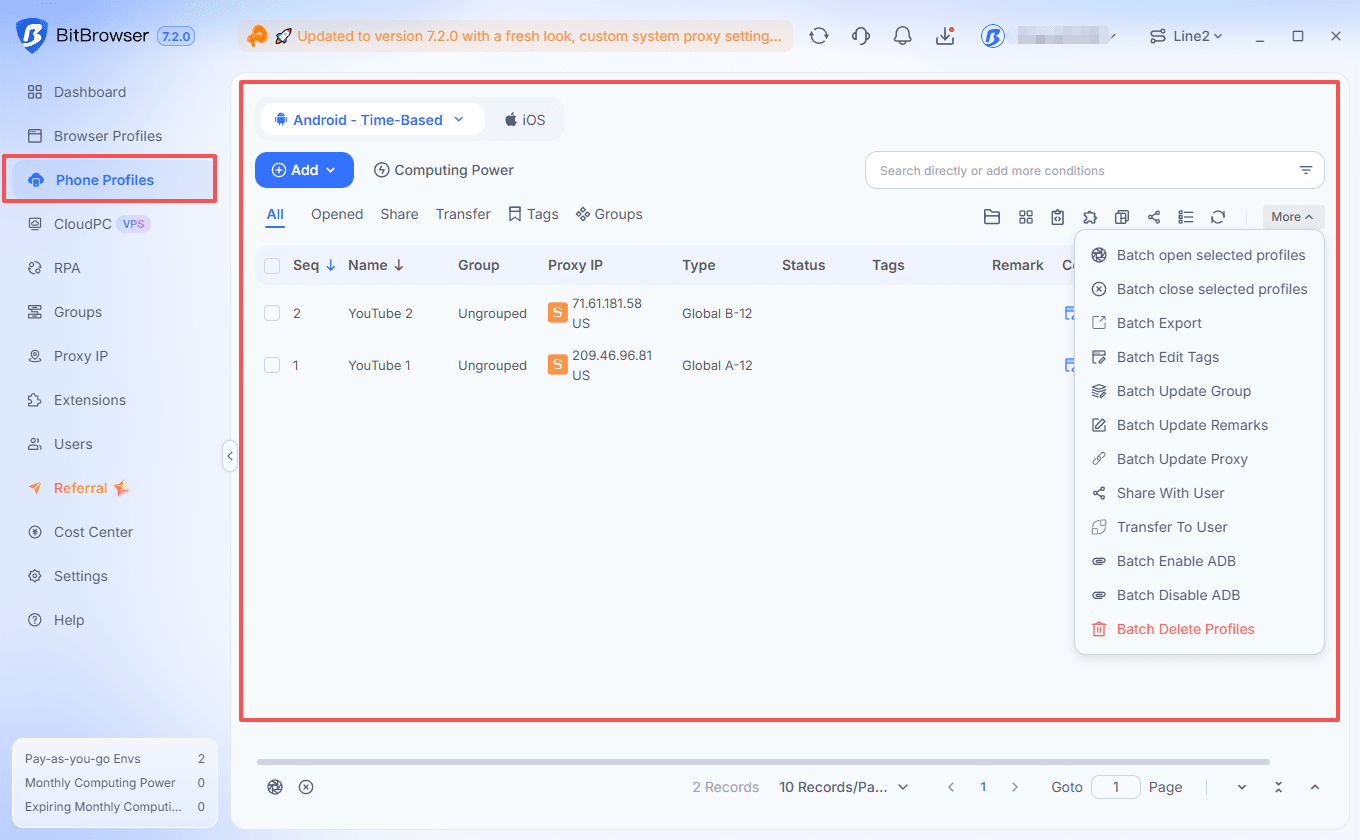
I also like the pay-as-you-go billing (Time-Based). You are charged for computing when you actually run a phone, and charges stop when you shut it down. That suits intermittent use much better than committing to a long rental, and it makes it easier to start small and add more environments only when needed.
Pricing
The total cost consists of two parts: the phone profile fee and the computing power fee. For computing power, you can choose between pay-as-you-go and monthly billing.
| Cost component | Price | Billing details |
|---|---|---|
| Phone profile | $0.03 / 24 hours | Charged separately; only pay when needed with unlimited numbers of profiles. |
| Computing power Option 1: Temporary plan | $0.07 / 15 minutes | Capped at $1.60/day |
| Computing power Option 2: Monthly plan | From $20/month | Monthly subscription |
| Proxy | Varies | Choose your own proxy; charged separately |
For a simple example, one hour of computing costs about $0.28. Adding one 24-hour profile fee brings the total to approximately $0.31, before proxy or other charges.
Find the best proxy services for you
2. GeeLark (Great for RPA, but Pricing Can Get Tricky)
Best for: Managing multiple social media accounts and handling repetitive mobile tasks.
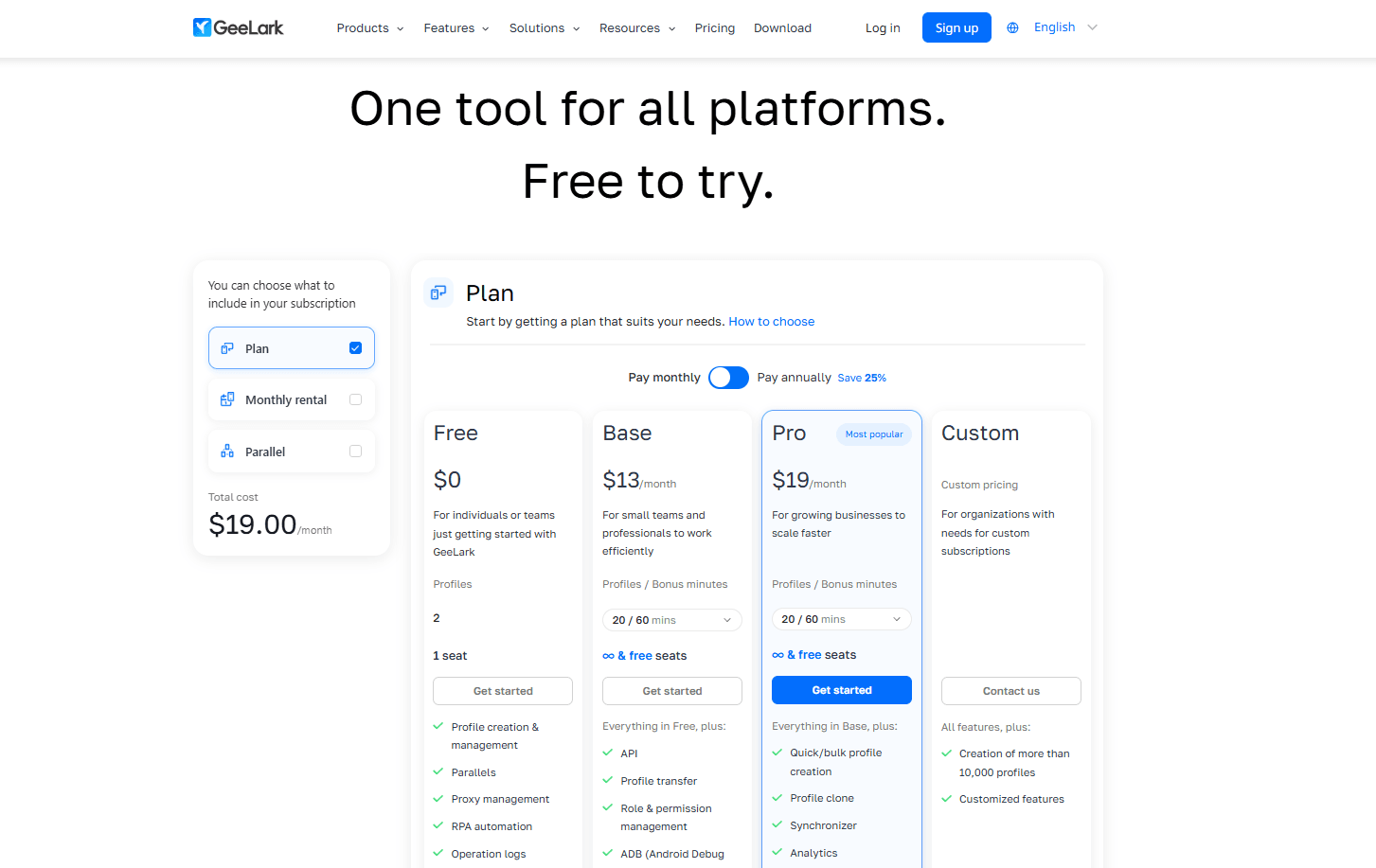
GeeLark combines cloud phones with browser profiles, so mobile apps and web accounts can be managed in the same place. There’s also a Synchronizer and a set of RPA tools for repetitive tasks, which can come in handy when similar work needs to be done across several phones.
What I’m less keen on is the pricing. GeeLark’s Base plan starts at $5/month for 5 profiles, while Pro starts at $19/month for 20. But that’s not the full cost: cloud phone usage is charged separately at $0.007 per minute, although paid plans include some bonus minutes each month.
There’s also a $29.90/month rental option for each device with unlimited usage. That can make more sense for phones that stay active regularly, while occasional users may prefer usage-based billing. The Synchronizer is included in Pro, so it’s worth checking the plan details before signing up.
Overall, GeeLark has a useful mix of mobile and browser tools, but the pricing takes some working out. It’s worth comparing the subscription, usage fees, and any extra features needed before scaling up.
Pricing: Base from $5/month for 5 profiles; Pro from $19/month for 20 profiles; cloud phone usage $0.007/minute; monthly device rental $29.90/device. Usage fees and applicable plan conditions are additional.
3. Multilogin Cloud Phone (Convenient All-in-One Setup, but Mobile Usage Costs Extra)
Best for: Teams that manage social media accounts across mobile apps and websites.
Multilogin is an interesting choice because cloud phones and browser profiles live in the same workspace. That’s useful for workflows that switch between mobile apps and web dashboards throughout the day, without having to manage two separate tools.
The cloud phones support persistent app data, multiple Android versions, proxy configuration, and API-based workflows. There’s also a built-in app library, which makes getting started with common social media apps fairly straightforward.
The main thing to watch is the usage allowance. The free plan includes five profiles and 30 mobile minutes, but those minutes are a one-time bonus rather than a recurring monthly allowance. Paid subscriptions include additional mobile minutes, but usage beyond that allowance costs extra. Annual plans start at $7.08/month, while monthly billing is more expensive.
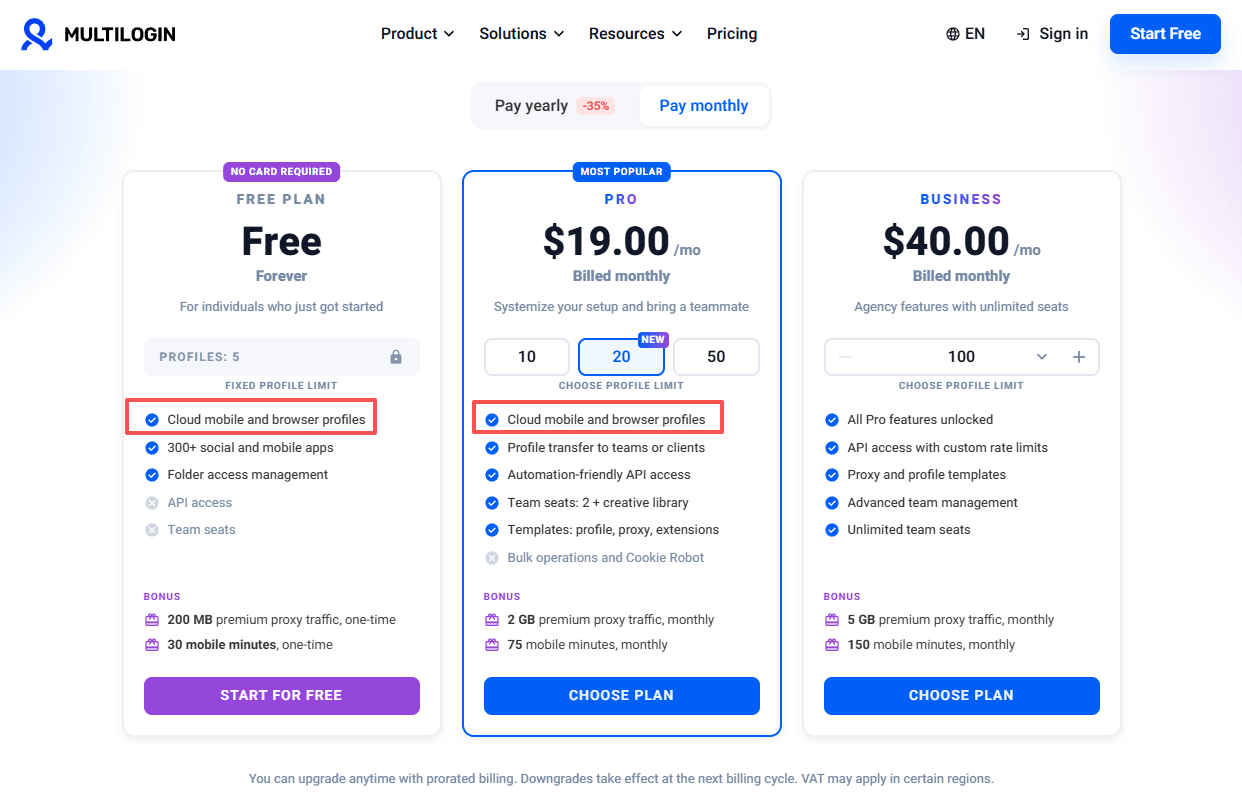
Multilogin makes the most sense when both mobile and browser profiles are part of the same workflow. If cloud phones are the only requirement, the combined platform may offer more than necessary.
Pricing: Free plan available; paid plans start at $7.08/month with annual billing. Mobile usage is charged separately according to the plan and usage rate.
4. GoLogin Cloud Android (Convenient for Existing Users, but Check the Limits)
Best for: Existing GoLogin users who want browser-profile management and cloud Android access in one setup.
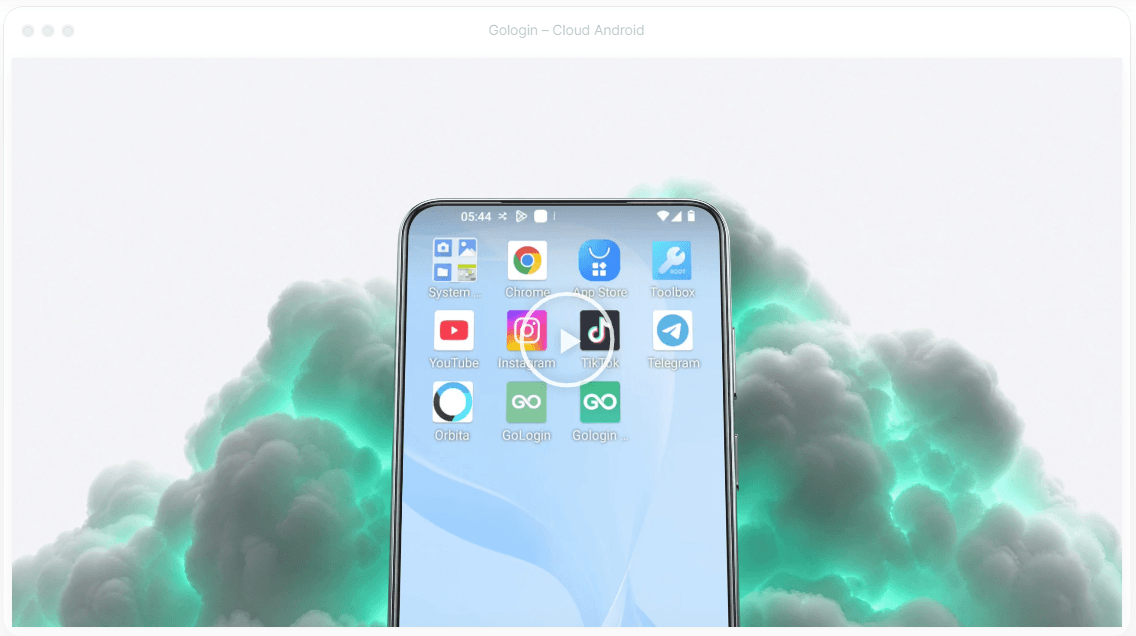
GoLogin is primarily known for its antidetect browser, so its cloud Android offering is most interesting for people who already use the platform. Browser profiles, proxy tools, bulk actions, and cloud-related features can make account management more convenient without adding another provider to the workflow.
The catch is that a browser profile subscription doesn't automatically mean unlimited cloud phone access. GoLogin's current pricing lists limited Cloud Android minutes on selected plans, with allowances varying by tier. Some advanced tools, including the Synchronizer and API access, are also tied to higher plans.
For someone who mainly manages websites, that may be enough. But if most of the work happens inside native Android apps, the included minutes and phone functionality deserve a closer look before subscribing.
Pricing: Free plan available, with paid plans starting at $4.50/month on annual billing for 10 browser profiles. Cloud Android access and included minutes depend on the plan.
5. VMOS Cloud (Flexible Device Options, but Compare Configurations Carefully)
Best for: Users who want to choose between budget cloud phones, timed devices, and higher-spec Android environments.
VMOS Cloud offers several device configurations rather than relying on one standard phone package. That’s useful when a lightweight app doesn't need the same resources as a more demanding mobile workflow. There are also timed devices for occasional use and higher-spec options for users who need more memory or storage.
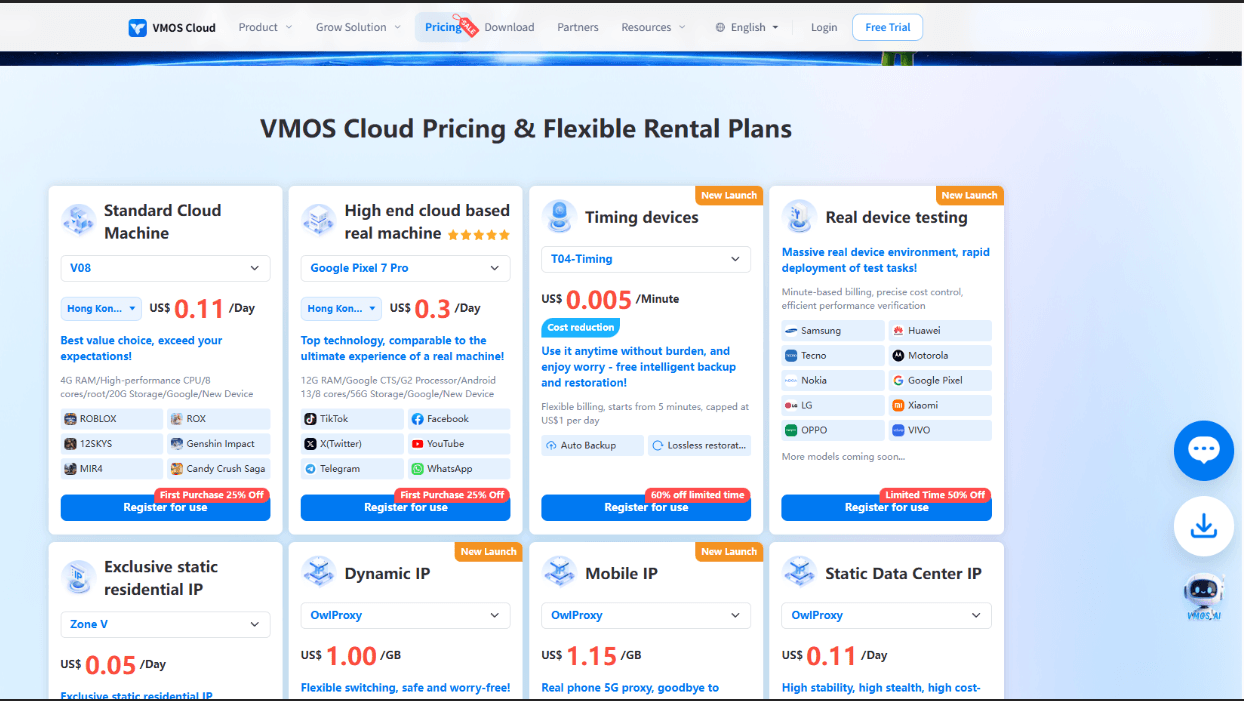
The pricing is relatively easy to compare at the entry level. Standard cloud devices start at $4.99 for 30 days, while timed devices cost $0.006 per minute. Higher-spec configurations cost more, and some proxy services are billed separately.
One thing worth checking is the exact device type. VMOS Cloud lists both standard cloud devices and higher-end real-device options, and they aren't necessarily interchangeable for every app or workflow. Android version, memory, and storage can make a noticeable difference to compatibility.
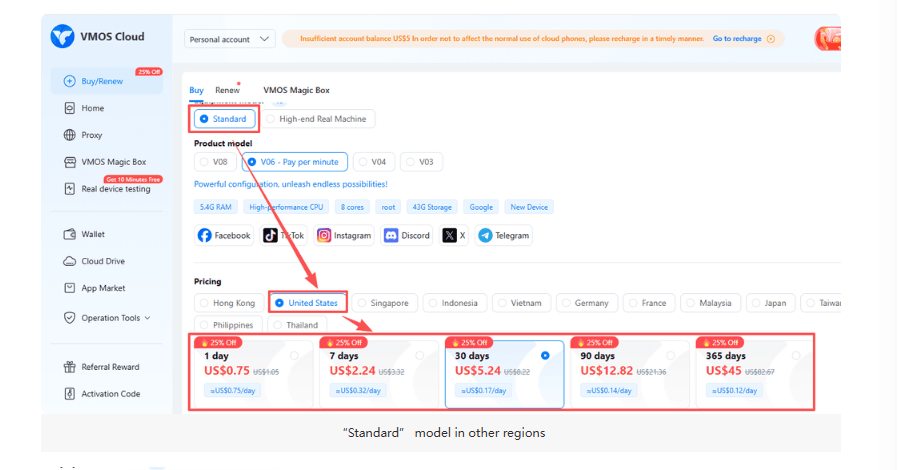
VMOS Cloud is worth considering if device choice and flexible billing matter more than having browser profiles and mobile phones in one workspace. Just make sure the cheaper configuration actually fits the intended workload.
Pricing: Standard cloud devices start at $4.99/30 days; timed devices cost $0.006/minute.
6. DuoPlus (Built for Bulk Operations, but Billing Takes Some Math)
DuoPlus is aimed at people running a lot of cloud phones at once, and that focus shows. The batch side is where it makes the most sense: managing several phones together, keeping device environments separate, and coordinating repeatable mobile work from one computer. If your job is bulk operations rather than one-off app checks, it fits that use case better than tools built around a single device.
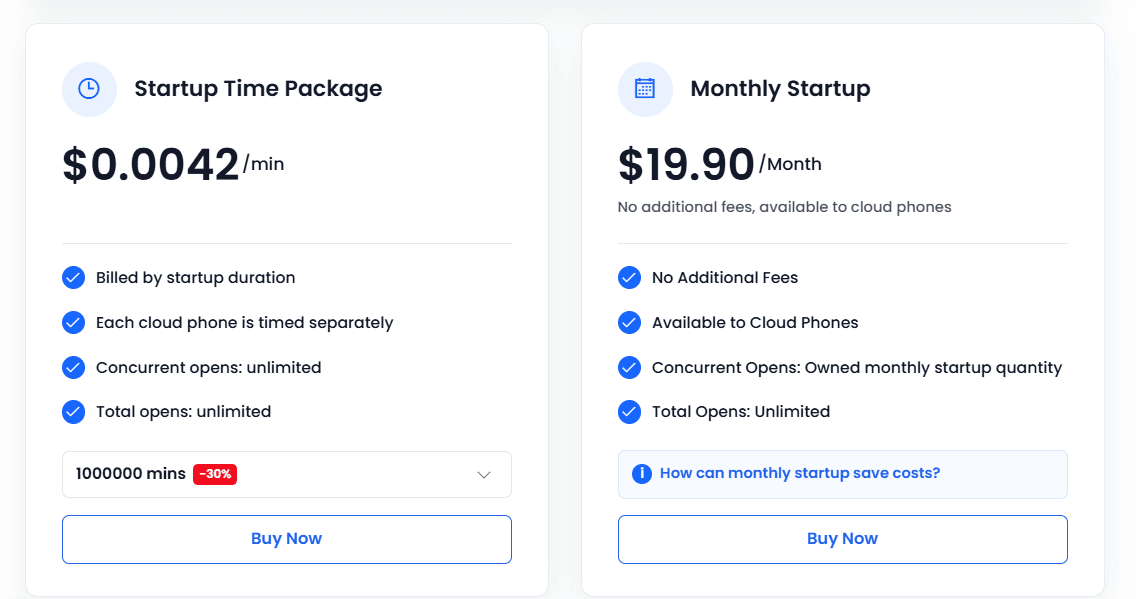
What gave me pause is the billing. Device resources and startup time are charged separately, and buying a phone resource does not automatically mean unlimited runtime is included. That is not a dealbreaker for a larger operation where you already know how many devices you need and how long they will run. For a smaller setup, though, you really need to add both parts up before comparing it with services that bundle more usage into a monthly rental.
Best for: Managing large numbers of cloud phones and coordinating mobile operations from one computer.
Pricing: Device resources are listed from $0.085 per device/month under a displayed volume configuration; temporary startup costs $0.0042/minute, with monthly startup packages also available.
My take: A sensible choice for bulk operations where device quantities and running hours are planned in advance. The separate resource and startup charges make it less straightforward for small setups, so do the math first. If you need simple low-cost entry, look elsewhere; if you are coordinating many phones, it is worth a closer look.
7. MoreLogin Cloud Phone (Useful for Team Workflows, but Watch Runtime Costs)
MoreLogin is the one I’d look at if cloud phones are a team job rather than a solo setup. It ties mobile environments into its antidetect browser, so if your account work already lives there, keeping phones in the same place is convenient. The team features are the real reason to consider it: shared access, synchronized mobile tasks, and batch text input. That last one sounds small, but in practice it saves time when you are pushing the same captions or product info to several phones instead of typing it over and over.
The catch is runtime cost. Short sessions can be cheap, but if you keep phones active every day, the minute-based pricing adds up and you should compare it with a monthly package before committing. I also wouldn’t pick MoreLogin just for basic remote app access. The management tools are useful when shared access and synchronized tasks actually matter, but they can make a simple job feel more complicated than it needs to be.
Pricing is pay-as-you-go at $0.006 per minute, capped at $1.50 per cloud phone per day, with monthly rental options also available.
8. Hippo Cloud Phone (Affordable Device Rentals, but Some Extras Cost More)
Best for: Users who want straightforward Android phone rentals and the option to manage multiple devices together.
Hippo Cloud Phone offers different Android phone configurations, with options for batch control and synchronized operations. The main appeal is the choice of hardware specifications and rental periods, rather than a complicated browser-and-phone management ecosystem.
Its entry-level R9 costs HKD 88 for 30 days and runs Android 9, while the X11 costs HKD 120 for 30 days with Android 11, and the X13 costs HKD 138 for 30 days with Android 13. The differences in Android version, memory, and storage matter more than the price alone when choosing a device.
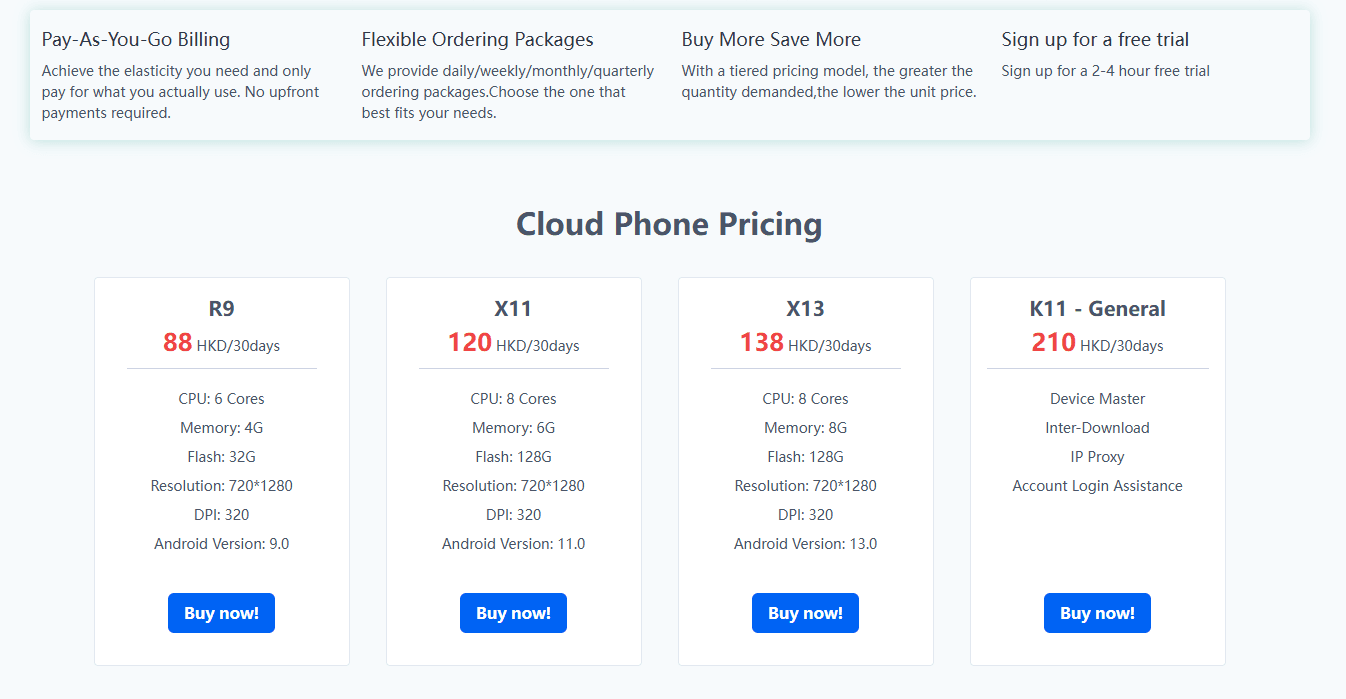
The extra services are where the total can change. Proxy support, hardware or system parameter customization, and ADB debugging are priced separately. Some of these add-ons can cost more than the basic phone rental, so the cheapest advertised device isn't necessarily the cheapest complete setup.
Hippo is worth a look for straightforward device rentals and multi-phone control. Just check Android compatibility first, especially if the apps require a newer version of the operating system.
Pricing: R9 at HKD 88/30 days; X11 at HKD 120/30 days; X13 at HKD 138/30 days. Add-ons are charged separately.
9. Redfinger (Good for Remote Android Access, but Less Focused on Browser Workflows)
Best for: Users who want to access Android apps remotely and keep mobile tasks running in the cloud.
Redfinger is a long-established cloud Android service, particularly suited to remote app access and tasks that need to continue running without keeping a physical phone powered on. It can be useful for app sessions that need to stay available while the local computer is switched off.
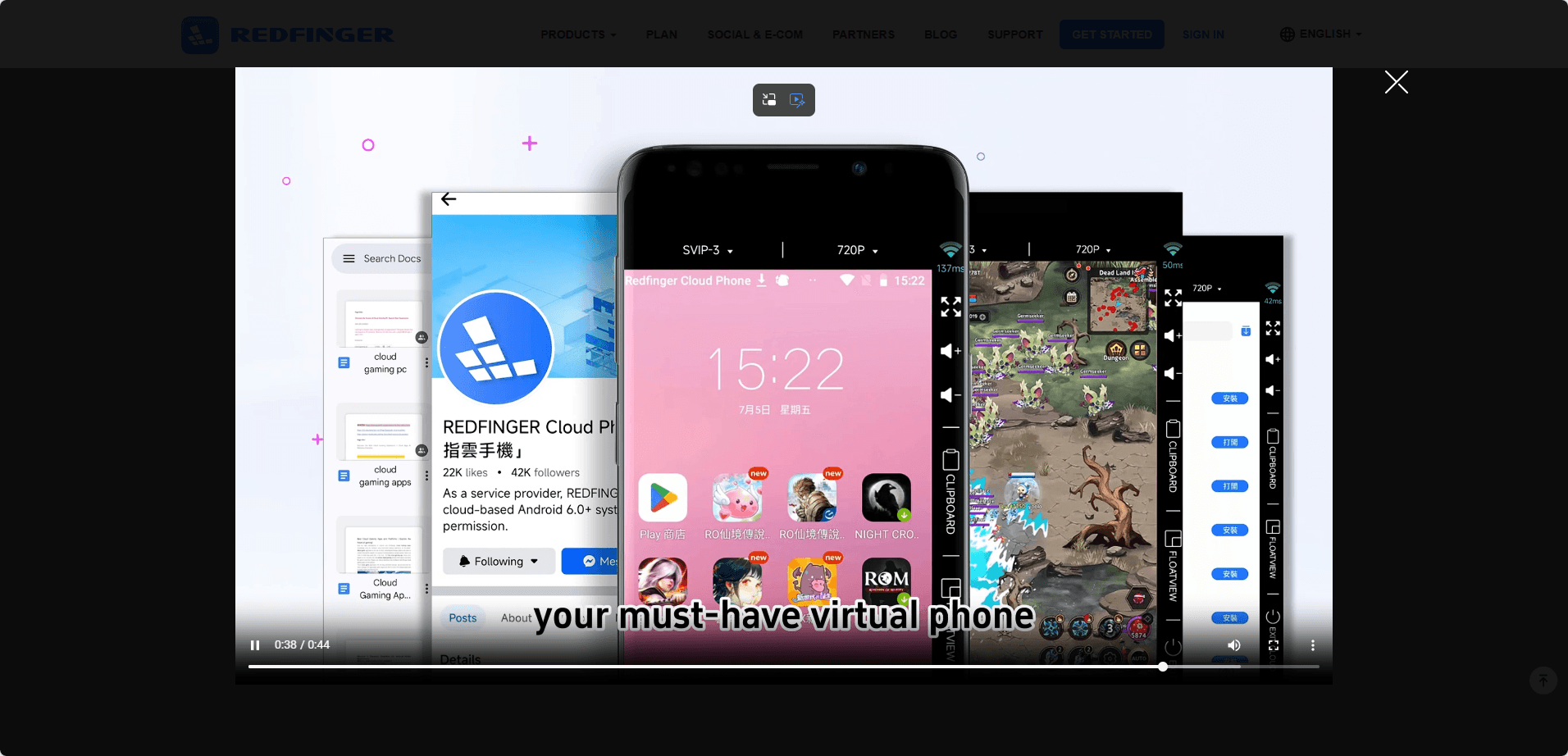
Compared with platforms that combine browser profiles, cloud phones, and team tools, Redfinger has a more straightforward mobile focus. That can be an advantage when the main requirement is simply running Android apps remotely, rather than coordinating a larger account-management workflow.
The important details to check are the Android version, device resources, subscription duration, and whether the chosen plan supports the required number of simultaneous devices. Pricing can vary by device specification and rental period, so a single starting price doesn't tell the whole story.
Redfinger is worth considering for general-purpose cloud Android use, especially when continuous remote access matters more than browser-profile integration. For multi-account workflows involving both websites and mobile apps, it is worth comparing its management features with the more integrated platforms above.
Pricing: Starts at $0.99/day or $10.95/month for VIP, $12.95/month for KVIP, and $15.95/month for SVIP.
10. Genymotion Cloud (Excellent for Android Testing, but Not a Typical Cloud Phone)
Best for: Developers and QA teams testing Android apps across cloud-hosted devices.
Genymotion Cloud is different from most services on this list. Its main purpose is Android development and testing, including automated tests and CI/CD workflows, rather than managing social media accounts.
The platform supports cloud-hosted Android virtual devices, ADB connectivity, and testing integrations. That makes it useful for checking app behavior across configurations without maintaining a large collection of physical devices.
Pay-as-you-go cloud usage starts at $0.06 per minute per running virtual device. That's $3.60 for one hour, or about $54 for a device running 30 minutes every day for a 30-day month. An unlimited-runtime plan is also available, but at a much higher monthly price.
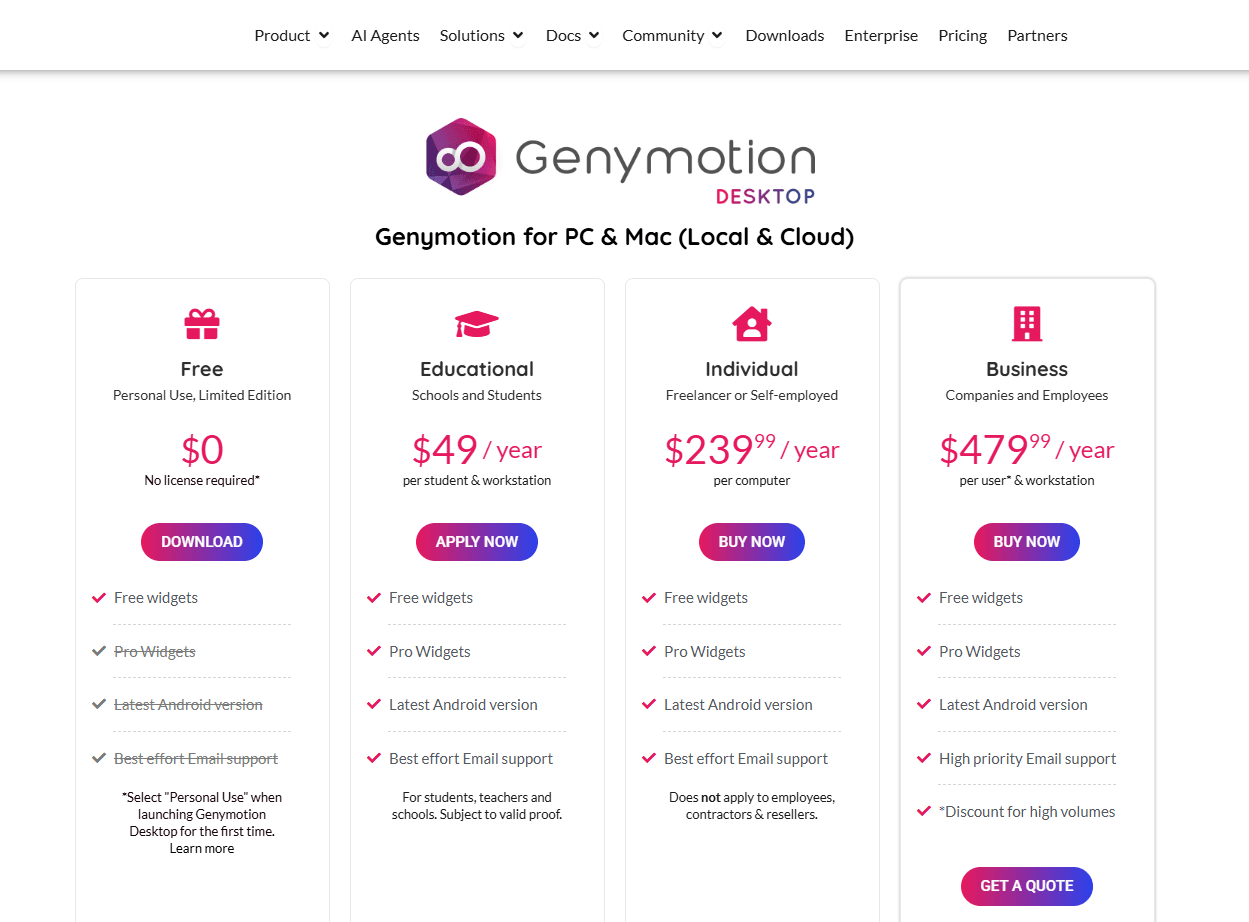
Genymotion is a strong option when the goal is testing an app, reproducing bugs, or running automated QA. For everyday mobile account management, it's probably not the right fit: development-oriented virtual devices serve a different purpose from cloud phones built for regular app use.
Pricing: $0.06/minute per running virtual device; unlimited-runtime plans are available.
How to Choose an Android Cloud Phone
Before paying, focus on a few things that affect daily use and total cost.
1. Check the Android version and device type
Android versions and hardware vary by provider. Check app compatibility first, especially if a specific app is essential. Also confirm whether the service uses virtualized Android hardware, mobile chipsets, or remotely hosted physical phones.
2. Work out the real cost
Look beyond the starting price. Check charges for phone profiles, active usage, monthly rentals, proxies, extra devices, team members, and automation features.
Billing models differ. BitCloudPhone charges separately for profiles and computing time, while VMOS and GeeLark offer different combinations of timed use and monthly rentals. MoreLogin also caps its per-minute charges daily.
Estimate how many phones you need and how long they will run before comparing plans.
3. Check the automation tools
The names can sound similar, but the functions differ:
▸ Synchronizer: Repeats actions across multiple phones.
▸ RPA: Automates routine steps such as tapping and entering text.
▸ ADB: Lets supported tools communicate with Android devices.
▸ API: Allows software to manage cloud phones.
▸ AI agent integrations: Connect AI tools to supported functions, but do not always enable direct control of apps.
If automation is the main reason for renting cloud phones, check that the provider supports the exact tasks you need.
4. Check app installation and saved data
Look for Google Play, APK installation, and persistent app data. Find out what happens to apps and sessions when a phone stops or restarts. Repeatedly setting everything up again can quickly become a nuisance.
5. Check team permissions
Solo users may only need basic device management. Teams should check profile sharing, access permissions, and whether access can be revoked without sharing account credentials.
6. Test before adding more phones
Install the apps you need and run your usual workflow. Stop and restart the phone to check whether apps and sessions are preserved. If several devices will run together, test them at the same time before committing to a larger plan.
Frequently Asked Questions
What is an Android cloud phone?
An Android cloud phone is an Android environment hosted remotely and accessed over the internet. It lets you use mobile apps from a computer or another supported device without keeping a separate physical phone for every workflow.
The exact implementation varies by provider, so check whether the service uses virtualized Android devices, mobile chipsets, or physical devices hosted remotely.
Which Android cloud phone is best for multiple accounts?
For users who want to combine mobile environments, profile management, and repeatable workflows, BitCloudPhone is a strong starting point. GeeLark, Multilogin, and MoreLogin are also worth comparing, especially if synchronization or browser-profile integration matters.
The best choice depends on your app requirements, how many devices you need, and how often they will run.
Are Android cloud phones free?
Some providers offer free trials or limited free plans. For example, Multilogin lists a free plan with limited profile access and one-time mobile usage, while DuoPlus offers a trial with one cloud phone and 30 minutes of temporary startup time.
Free access is useful for testing, but it usually has limits. Check the current terms before relying on a free plan for regular work.
Are cloud phones the same as Android emulators?
Not always. Both can provide Android app environments, but they may use different underlying technology and serve different purposes.
A local emulator runs on your own computer. A cloud phone or cloud Android service runs remotely. Some cloud services use virtualized devices, while others advertise real mobile chipsets or hosted physical devices. Read the provider's technical description rather than relying on the name alone.
Can I automate Android cloud phones with an AI agent?
Potentially, yes, but the details matter. Some providers offer APIs for device management, while others also support ADB, RPA, CLI, MCP, or integrations with testing tools.
Before choosing a platform, confirm that the required controls are available and that your agent can interact with the app itself, not just start or stop the phone. Support for one automation feature does not guarantee that every AI workflow will work out of the box.
Final Verdict
For users who want to manage multiple mobile environments, organize profiles, and build repeatable tasks, BitCloudPhone is our first choice in this comparison. Its combination of profile management, RPA, API access, ADB support, and integration with BitBrowser makes it worth considering, particularly when mobile and browser work are connected.
GeeLark is a strong alternative for synchronized social media workflows. Multilogin and MoreLogin are worth a look if browser profiles are part of the same operation. VMOS and DuoPlus offer flexible options for cloud Android use and larger device setups, while Hippo focuses more on managing device fleets. Redfinger is worth checking for extended-running sessions, and Genymotion Cloud is better suited to app development and testing.
Before committing, compare the full cost of running your devices, not just the advertised starting price. A small difference in per-minute charges, proxy costs, or the number of devices you can run at once can make a noticeable difference once your workflow grows.

 Multi-Account Management
 Prevent Account Association
 Multi-Employee Management
Recommended
See More