Best Unblocked YouTube Sites & Methods in 2026: A Safe, Practical Guide
 2026.08.16 13:54
 petro
petroAn “unblocked YouTube site” is usually one of three things: a privacy-focused front end that displays public YouTube content, a web proxy that fetches a page on your behalf, or an approved platform that embeds a video without opening the main YouTube domain. Each category solves a different problem. A front end may help when the primary domain is filtered, while a proxy can route traffic through another server. An approved learning platform is often the cleanest answer on a school or corporate network because it keeps access within an authorized workflow.
Restrictions can also exist at several layers. A network may block a domain with DNS filtering, inspect traffic at a secure gateway, deny streaming categories, limit bandwidth, or enforce rules through a managed browser or device policy. That is why a single “magic URL” cannot be guaranteed. Public instances change, proxy domains are frequently blocked, and a Chromebook or office laptop may enforce rules even on another network. A good 2026 strategy begins by identifying the layer instead of repeatedly trying random websites.
Best unblocked YouTube site categories to evaluate
The services below are useful categories rather than permanent guarantees. Availability, operators, privacy practices, and supported features can change without notice. Treat any third-party instance as a viewer for public videos, not as a trusted place for your Google credentials.
Option | Best for | Main strength | Important limitation | 2026 verdict |
|---|---|---|---|---|
 | Public videos | Lightweight open-source interface; often less tracking | Instances can disappear, lag, or be blocked; no guarantee of complete features | Good first test |
 | Fast viewing | Clean interface and reduced direct contact with YouTube | Instance quality varies; some videos, captions, or live streams may fail | Useful alternative |
 | One-off access | Browser-based proxy with no local installation | Free capacity, ads, logging, and domain blocking can affect reliability | Use cautiously |
 | Simple proxy test | Quick way to check whether routing is the issue | Not suitable for sensitive logins; streaming quality may be inconsistent | Temporary only |
Embedded player or LMS | Classes and training | Often already approved and focused on a specific video | Only works for content selected or embedded by the organization | Safest at school |
YouTube offline downloads | Travel and weak networks | Official playback with predictable quality and account security | Requires prior access and availability may depend on region or subscription | Most reliable |
For casual viewing, start with a reputable front end and compare two independent instances. For a required class, presentation, or work task, ask for the exact video to be embedded, allowlisted, or supplied through an approved repository. A web proxy is better treated as a diagnostic or short-lived fallback than as a daily browser, particularly when the page contains comments, account prompts, or payment links.
Methods ranked by safety and reliability
Method | When it works | Privacy / security | Policy impact | Recommendation |
|---|---|---|---|---|
Request an allowlist or approved embed | Educational or business video has a legitimate purpose | High: no unknown intermediary | Low when approved | Start here |
Personal connection on a personal device | Restriction belongs only to the local network | Good if the device and connection are trusted | Usually low, but follow site rules | Strong option |
Reputable paid VPN | Network-level filtering blocks the destination | Potentially strong with a transparent provider | May be prohibited on managed networks | Use only when allowed |
Authorized proxy in BitBrowser | A permitted proxy endpoint is available | Good separation when the proxy is trustworthy | Depends on authorization | Flexible and controlled |
Approved public DNS resolver | Only DNS resolution is filtered or broken | Does not hide traffic from the network | May conflict with policy | Limited diagnostic |
Tor Browser | Privacy matters more than video speed | Strong route privacy, but exit behavior and abuse blocks matter | Often restricted | Poor for streaming |
Unknown free web proxy | A quick public page test is needed | Uncertain logging, injection, and operator risk | Often blocked | Last resort |
A safer BitBrowser workflow for authorized access
1 | Create a new BitBrowser profile dedicated to video research or training rather than reusing a profile that contains personal accounts.
|
2 | Choose a current browser core and a normal operating-system profile. Extreme or inconsistent fingerprints can trigger more verification, not less. |
3 | Attach only a proxy that you own, administer, or are explicitly permitted to use. Confirm its country, latency, and connection status before browsing. |
4 | Keep cookies, local storage, and account sessions isolated. Open public videos while signed out unless a trusted first-party login is genuinely required. |
5 | Test a harmless site and the target page, then check video, captions, audio, and full-screen playback. Stop if the page requests software installation. |
6 | Do not mix sensitive banking, email, or identity tasks into the same profile. Close the profile and clear it according to your retention policy when finished. |
7 | Document the approved purpose and proxy owner when the workflow is used by a team, so access remains auditable and repeatable. |
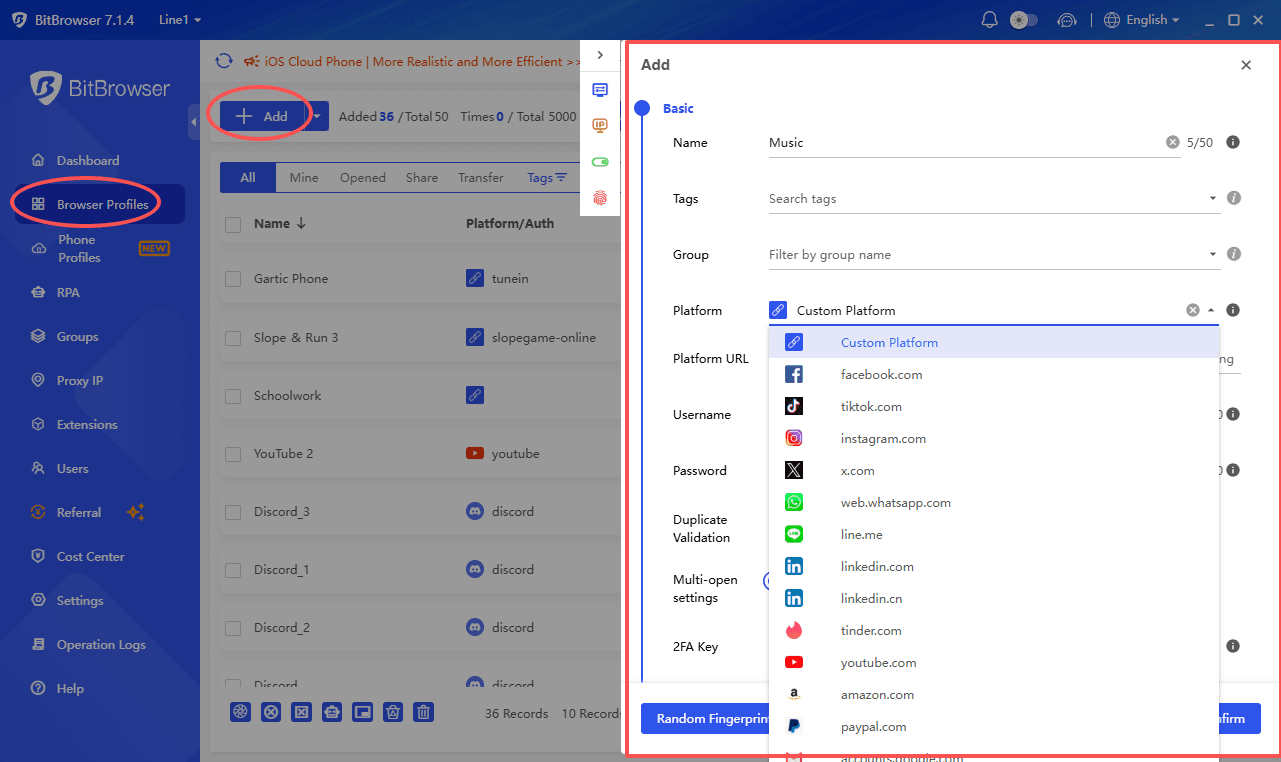
! | Red flag: an “unblocked YouTube” page that asks you to sign in to Google inside its own form can capture credentials. Open account pages only on a verified Google or YouTube domain. |
Fix common failure modes without guessing
Symptom | Likely cause | Low-risk response |
|---|---|---|
Site opens, video does not play | Media domains, scripts, codecs, or the instance backend are blocked | Try another reputable instance, lower quality, or an approved embed; do not install random codecs |
Video buffers constantly | Proxy congestion, long routing path, or bandwidth shaping | Choose a closer authorized endpoint, reduce resolution, or use offline viewing |
Captions or age-restricted video fails | The front end cannot access account-gated features | Use official YouTube through an approved route or request a transcript |
Every mirror is blocked | Category filtering or gateway inspection is broader than one domain | Stop rotating random domains; ask for allowlisting or use a permitted personal connection |
Works on phone, not managed laptop | Device policy, certificates, browser extension, or local agent | Use the approved device workflow; do not tamper with management controls |
Repeated CAPTCHA or login prompts | Shared proxy reputation, unusual fingerprint, or session inconsistency | Switch to a reputable endpoint and a stable isolated profile; remain signed out when possible |
Responsible access is the most durable method
Schools and businesses often block video because of safeguarding, licensing, bandwidth, or productivity requirements. A concise request that names the educational or operational purpose, exact URL, audience, and required date is more likely to receive an exception than a general demand for unrestricted YouTube. Administrators can allowlist a channel, embed a single video, provide a transcript, or schedule access without weakening the whole network.
Related BitBrowser reading
These BitBrowser blog guides expand the comparison, safety checks, proxy workflow, and school-device context discussed above.
BitBrowser guide | Why it is useful |
|---|---|
A current list of front ends and proxy-style options, with practical strengths and limitations. | |
Security checks for mirrors, proxies, credentials, malware, and privacy. | |
A profile-and-proxy workflow for authorized, isolated browser sessions. | |
Context for managed devices, educational access, and safer alternatives. |
Frequently asked questions
What is the best unblocked YouTube site in 2026?
No public service is permanent. Invidious and Piped are sensible first tests for signed-out public viewing. For required school or work content, an approved embed or allowlist is normally safer and more stable.
Can I sign in to YouTube through a proxy site?
Avoid entering Google credentials into an unknown proxy or mirror. Sign in only on a verified first-party domain over a trusted and permitted route.
Will changing DNS unblock YouTube?
Only when the failure is limited to DNS resolution. It will not remove IP blocks, secure gateways, streaming controls, or device policies.
Is BitBrowser a VPN?
No. BitBrowser isolates browser profiles and can use configured proxies. The VPN or proxy provider supplies the network route and must be trustworthy and authorized.
Conclusion
The best 2026 approach is layered: identify the restriction, prefer an authorized or first-party route, use reputable front ends only for public signed-out viewing, and reserve VPNs or proxies for contexts where they are legal and permitted.
BitBrowser can separate research from personal browsing and attach an authorized proxy to a dedicated profile. Combine that isolation with domain checks, no credential reuse, and an approved fallback such as an embed, transcript, or offline copy.

 Multi-Account Management
 Prevent Account Association
 Multi-Employee Management
Recommended
See More 



