YouTube Unblocked for School, Work & More: 10 Easy Ways That Work in 2026
 2026.01.05 15:33
 YT.Shi
If YouTube is blocked at school, work, on public Wi-Fi, or while traveling, there are several ways to access it depending on the type of restriction. In this guide, we’ll cover 10 practical ways to unblock YouTube, including switching networks, using a VPN or proxy, changing DNS settings, and watching videos offline.
The easiest option is often to switch networks or use a reputable VPN. If you manage multiple YouTube channels or need separate browser environments, a browser such as BitBrowser can also be useful because it lets you configure proxy settings separately for different profiles.
Why Is YouTube Blocked?
Before trying to unblock YouTube, it helps to identify where the restriction is coming from. A few common causes are:
▸ Network restrictions: Schools, workplaces, libraries, hotels, and public Wi-Fi networks may block YouTube through firewalls, DNS filtering, or other access-control rules.
▸ Regional restrictions: A particular video may not be available in your country because of licensing or distribution rights.
▸ Device restrictions: School- or company-managed computers can use device management policies to restrict websites and applications.
▸ Video-specific restrictions: Age limits, copyright claims, private videos, deleted content, or creator settings can make an individual video unavailable.
▸ DNS or connectivity problems: Sometimes YouTube is not intentionally blocked at all. A DNS problem, browser issue, or unstable connection can produce a similar error.
This distinction matters. Changing DNS may help with a DNS-level block, while switching networks can help with a school or office firewall. Neither method will make a deleted or private YouTube video available.
First, Check What Kind of YouTube Block You Have
A quick test can save you from trying unnecessary workarounds. Check YouTube from another browser or another network, such as mobile data.
▸ YouTube does not open at all: The problem may be caused by DNS filtering, a firewall, or another network restriction.
▸ YouTube works on mobile data but not Wi-Fi: The Wi-Fi network is likely responsible for the restriction.
▸ YouTube opens but one video says it is unavailable: Check whether the video has regional, age, copyright, or account restrictions.
▸ YouTube works in one browser but not another: The issue may be caused by browser settings, extensions, cookies, or DNS configuration.
10 Ways to Access YouTube When It Is Blocked
| # | Method | Useful when | Main limitation |
|---|---|---|---|
| 1 | Try a different internet connection | School, office, hotel, or public Wi-Fi blocks YouTube | Requires another permitted connection |
| 2 | Use a reputable VPN | Network or regional restrictions | Some networks may block VPN connections |
| 3 | Use BitBrowser with a proxy or VPN | Separate YouTube profiles and network settings | Requires a proxy or VPN connection |
| 4 | Use unblocked YouTube sites | YouTube itself is blocked but third-party sites are accessible | Third-party sites may stop working or have limited features |
| 5 | Change your DNS settings | DNS-based filtering or lookup problems | Does not bypass every firewall or network block |
| 6 | Try a free proxy-based browser extension | You only need YouTube access in your browser | Extension quality, privacy, and access can vary |
| 7 | Try Google Translate | Basic domain-level filtering | Some YouTube features may not work |
| 8 | Find another copy of the video | You only need a specific video's content | The same video may not be available elsewhere |
| 9 | Download and watch videos offline | You know which videos you need in advance | Requires offline access or downloading beforehand |
| 10 | Try Tor Browser | Some network restrictions or privacy-focused browsing | Usually too slow for smooth YouTube streaming |
1. Try a Different Internet Connection
A mobile hotspot can help you access YouTube by switching away from the restricted Wi-Fi connection. Simply connect your computer to your phone’s hotspot or use USB tethering if available.
▸ Turn on the hotspot feature on your phone.
▸ Connect your computer to the hotspot network.
▸ Open YouTube and check if the website loads normally.
Keep in mind: Streaming videos can use a lot of mobile data, and a hotspot will not work if your device itself has restrictions from school or company management settings.
2. Use a Reputable VPN
A VPN can be useful for school, workplace, or public Wi-Fi restrictions because your connection no longer goes directly through the local network to YouTube. It creates a connection through a VPN server, allowing you to browse with a different IP address.
▸ Choose a reliable VPN service with good speed and privacy features.
▸ Install the VPN app on your device.
▸ Connect to a VPN server.
▸ Open YouTube and check if the content is available.
If YouTube still does not load: Try switching to another VPN server, restarting your browser, or checking whether the network blocks VPN connections.
3. Using BitBrowser with Proxies or VPNs
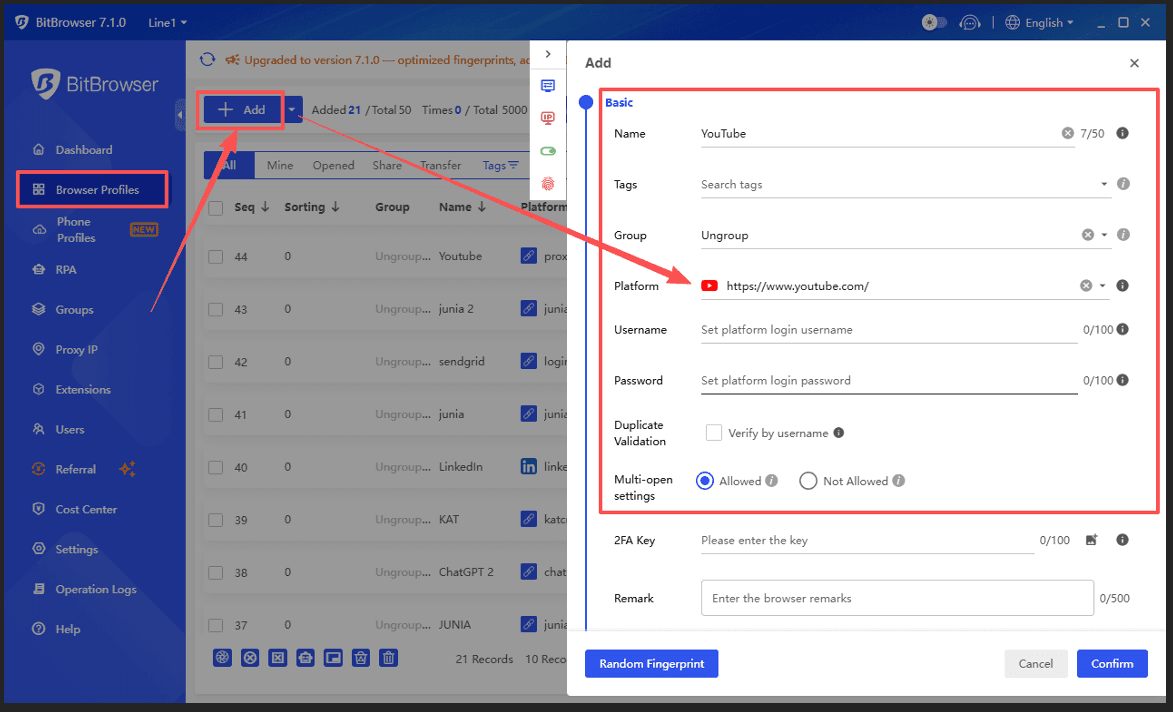
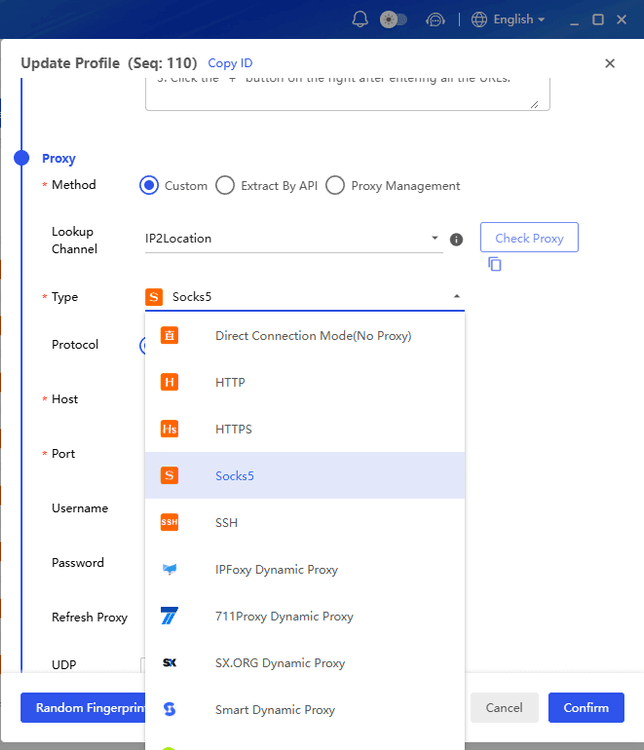
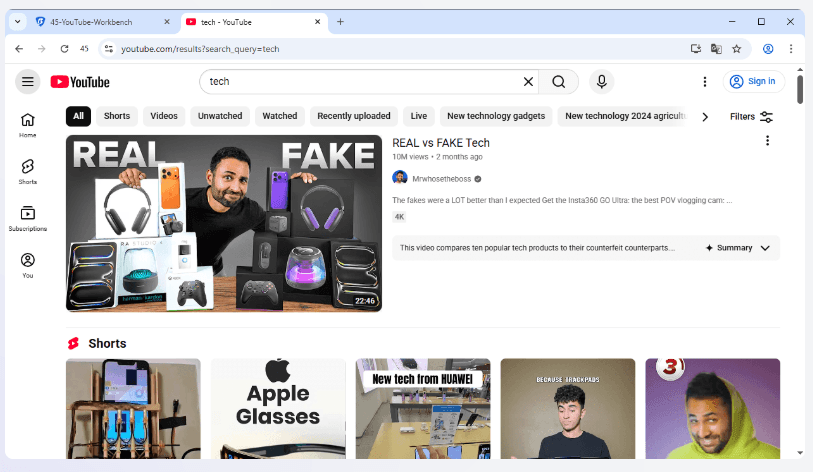
If YouTube is unavailable because of network restrictions, you can use BitBrowser with a proxy or VPN connection to access it through a different network environment. BitBrowser allows you to configure network settings for each browser profile, making it easier to switch between different connections when needed.
Compared with a regular browser, BitBrowser keeps each profile separate with its own cookies, sessions, and browser settings. This is useful if you need to access multiple YouTube accounts or manage several channels, including multiple YouTube channels created under the same Gmail account, without mixing different login environments.
Pros:
▸ Supports separate proxy or VPN settings for different profiles.
▸ Keeps YouTube sessions and account data organized.
▸ Useful for managing multiple YouTube channels in separate environments.
Cons:
▸ Requires a proxy or VPN connection.
▸ May be unnecessary for users who only need to watch YouTube occasionally.
4. Use Unblocked YouTube Sites
Unblocked YouTube sites, including mirror and proxy platforms such as CrossProxy, BlockAway, and ProxySite.com, let you watch YouTube videos without accessing YouTube directly. These sites load and relay YouTube content through their own domains, helping bypass basic network filters, firewalls, and URL-based blocks.
They are especially useful on school, office, or public networks where installing software or browser extensions is not allowed. Simply open the site, paste the video link or search for the content, and start watching.

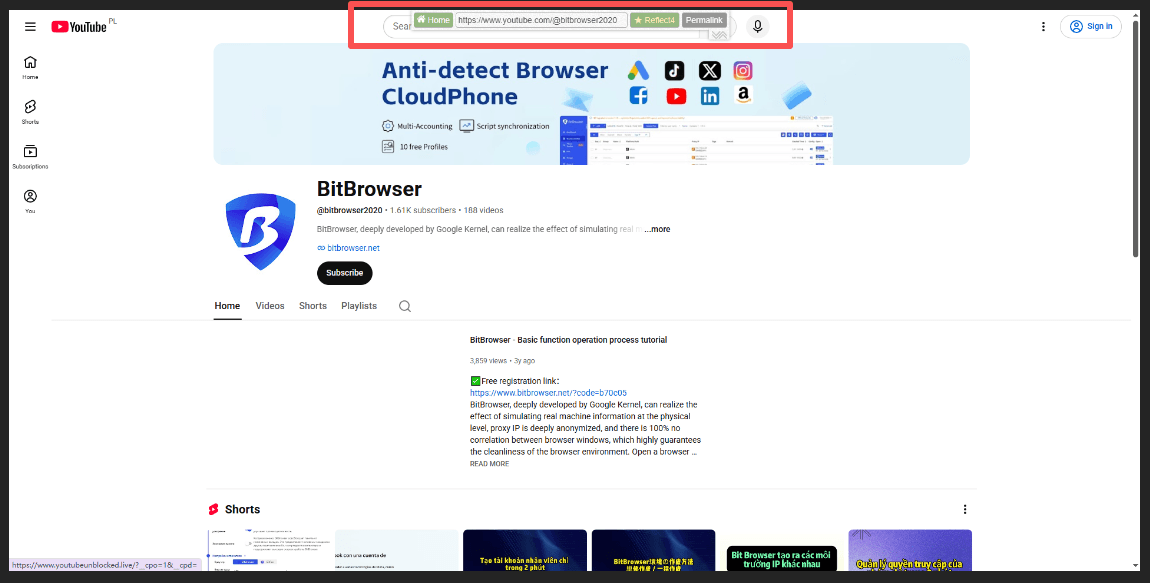
Projects such as Invidious provide alternative interfaces for viewing public YouTube content. Availability depends on the individual instance and the current state of YouTube's backend services.
Do not assume that every third-party viewer is trustworthy. If you use one, avoid entering your Google account credentials unless you have independently verified the service.
5. Change Your DNS Settings
If YouTube is blocked because your network uses DNS filtering, changing your DNS provider may help. This is a simple option to try before installing a VPN or other software. Popular public DNS services include Cloudflare DNS and Google Public DNS.
▸ Open your device’s network settings.
▸ Find the DNS settings for your Wi-Fi or Ethernet connection.
▸ Replace the default DNS with a public DNS service.
▸ Save the changes and reopen YouTube.
If YouTube is still blocked, the restriction may be coming from a firewall or the network itself. In that case, changing DNS alone will not be enough.
6. Try a Free Proxy-Based Browser Extension
If you only need to unblock YouTube in your browser, a proxy or VPN extension can be a simple option. Popular choices include Proton VPN, Windscribe, and Browsec, all of which offer browser extensions.
How to use one:
▸ Install the extension from the official browser extension store.
▸ Sign in if required and choose a server location.
▸ Connect and open YouTube again.
Browser extensions usually affect browser traffic only, rather than your entire device. Check the publisher, permissions, and privacy policy before installing, especially with lesser-known free proxy extensions.
7. Try Google Translate as a Temporary Workaround
If your network only blocks the YouTube domain, you can sometimes open a YouTube page through Google Translate. It is worth trying for a quick check, but it is not a reliable long-term solution.
▸ Open Google Translate.
▸ Choose any source language (Such as Spanish) instead of Detect language, then choose your target language (Such as English).
▸ Paste the full YouTube video or page URL into the source text box.
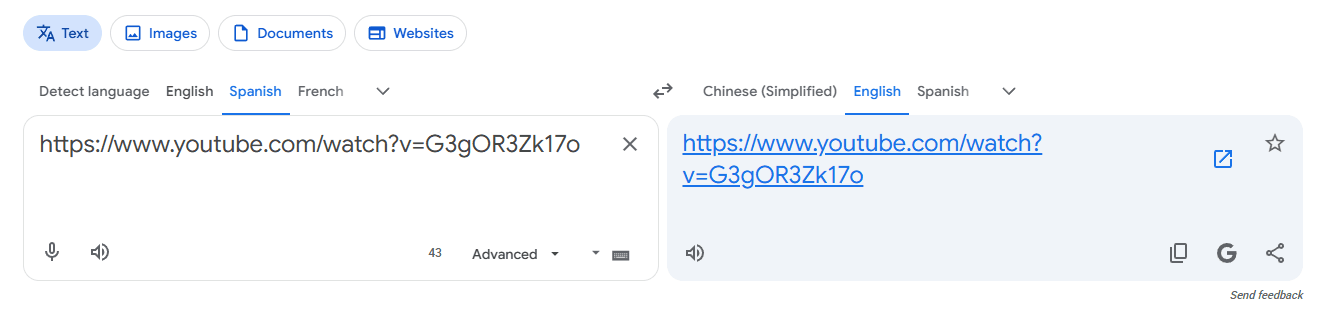
▸ Click the link that appears in the translated result.
▸ Google Translate will open the YouTube page through its translate.goog domain.
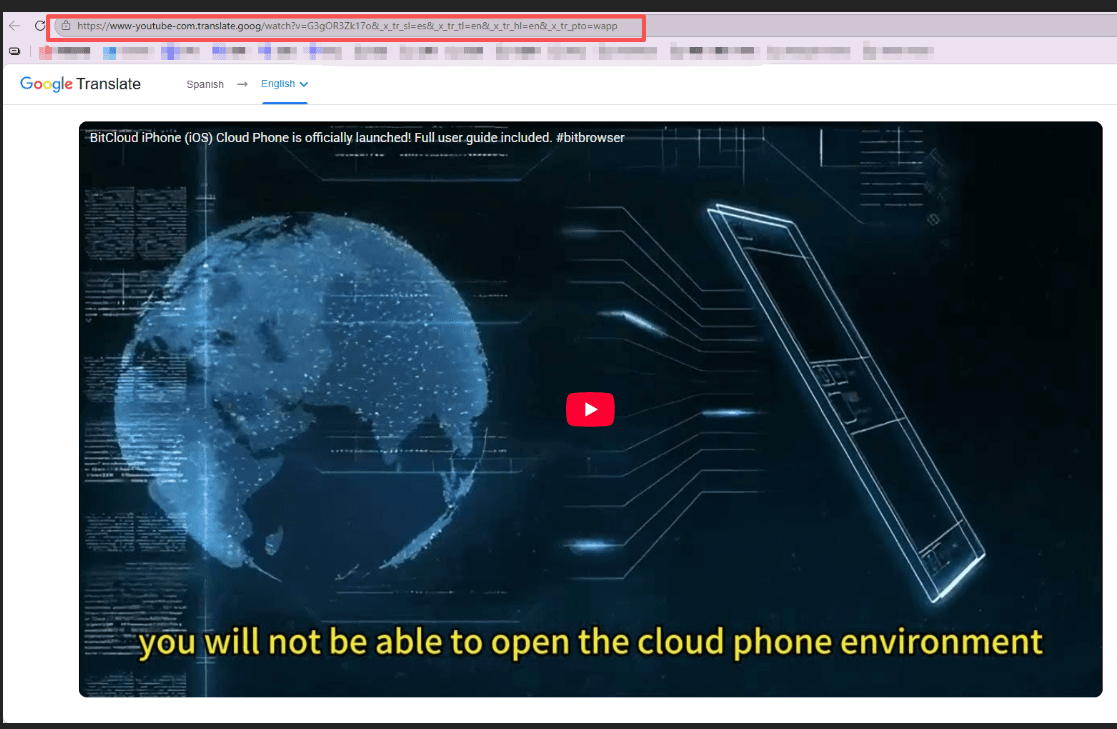
Keep in mind: This workaround may not support YouTube's full functionality. Videos, page layouts, JavaScript features, and login sessions may not work correctly. Modern network filters may also block Google Translate's proxy domains, so use it mainly as a temporary option rather than a regular way to access YouTube.
8. Find Another Copy of the Video
Sometimes you do not need to access YouTube itself. If you only need a specific video, you can look for the same content on other platforms or use a video search tool to find alternative sources.
Options include Vimeo, Dailymotion, and YouTube Video Finder. You can also check the creator’s official website, social media pages, podcast platforms, or the website of the organization that originally published the content.
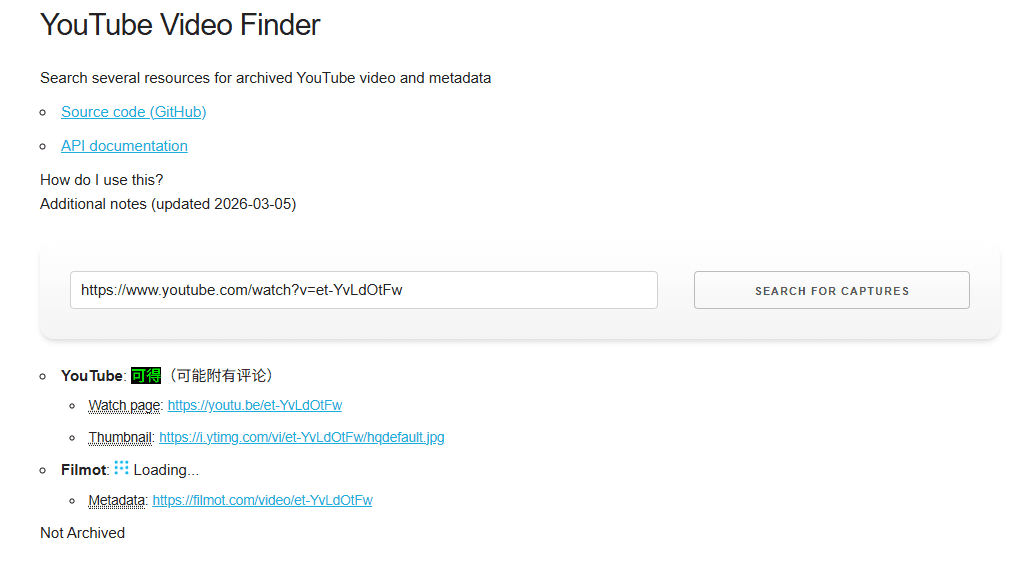
This approach is especially useful when only one YouTube video is unavailable rather than YouTube being blocked completely. It also lets you access the content without changing your network settings or installing additional software.
9. Download & Watch YouTube Videos Offline
If you already know which videos you need, offline viewing can eliminate the need to access YouTube on a restricted network.
Where available, YouTube's own offline features can be used to save eligible videos for later viewing. This is useful for lessons, presentations, travel, or situations where the internet connection is unreliable.
Keep copyright and platform rules in mind: downloading or redistributing content through third-party tools may be subject to copyright restrictions or YouTube's terms.
Proven Methods to Download YouTube Videos Safely
10. Try Tor Browser
Tor Browser routes traffic through the Tor network, which can provide another path to websites when a local network restricts direct connections.
It can be useful for privacy-focused browsing and in some censorship environments, but it is usually not the first choice for YouTube streaming. Video playback can be considerably slower because traffic passes through multiple relays.
Tor can also be blocked by some networks, so availability depends on the environment you are using.
What If YouTube Is Blocked on a School or Work Computer?
School and company computers can have restrictions that are stronger than a normal Wi-Fi block. Administrators may control installed applications, browser extensions, DNS settings, network access, or the device itself.
If the device is managed, installing a VPN, Tor Browser, proxy extension, or other software may be impossible. In that situation, the practical options may be to use an approved connection, ask the network administrator for access, or watch the required content through an approved alternative.
For school or workplace networks, also check the organization's acceptable-use policy before attempting to bypass a restriction.
Safety, Privacy, and Legal Considerations
Using a VPN, proxy, or alternative viewer does not automatically make every use of YouTube legal or permitted. Rules vary by country, platform, school, employer, and network administrator. A technical workaround may also conflict with a network's acceptable-use policy.
Be particularly careful with free proxy sites and unknown browser extensions. Avoid entering passwords, payment details, or other sensitive information into services you do not trust. For regular use, established services with clear privacy policies are generally easier to evaluate.
FAQ: YouTube Unblocked
How Do I Get to YouTube Unblocked?
If YouTube is blocked on your current Wi-Fi, try another permitted network first. You can also try a VPN, proxy, DNS change, or an unblocked YouTube site, depending on the type of restriction.
Why Is YouTube Blocked by My School?
Schools may block YouTube to limit distractions, manage network traffic, or restrict access to websites that are not allowed on the school network. School-managed devices may also have additional restrictions.
How Can I Unblock YouTube Online?
Start by checking whether YouTube works on another network. If the network is responsible for the block, a VPN, proxy, or DNS change may help. You can also try an unblocked YouTube site or look for the same video on another platform.
Can a VPN Unblock Every YouTube Video?
No. A VPN can change your network connection and IP location, but it cannot make private, deleted, age-restricted, or otherwise unavailable videos accessible. Some VPN connections may also be blocked.
Is BitBrowser a VPN?
No. BitBrowser is an anti-detect browser that provides separate browser profiles and profile-level network settings. It can be used with proxies or VPN connections, but it does not replace a VPN or provide network-wide VPN access.
Are YouTube Unblockers Legal?
This depends on your location and how the service is used. VPNs, proxies, and alternative access methods are not automatically illegal, but bypassing school, workplace, or other network policies may violate their rules. Check the applicable laws and network policies before using them.

 Multi-Account Management
 Prevent Account Association
 Multi-Employee Management
Recommended
See More 



