ChatGPT Unblocked at School in 2026: How Students Can Access It Safely
 2026.01.29 11:20
 YT.Shi
ChatGPT has become a go-to study tool for students in recent years. From brainstorming essays to explaining complex math problems, it’s no surprise that many students now search for ChatGPT unblocked or unblocked ChatGPT for school when they suddenly find the tool unavailable on campus networks in 2026.
If you’re seeing error pages, connection blocks, or access restrictions, you’re not alone. This guide explains why ChatGPT is blocked at school, what “ChatGPT unblocked” actually means, and what students should realistically know before trying to regain access.
Why Is ChatGPT Blocked at School?
Schools don’t block ChatGPT randomly. In most cases, restrictions are intentional and policy‑driven. Common reasons include:
· Academic integrity concerns: ChatGPT can generate essays, solve homework, and even write code, which raises fears of plagiarism or cheating.
· Classroom distraction: Schools aim to keep students focused on approved learning platforms during school hours.
· Student data protection: Many districts limit third‑party tools that collect user data to comply with privacy regulations.
· Network and bandwidth control: AI tools can be resource‑heavy, and schools often restrict them to maintain stable networks.
Because of these factors, many school IT departments classify ChatGPT the same way they classify social media or streaming platforms.
Where Is ChatGPT Commonly Blocked?
Students usually encounter ChatGPT blocks in these environments:
· School Wi‑Fi networks using firewalls or DNS filtering
· School‑issued Chromebooks or laptops managed by admin policies
· Restricted regions or countries where ChatGPT access is limited by law
· Individual accounts temporarily restricted due to unusual login activity
In most cases, the block is tied to the network or device, not to ChatGPT itself.
What Does “ChatGPT Unblocked” Mean for Students?
When students talk about unblocked ChatGPT, they usually mean one of two things:
1. ChatGPT is accessible outside the school network (for example, at home or on mobile data).
2. ChatGPT opens in a different browsing environment that isn’t restricted by school filters.
It does not necessarily mean that ChatGPT is officially approved by the school. In fact, most “ChatGPT unblocked” situations simply involve accessing the tool beyond school‑controlled systems.
Understanding this distinction is important before attempting any workaround.
Is It Legal and Safe to Use Unblocked ChatGPT?
This is one of the most common questions students ask.
Legality
In most countries, using ChatGPT itself is legal. Tools like VPNs or alternative browsers are also legal for personal use in many regions. However, bypassing school restrictions may violate school IT policies, which can lead to disciplinary consequences.
Safety
Safety depends heavily on the method used:
· Free or unknown proxy sites may expose personal data
· Phishing copies of ChatGPT are common
· Logging into AI tools on shared or managed devices can leave traces
Students should always prioritize privacy and understand school rules before attempting to access unblocked ChatGPT.
Common Ways Students Try to Unblock ChatGPT (Overview)
While this article doesn’t promote policy violations, it’s useful to understand what students commonly attempt:
1. Changing DNS Settings or Clearing Browser Data
DNS changes can sometimes bypass basic domain-level blocks. Schools using simple DNS filtering prevent your device from translating the ChatGPT domain into an IP address. Switching to public DNS servers like Google DNS (8.8.8.8 / 8.8.4.4) or Cloudflare DNS (1.1.1.1 / 1.0.0.1) may restore access.
Clearing browser cache can also help in minor cases where old DNS records or cookies interfere with connectivity. These methods are simple and safe but usually only work on lightly restricted networks and personal devices.
2. VPNs, Proxy Servers, and Browser VPN Extensions
VPNs, proxies, and browser VPN extensions route your traffic through external servers, hiding your destination and encrypting your connection.
· VPNs encrypt all device traffic and provide high privacy. Popular options include NordVPN, Surfshark, and ExpressVPN.
· Proxy servers handle traffic per browser session but offer less security and stability than full VPNs.
· Browser VPN extensions provide lightweight routing for a single browser but cannot protect system-wide traffic.
These tools are generally reliable, but may still be blocked on school-managed Chromebooks or networks with strict firewall rules. Test with a personal device first if possible.”
3. Switching Devices or Networks
If the school network or device is heavily restricted, using a personal device or mobile data can be the easiest solution. Connecting through a smartphone hotspot or a non-school-managed laptop often bypasses firewalls.
4. Tor Browser
Tor Browser encrypts traffic and routes it through multiple relays, making it difficult for school networks to track your activity. It provides strong anonymity and is free, but it can be slower than VPNs and may have compatibility issues with some sites. Tor is a good option for anonymous access when other methods are blocked.

5. Alternative AI Platforms
If ChatGPT remains inaccessible, other AI platforms or mirror sites can offer similar functionality. Examples include Google Gemini, Claude AI, Perplexity AI, or Microsoft Copilot. These platforms can help with writing, research, and academic tasks without triggering school network restrictions. Mirror sites can work too, but they carry potential security risks.
6. Anti-detect Browsers (e.g., BitBrowser)
For environments where simple solutions fail, anti-detect browsers offer a robust option. These specialized browsers isolate sessions, mask fingerprints, and integrate proxy support, making it much harder for school networks to detect or block access.
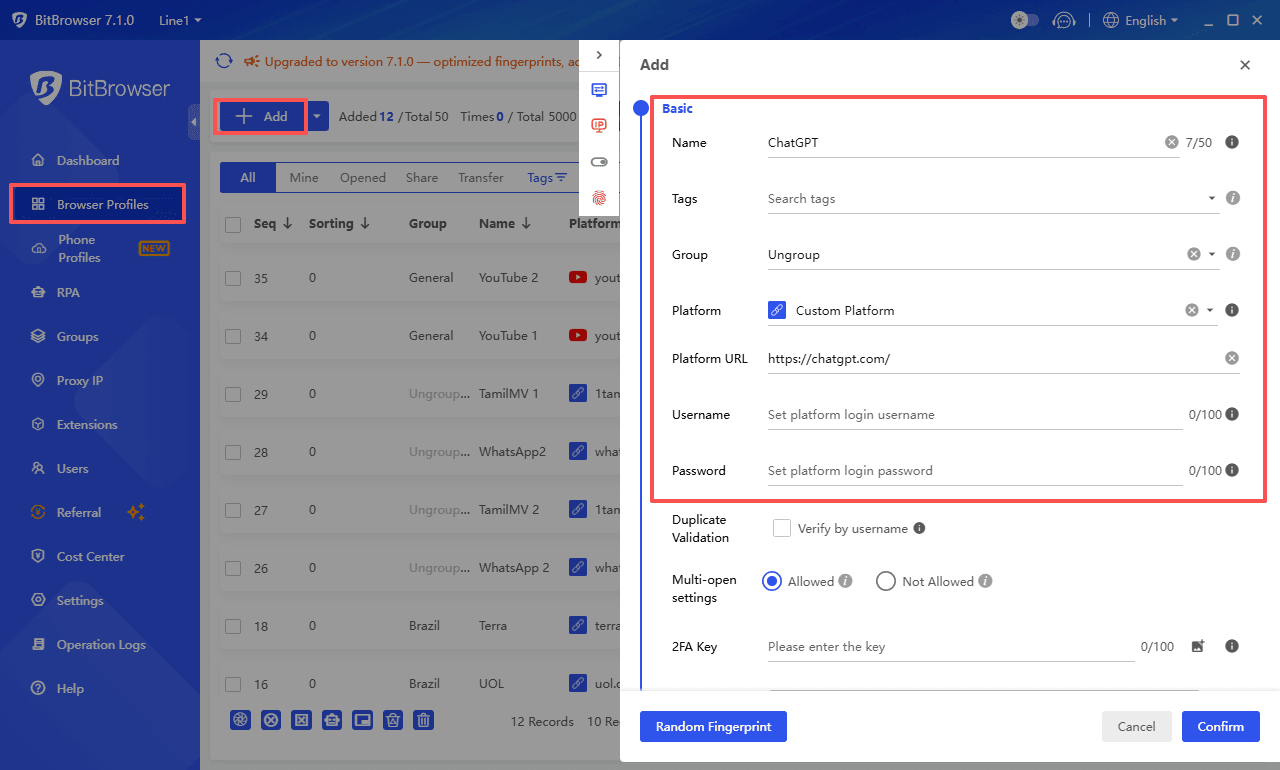
They allow multiple profiles, separate cookies, and advanced automation, providing consistent, long-term access to ChatGPT for educational use, even in strict school networks.
Some methods work only against simple restrictions, while others may be blocked entirely on managed devices like Chromebooks.
➤ Get your 10 permanent free profiles on BitBrowser
Quick Comparison of Methods
Some simple tricks like DNS changes or browser cache clearing may not work on managed devices or strict school networks, which is why more advanced tools like anti-detect browsers exist.
| Method | Ease | Privacy | Reliability | Notes |
|---|---|---|---|---|
| DNS / Cache Clearing | Super easy | Low | Limited | Only works on simple blocks |
| VPN / Proxy / Browser VPN | Medium | High | Medium | Might be blocked on some managed devices |
| Switch Device / Mobile Network | Easy | Medium | High | Works even on strict Wi-Fi |
| Tor Browser | Medium | Very High | Medium | Slower, some sites may not work |
| Alternative AI / Mirror Sites | Easy | Medium | Medium | Stick to trusted platforms |
| Anti-detect Browser | Advanced | Very High | High | Best for long-term and multi-account use |
Notes: Test on a personal device first, and avoid school accounts for privacy.
For more details on each method and step-by-step instructions, you can check out the original guide here: How to Get Unblocked ChatGPT for School 2026
ChatGPT Unblocked on School Chromebooks: What to Know
Chromebooks are especially restrictive because they’re often controlled by Google Workspace admin policies. In these cases:
· Website blocks are enforced at the system level
· App installations may be disabled
· Browser extensions can be restricted
This is why many students report that ChatGPT is blocked on Chromebooks even when it works fine on personal laptops or phones. Some simple methods like DNS changes, browser cache clearing, or basic VPNs may not work on managed devices.
Possible Ways to Access ChatGPT on Chromebooks:
1. Use Guest or Incognito Mode
Some restrictions are tied to your school account. Switching to Guest Mode or an incognito session may allow temporary access.
2. Switch to Mobile Data / Personal Device
Bypass school Wi-Fi entirely by using a phone hotspot or a personal device not managed by the school.
3. VPN / Browser VPN Extensions (if allowed)
Some lightweight VPN extensions may still work if installation isn’t blocked.
4. Anti-detect Browser
For long-term, multi-account use, specialized browsers like BitBrowser can provide isolated sessions even on managed devices (if installation is allowed).
Note: System-level restrictions on school Chromebooks may prevent some methods entirely. Using a personal device or mobile network is generally the most dependable way to access ChatGPT for schoolwork.
Using ChatGPT Responsibly at School
Access alone is not the goal. Responsible use matters far more than whether ChatGPT is technically available.
When using ChatGPT for schoolwork, it should be treated as a learning assistant, not an answer generator.
Appropriate uses include:
· Clarifying difficult concepts
· Brainstorming ideas or outlines
· Practicing languages or explanations
· Exploring alternative approaches to a problem
What students should avoid:
· Submitting AI-generated content as their own work
· Using ChatGPT during exams or restricted assessments
· Sharing personal or school login information
Many educators are increasingly open to AI tools when they are used transparently and ethically.
FAQ: ChatGPT Unblocked at School
Q1: Is it legal to use ChatGPT unblocked at school?
A: Using ChatGPT itself is legal in most countries. However, bypassing school restrictions may violate school IT policies. Students should understand their institution’s rules before attempting to access ChatGPT unblocked.
Q2: Which method is safest for accessing ChatGPT at school?
A: Using a reputable VPN or an anti-detect browser like BitBrowser provides the highest privacy and reliability. Simple DNS changes or free proxies may work but offer limited protection.
Q3: Can I get ChatGPT unblocked on a school Chromebook?
A: Chromebooks are managed devices, so some restrictions are enforced system-wide. The most effective options are using Guest or Incognito Mode, connecting via mobile data, or using an anti-detect browser if installation is allowed.
Q4: Are free VPNs or proxies safe to use for ChatGPT unblocked?
A: Free VPNs and proxies often have performance issues, ads, or security risks. Paid and well-reviewed providers are recommended to maintain privacy and consistent access.
Q5: What should I avoid when using ChatGPT at school?
A: Students should avoid submitting AI-generated content as their own, sharing personal school logins, or using ChatGPT during exams. Treat ChatGPT as a learning assistant, not a shortcut.
Final Thoughts
ChatGPT being blocked at school reflects real concerns about education, privacy, and responsible technology use. The real question is not whether students should use AI, but how to use it wisely.
Understanding why restrictions exist, knowing what options are available, and respecting school policies will help ensure that tools like ChatGPT support learning rather than undermine it.
As AI literacy becomes more important in 2026 and beyond, responsible access and informed decisions matter more than shortcuts.

 Multi-Account Management
 Prevent Account Association
 Multi-Employee Management
Recommended
See More 



