How to Safely Buy LinkedIn Accounts: Risks, Methods, and Smarter Alternatives
 2026.04.25 13:53
 YT.Shi
If you are a marketer, a sales professional, or someone running an outreach agency, you have probably thought about buying LinkedIn accounts at some point. Maybe you need to scale your prospecting fast. Maybe your account got restricted and you are looking for a quick way back in. Or maybe you simply do not want to spend months warming up a brand new profile from scratch.
Buying LinkedIn accounts is a gray area full of risks, but if you truly understand those risks and take the right precautions, you can reduce your chances of getting burned. In this article, I will walk you through everything: why people buy accounts, what can go wrong, how to do it as safely as possible if you choose to go that route, and what smarter alternatives exist.
I will also show you how a tool like BitBrowser can help you manage multiple LinkedIn accounts while keeping each one properly isolated so platforms see them as completely separate users.
Why Do People Buy LinkedIn Accounts
If buying LinkedIn accounts is so risky, why do so many people still do it? The answer is simple: speed and scale.
LinkedIn is the world‘s largest professional network with over 1 billion users, making it the go to platform for B2B lead generation and sales outreach. But LinkedIn also enforces strict limits on how many connection requests and messages each account can send daily, especially for new profiles. A fresh account with zero connections and no activity history cannot do much. It takes weeks or even months of careful “warming up” before you can start real outreach without triggering LinkedIn’s security systems.
Bought accounts, especially aged ones, come with several built in advantages. They already have an established profile with a profile picture, work history, and sometimes even existing connections. Their sending limits are typically higher because they look like normal, active users. And perhaps most importantly, they save you the long waiting period that comes with building a new account from zero.
LinkedIn blocked 140 million fake accounts in 2024 to 2025 alone, which shows just how aggressively the platform polices its network. When your own accounts get caught in that net, buying a replacement can feel like the only way to keep your outreach running without weeks of downtime.
What Are the Real Risks of Buying LinkedIn Accounts
Let’s be honest about the potential problems. If you plan to buy LinkedIn accounts, you need to understand the risks clearly.
You are violating LinkedIn’s Terms of Service.
This is the most obvious risk, but many underestimate it. LinkedIn’s User Agreement explicitly prohibits buying, selling or transferring accounts. Accounts are personal and non-transferable. If LinkedIn detects a bought or sold account, it will typically ban it permanently, with no warning or second chance.
A permanent ban is final. Unlike temporary restrictions, there is no appeal process to get the account back. All your connections, messages and content will be lost forever.
Your main account could also get banned.
This unexpected risk comes from LinkedIn’s sophisticated detection systems. They track patterns across accounts, such as shared IP addresses, overlapping device fingerprints or coordinated behavior. If a purchased account gets flagged, LinkedIn may link it to your main profile and ban both. Your main account was built over years and becomes collateral damage.
You could walk into identity theft or fraud.
Many purchased LinkedIn accounts are not clean. Some use stolen identities or repurposed credentials from real people. You might buy an account only to find the original owner still using it, or discover you’re linked to fraudulent activity under someone else’s name.
Using another person’s identity for business can lead to civil and criminal liability. If the account uses stolen personal information, you could unknowingly be complicit in identity theft, which carries serious legal penalties in most places.
Sellers can recover the account.
Even after you pay and change the password, the original seller may still have the linked recovery email or phone number. Once payment clears, they can reclaim the account via LinkedIn’s recovery process, resell it or use it for other purposes. You lose your money and have no way to get it back.
LinkedIn’s algorithms are getting smarter every year.
By 2026, LinkedIn’s risk control system is highly intelligent and targets specific red flags. It monitors behavior 24/7 and detects even subtle abnormalities. Things that went unnoticed two years ago now trigger instant restrictions.
This is where BitBrowser helps. LinkedIn often catches purchased accounts by detecting environment inconsistencies. When you log into a bought account from your computer, LinkedIn sees a different browser fingerprint than the one used to register the account. This is a major red flag.
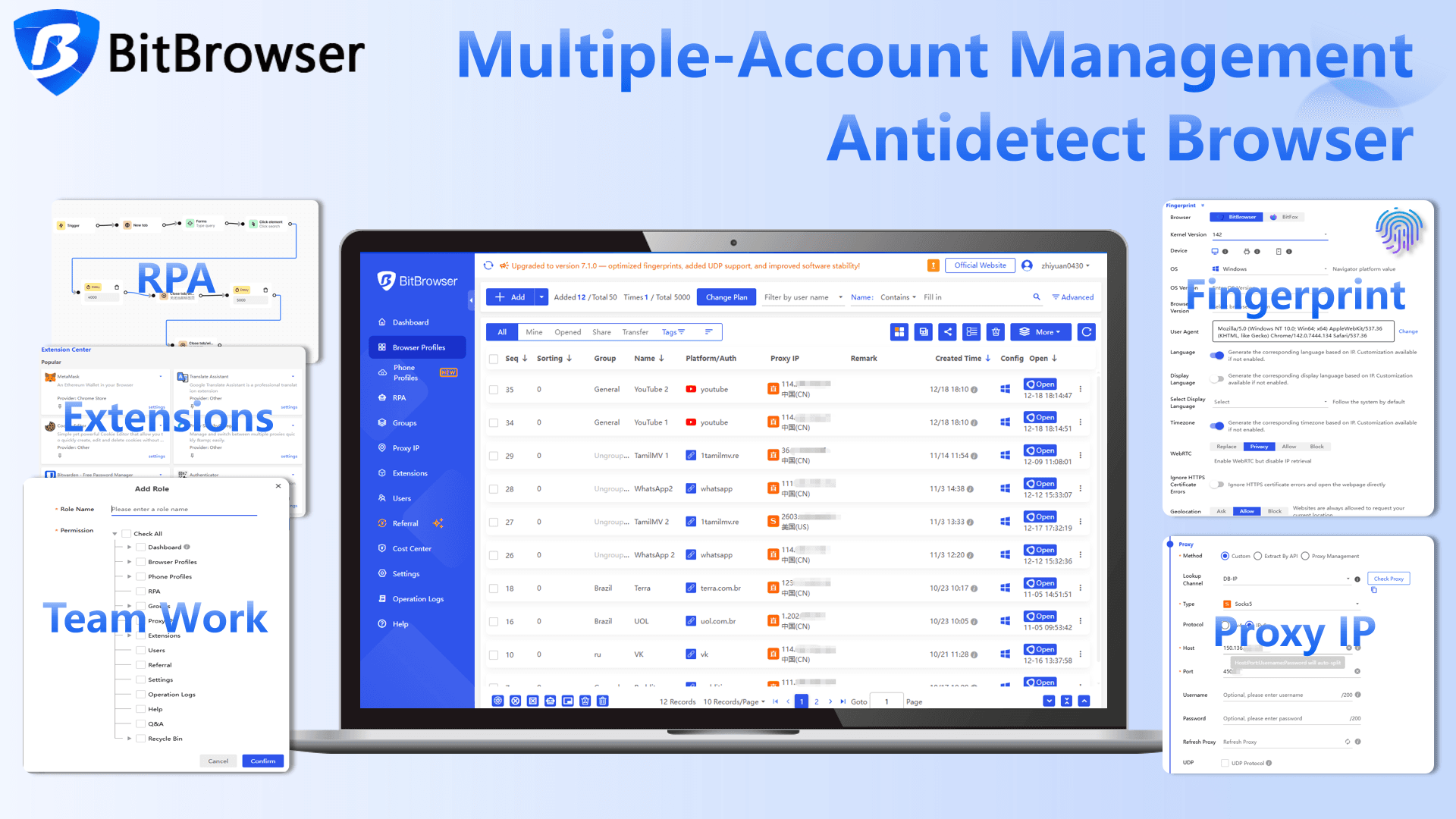
BitBrowser is an anti-detect browser that creates isolated environments, each with a unique fingerprint. Every profile has its own cookies, cache, timezone, screen resolution, user agent and other identifying parameters. To LinkedIn, each account appears to be accessed from a different real device by a different person. This isolation is key to safe multi-account management, whether you bought the accounts or built them yourself.
Sign Up
How to Buy LinkedIn Accounts as Safely as Possible
If you’ve read the risks and still want to go ahead, here’s how to lower your chances of getting caught. Nothing here is a guarantee, but it’s far safer than just logging in from your normal browser.
Step 1: Pick a Reliable Seller
Look for sellers with a track record and real user reviews. Avoid anyone who operates only through anonymous apps like Telegram with no verifiable presence. A legitimate seller will usually offer a replacement guarantee if the account gets banned shortly after purchase.
Ask key questions before buying. How old is the account? How many connections does it have? Does it come with the original registration email? Can you verify the profile picture is unique? If a seller dodges these, walk away.
Please read: Top platforms to buy LinkedIn accounts in 2026
Step 2: Check the Account Quality
Aged accounts with real activity history are much harder for LinkedIn to flag. Look for complete profiles: a natural-looking photo, detailed work history, and some existing connections that seem genuine.
Always run the profile picture through a reverse image search. If it’s stolen from another user or a stock photo site, the account is a huge red flag. This is one of the easiest ways LinkedIn spots fakes.
Step 3: Set Up Isolated Environments First
Never log into a bought account from your regular browser. Your usual Chrome or Firefox shares a browser fingerprint with your main account—timezone, screen resolution, installed fonts, and more. LinkedIn sees this overlap and connects the dots instantly.
This is where BitBrowser makes all the difference. It creates a completely separate browser profile for every account. Each profile has its own fingerprint, cookies, local storage, and cache. To LinkedIn, each profile looks like a totally different person on a different device.
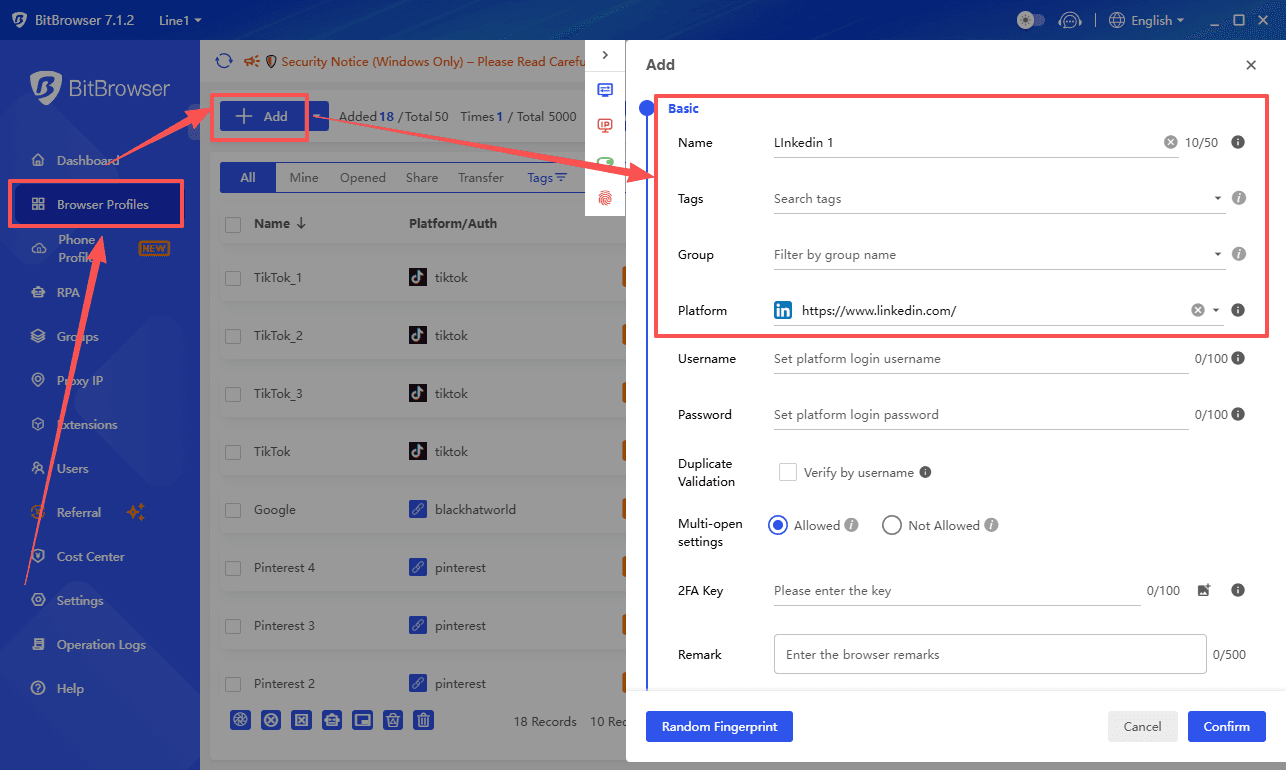
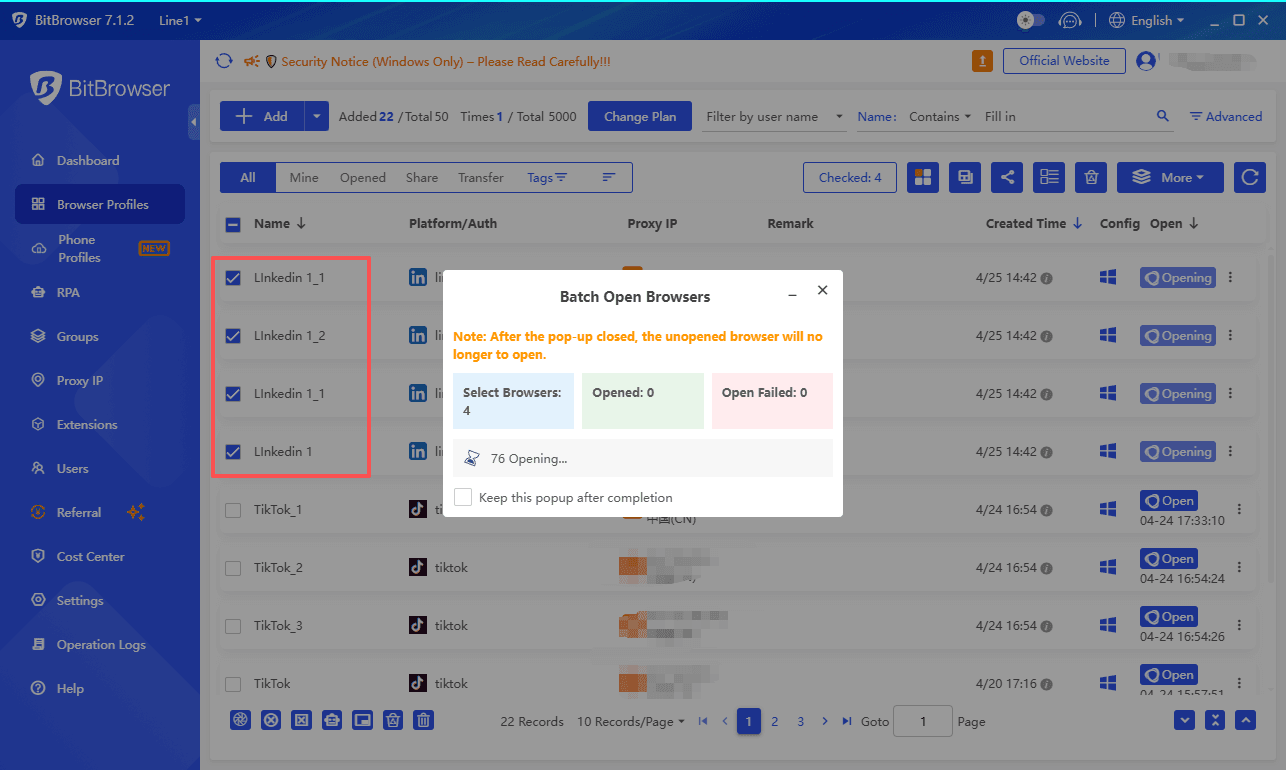
You can create unlimited profiles, group them in folders, and manage everything from one app. This keeps every LinkedIn account fully isolated and dramatically lowers your risk.
Sign Up
Step 4: Use Stable, Dedicated Proxies
A fresh browser fingerprint isn’t enough on its own. LinkedIn also looks at your IP address. If five accounts share the same IP, it’s an obvious alarm.
Residential proxies are the safest choice. These IPs come from real home internet connections and look completely legitimate. Use a static residential proxy so your account’s IP stays consistent over time. Avoid datacenter proxies for LinkedIn, cause they get flagged too often.
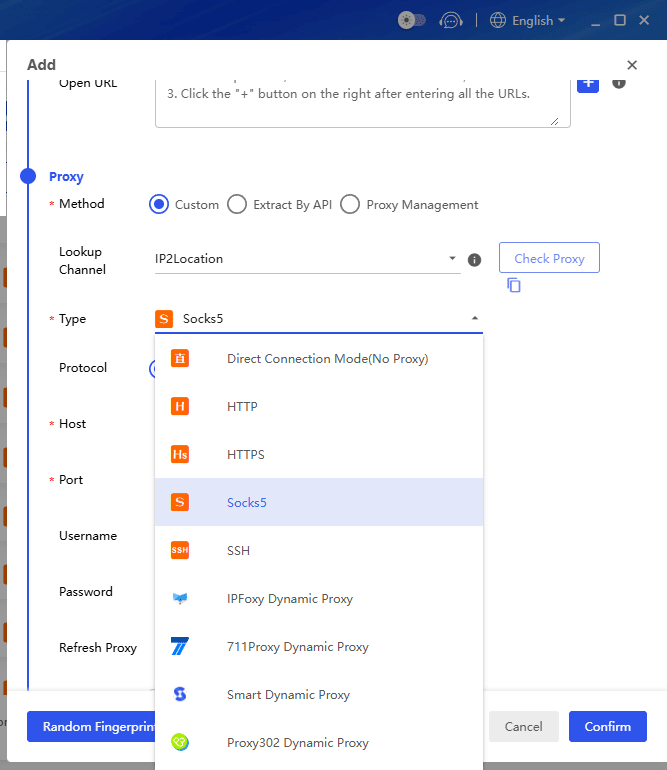
BitBrowser lets you assign a dedicated proxy to each browser profile. This gives every account its own unique, stable IP, reinforcing the illusion that each one belongs to a real person in a real location.
Step 5: Transfer Accounts via Cookies Login
Here’s a smoother way to take over an account. Instead of only getting the email and password, ask the seller to export the account’s active session cookies.
Cookies are tiny files that tell LinkedIn the browser is already logged in. When you import those cookies straight into a BitBrowser profile, the session just continues. There’s no suspicious new login from an unknown device and no verification trigger. LinkedIn sees the same session running as before.
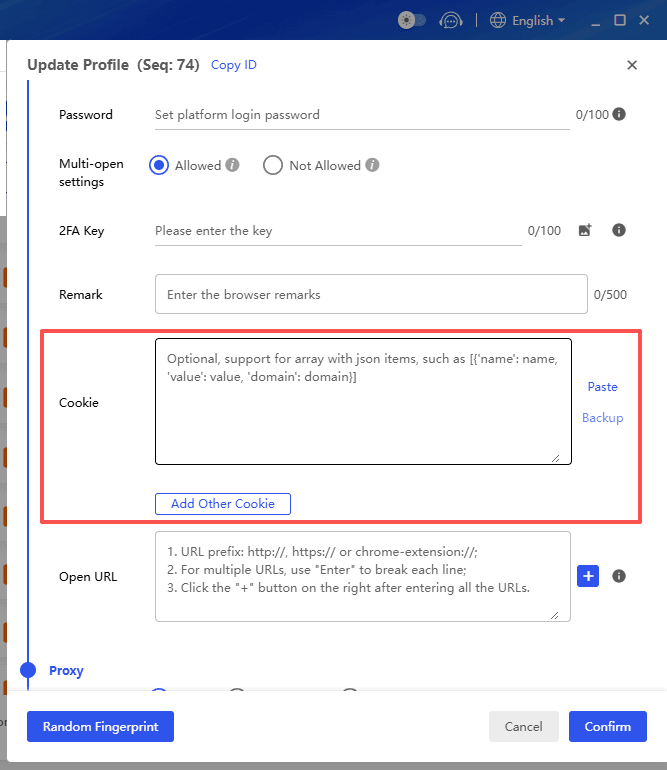
BitBrowser has a batch cookie import feature. You can load cookies into multiple profiles at once, saving a ton of time when setting up several accounts. Simply create a profile, open its settings, go to the account section, import the cookies, and launch the profile. That’s it.
Sign Up
Step 6: Warm Up the Account Gently
Once the account sits inside its own isolated BitBrowser profile, don’t jump into action. Spend one to two weeks just behaving like a normal user. Scroll the feed, read articles, like a few posts. Send zero connection requests during this phase.
After that, start connecting very slowly, maybe 5 to 10 requests per day. Only reach out to people likely to accept, like those in your industry or with mutual contacts. Personalize each message slightly and never copy-paste the same text.
The biggest mistake people make is starting heavy outreach right away. LinkedIn’s systems are tuned to catch exactly that: a dormant account that suddenly fires off a burst of activity. Take it slow, and you’ll look like a normal user coming back online.
Safer and More Sustainable Alternatives
Now that I have covered the how to, let me also share some alternatives that do not involve any of these risks.
Build and warm up your own accounts
Yes, it takes longer. But the accounts you build yourself are completely clean and under your full control. You know the registration details, you control the recovery methods, and you have built a real activity history from day one. All you need is BitBrowser to create isolated environments for each account, residential proxies for stable IPs, and patience. Six months from now, you will have accounts that are far more valuable than anything you could buy.
Use your team members‘ real profiles
If you have a sales team, equip them to do outreach from their actual LinkedIn accounts. When real people use their real profiles to connect with prospects, there is zero risk of getting banned for account fraud. This approach does not scale infinitely, but it is completely compliant and sustainable.
Invest in LinkedIn Sales Navigator
Sales Navigator is LinkedIn’s own premium tool designed for sales professionals. It unlocks advanced search filters, lead recommendations, and InMail credits that let you reach people outside your network. The pricing starts at about $99.99 per month for the Core plan, which gives you advanced search capabilities like filtering by company size, seniority level, and geography, plus account alerts and CRM sync. It is not cheap, but it is 100% within LinkedIn‘s rules and will never get your account banned.
Build real authority through content
This is a long term play, but it is the most sustainable of all. Consistently post valuable insights in your industry. When your content resonates, prospects come to you instead of you chasing them. An account that publishes quality content regularly builds real trust and a real audience. No purchased account can compete with that.
Frequently Asked Questions
Does buying a LinkedIn account really save time?
In the short term, yes. An aged account can start outreach faster than a new one. But when the account gets banned after a few weeks or months and you have to start over, the time you “saved” disappears. Factor in the money lost on the purchase, the connections lost with the banned account, and the potential damage to your main profile. It often ends up costing more time than it saves.
I see other people using bought accounts without getting caught. Is it really that risky?
What you are seeing is survivorship bias. You notice the accounts that have not been caught yet, but you never see the thousands that have already been banned. LinkedIn‘s enforcement is not instantaneous, but it is persistent and constantly improving. An account that is fine today could be flagged tomorrow based on a new detection rule.
Can I use a VPN instead of a proxy for my LinkedIn accounts?
VPNs are not suitable for multi-account management on LinkedIn. Most VPN IP addresses are shared across thousands of users, and many are already flagged by LinkedIn‘s systems as suspicious. A dedicated residential proxy gives each account its own clean IP address. VPNs are designed for privacy, not for making accounts look like independent users.
How many LinkedIn accounts can I manage from one device?
With a tool like BitBrowser, you can manage as many accounts as you need from a single computer. BitBrowser‘s free permanent plan already gives you 10 browser profiles at no cost, and paid plans start at $10 per month for more profiles and features. Each profile is completely isolated, with its own fingerprint and proxy settings, so LinkedIn sees each one as a separate real device.
What exactly is a browser fingerprint and why does it matter for LinkedIn accounts?
A browser fingerprint is a collection of data points about your device and browser that websites can use to identify you uniquely, even without cookies. This includes things like your operating system, screen resolution, installed fonts, graphics card details, timezone, language settings, and dozens of other parameters. When multiple LinkedIn accounts share the same fingerprint, the platform can easily link them together. BitBrowser creates unique fingerprints for each profile so that every account appears to be on a completely different device.
Conclusion
Buying LinkedIn accounts can feel like a fast shortcut, but it comes with heavy risks. If you still go down this path, take every precaution. Use BitBrowser to create fully isolated profiles. Assign stable residential proxies. Import session cookies to avoid fresh login triggers. Warm up accounts slowly and never rush into outreach. These steps won't make buying accounts risk-free, but they'll significantly lower your chances of quick detection.
An even smarter move is building your own accounts from scratch. It takes patience, but the profiles stay clean and under your control long-term. Whether you buy or build, the rule is the same: every account needs its own independent digital identity. BitBrowser makes that simple. Create your profiles, assign your proxies, and treat each account like a real person with their own device. That's the foundation for staying under the radar.

 Multi-Account Management
 Prevent Account Association
 Multi-Employee Management
Recommended
See More 



