How to Access Instagram When Blocked: Unblocked Browsing with BitBrowser
 2026.06.24 07:01
 YT.Shi
Instagram is one of the most popular social media platforms in the world. People use it to stay connected with friends, follow creators, promote businesses, and discover new content. However, access to Instagram is not always available. Many users find that Instagram is blocked at school, work, public WiFi networks, or even in certain countries.
If you are unable to access Instagram, there are several ways to regain access safely and securely. This guide explains why Instagram gets blocked and how you can enjoy unblocked browsing without putting your account at risk.
Want to browse the internet anonymously without leaving a trace? Check out our guide to anonymous browsing on Instagram.
Why Instagram Gets Blocked
Instagram can be blocked for several reasons, including network policies, regional restrictions, bandwidth controls, and device settings. Understanding the cause can help you choose the right solution.
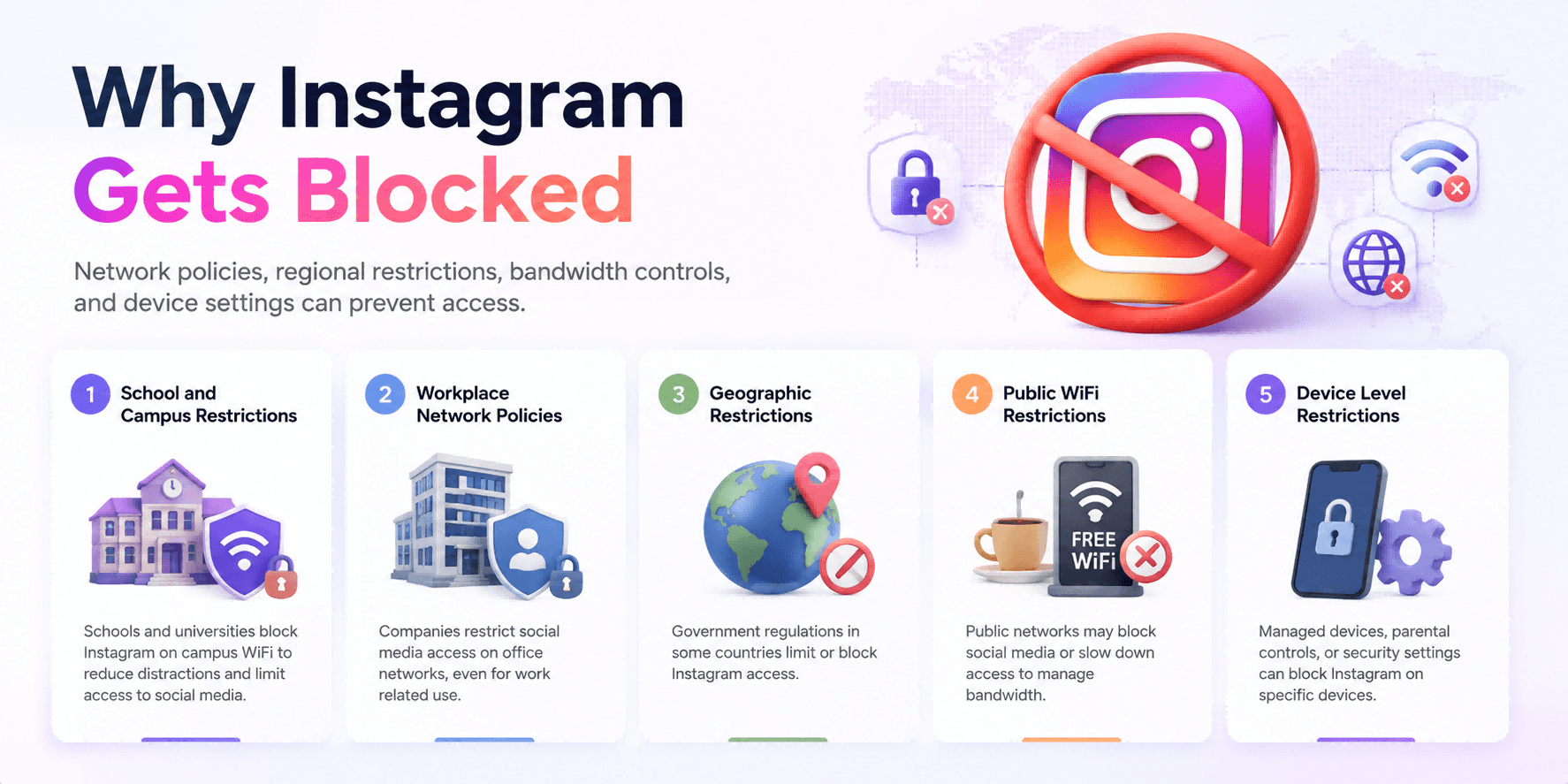
1. School and Campus Restrictions
Many schools and universities block Instagram to reduce distractions and limit access to social media. These restrictions are usually applied through the campus WiFi network rather than your device itself. This can affect students who use Instagram for educational purposes, student organizations, or research projects.
2. Workplace Network Policies
Many companies restrict access to social media platforms on office networks. Even employees who use Instagram for marketing, customer support, or business research may find the platform blocked due to company wide network policies.
3. Geographic Restrictions
In some countries, Instagram access is limited or unavailable due to government regulations. Travelers often encounter these restrictions when visiting regions where Instagram is blocked, making it difficult to access messages, business accounts, and other important features.
4. Public WiFi Restrictions
Airports, hotels, libraries, and cafes sometimes restrict access to social media websites to manage network usage. In some cases, internet providers may also slow down access to certain platforms, causing Instagram to load slowly or function poorly.
5. Device Level Restrictions
Not all restrictions come from the network. Managed devices, parental controls, or workplace security settings can also block Instagram. In these situations, Instagram may work on another device connected to the same network but remain unavailable on the restricted device.
What “Unblocked Instagram” Access Actually Means
When people say “Instagram unblocked,” they usually mean one of these situations:
● Instagram will not load on a specific Wi Fi network
● the app loads but posts and stories do not refresh
● the login page will not open
● you get an error like “could not connect” or “try again later”
● the website version is blocked while the app works, or the opposite
● Instagram works on mobile data but not on Wi Fi
● it works in one country but not another
So the goal is not just “open Instagram once.” The goal is stable access that does not constantly trigger security checks, captchas, or “suspicious login attempt” warnings.
That is where people often mess up. They fix access for five minutes, then Instagram starts challenging the account because everything looks inconsistent.
Quick checks before you try anything complicated
Do these first. Seriously. Sometimes the simplest thing is the whole problem.
Check if Instagram is down
If Instagram is having an outage, nothing else matters. Try checking another network or use a status site.
Try switching networks
If it works on mobile data but not on Wi Fi, you are dealing with a network block.
Try the web version
Open instagram.com in a browser. Sometimes only the app is blocked, sometimes only the website is blocked.
Restart and update
Update the Instagram app. Restart the device. Clear the app cache if you are on Android. It sounds basic because it is. But it works more often than you would think.
Common ways to access Instagram when blocked
Now the practical part. There are a few routes people use, depending on how strict the restriction is.
Option 1: Use mobile data or a different network
If you are at school or work and just need quick access, switching to mobile data can bypass the Wi Fi filter.
Not ideal if you need stable access all day. But as a quick fix, it is clean and low risk.
Option 2: Use the Instagram web version with a different browser
Sometimes a restrictive network blocks a specific app pattern more aggressively than regular browsing. Trying a different browser can help, especially if the block is light.
This is not reliable against serious firewalls, but it is worth trying.
Option 3: Use a VPN
A VPN routes your connection through another location. This can help with network firewalls and geographic restrictions.
But VPNs are not always stable on locked down networks, and some places block VPN traffic too. Also, if you are managing Instagram accounts, VPN use can create suspicious location changes if you constantly hop between countries.
So it can work, but it can also create extra login friction.
Option 4: Use a proxy plus a browser profile that stays consistent
A proxy changes the IP address you appear to be browsing from, similar to a VPN in that sense, but the real value for Instagram users is consistency. If you keep using the same proxy for the same account, from the same general location, your logins look normal.
Now add one more layer. A consistent browser profile.
Instagram does not only look at IP addresses. It also looks at device and browser signals. Cookies, local storage, browser configuration, and other fingerprint style signals. If those keep changing, Instagram may throw verification prompts or lock the account temporarily.
So if your goal is unblocked browsing and you also care about account stability, the “proxy plus consistent profile” approach tends to be smoother than random quick fixes.
Best Option: Using BitBrowser for Unblocked Instagram Browsing
If you have only occasional blocks, a network switch or VPN might be enough.
But if you need repeatable access to Instagram when blocked, and you care about privacy and account stability, BitBrowser is one of the tools people use for this.
BitBrowser lets you create separate browser profiles, so each Instagram login can have its own isolated environment. Cookies, cache, local storage, everything. You can also connect a proxy to each profile, which helps with:
● network level Instagram blocking at school, work, or public Wi Fi
● geo restrictions when traveling or living in a blocked region
● keeping logins stable by maintaining consistent IP and profile signals
● managing multiple Instagram accounts without mixing sessions
The basic idea is simple. Instead of fighting blocks with random changes every time, you build a setup that looks normal and stays consistent. That is usually what makes unblocked browsing actually last.
How to Access Instagram with BitBrowser
If you want to go that route, start by creating one BitBrowser profile for one Instagram account, attach a proxy in the right region, log in, and keep using that same profile for that same account. Then repeat for other accounts if you manage more than one.
Step 1: Create a Profile
Create a new BitBrowser profile for your Instagram account.
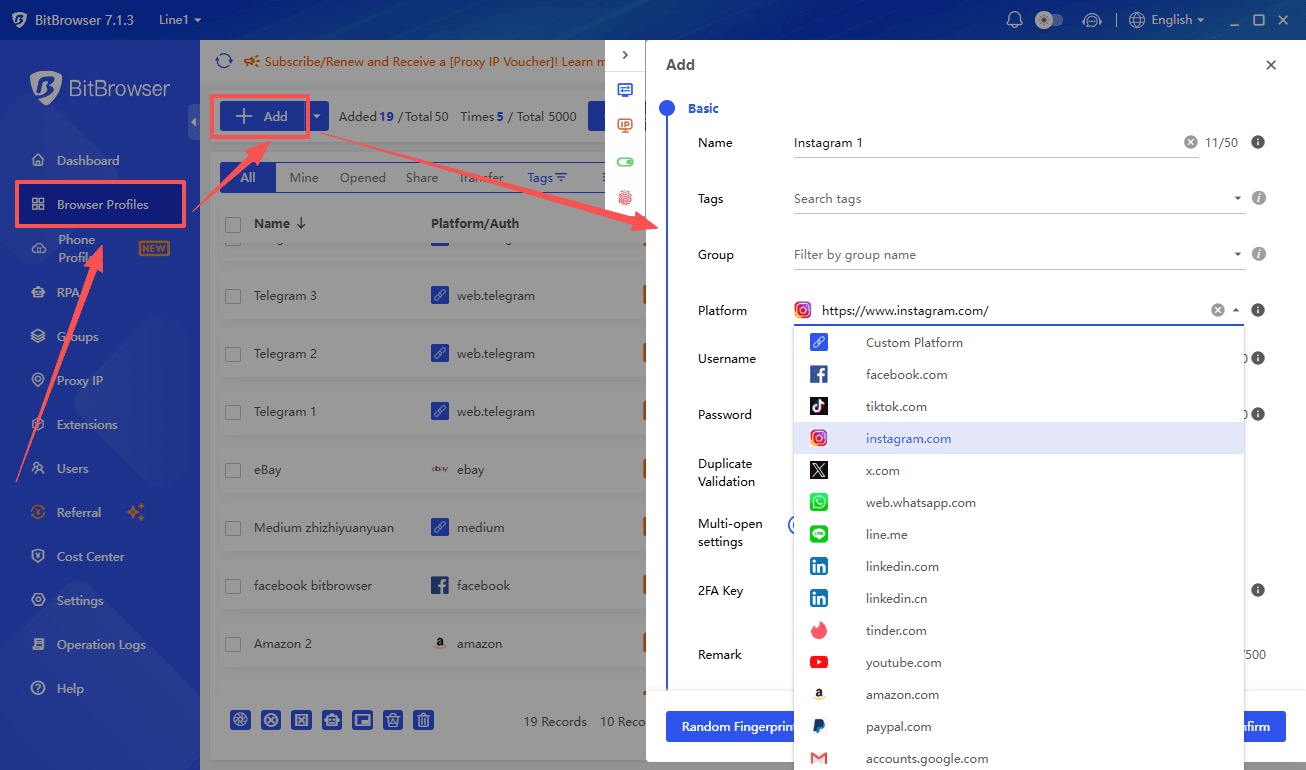
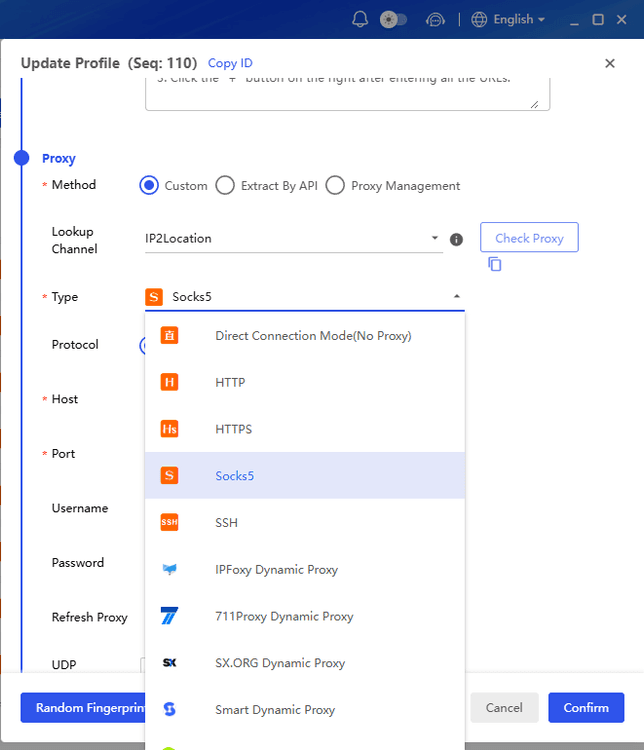
Step 2: Add a Proxy
Attach a proxy in the same region where the account is normally used.
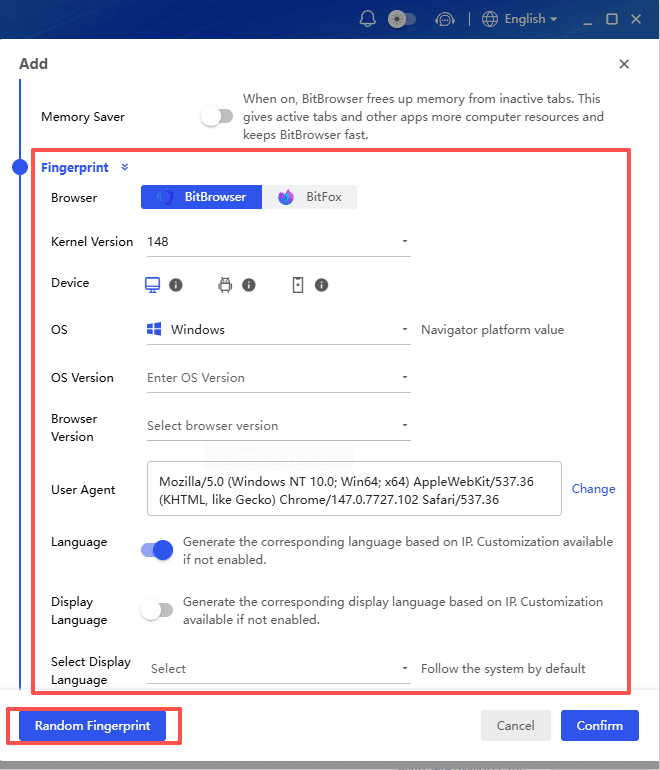
Step 3: Set Up the Fingerprint
Use the default fingerprint settings or customize them if needed.
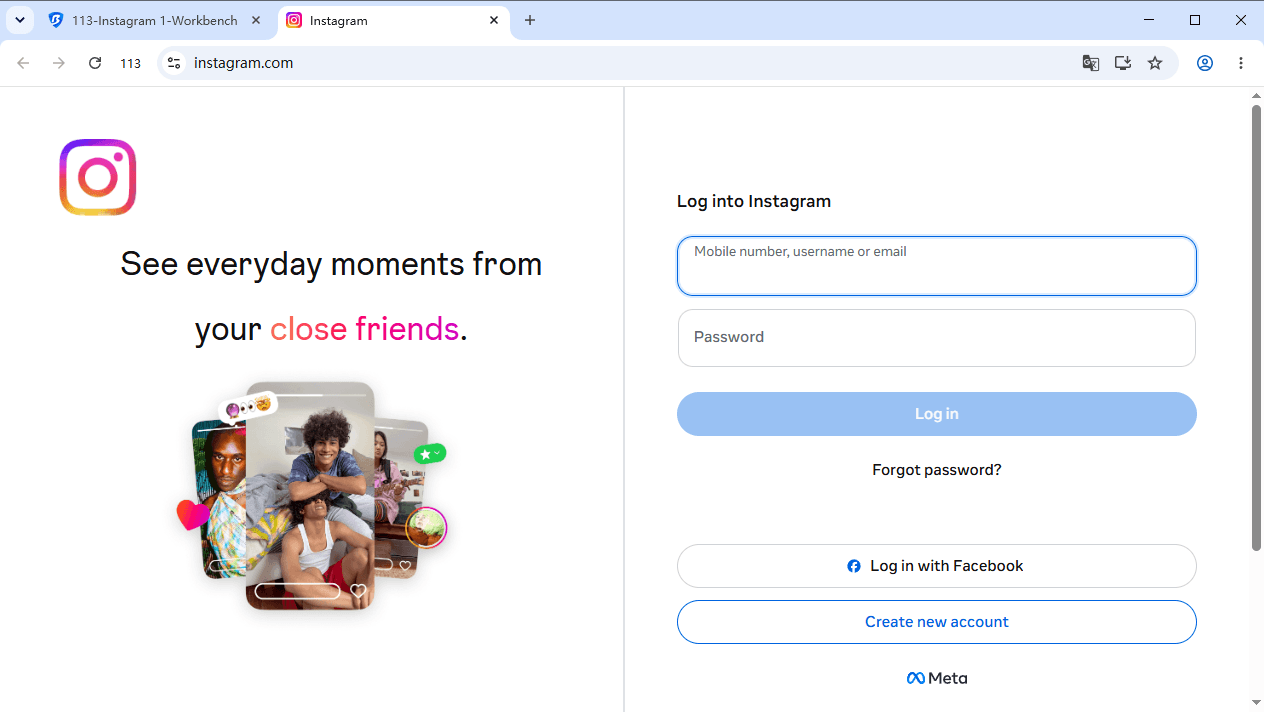
Step 4: Open Instagram and Log In
Launch the profile, visit Instagram, and log in to your account.
Step 5: Repeat for Other Accounts
If you manage multiple accounts, create a separate profile and proxy for each one.
Practical tips to stay logged in and avoid extra verification
These are simple, but they save headaches.
Match proxy location to your account
If your Instagram account is clearly a New York based business, logging in from Germany one hour and Singapore the next can trigger a challenge.
Pick a proxy location that makes sense and stick with it.
Do not constantly change your browser environment
If you use a profile based setup, do not change the fingerprint settings all the time. Once it works, keep it consistent for that account.
Use strong passwords and enable two factor authentication
Two factor authentication does not stop blocks, but it helps you recover faster and keeps your account safe if you need to log in again.
Separate accounts that should not be linked
If you manage multiple accounts, using the same browser session and same cookies can create cross contamination. Separate profiles reduce that.
Conclusion
Instagram blocks can occur in schools, workplaces, public WiFi networks, and certain regions around the world. Fortunately, there are several ways to regain access, including switching networks, using proxies, or using VPN services.
For users who manage multiple Instagram accounts or require greater privacy and account separation, BitBrowser can provide an additional layer of control through browser profile isolation and proxy support.
By choosing the right tools and following safe browsing practices, you can enjoy a smoother and more reliable Instagram experience wherever you are.

 Multi-Account Management
 Prevent Account Association
 Multi-Employee Management
Recommended
See More 



