How to Create a Second Facebook Account on BitCloudPhone in 2026
 2026.08.13 09:11
 YT.Shi
Managing multiple Facebook accounts has become a common need for many people in 2026. Whether you are a social media marketer, a business owner running multiple Pages, or someone who simply wants to separate personal and professional networks, having a second Facebook account can be incredibly useful.
However, using multiple Facebook accounts on the same device raises the risk of account‑linking. Different accounts may share the same device environment, app data, or login history.
A cloud phone like BitCloudPhone provides a separate Android environment for each account, making it easier to organize and manage different Facebook accounts from one computer.
In this guide, we will explain how to create a second Facebook account on BitCloudPhone and share practical tips for better Facebook account management in 2026.
Understanding the Challenge of Multiple Facebook Accounts
Before we dive into the how to create a second Facebook account process, it helps to understand why this is tricky in the first place.
Facebook’s detection systems are extremely sophisticated. They track device fingerprints, IP addresses, browser cookies, and login patterns. If you simply log out of your first account and try to create another Facebook account on the same device, Facebook will likely flag you.
The platform officially allows only one personal account per person. Having multiple Facebook accounts is technically against their terms of service. However, Facebook does permit up to four additional profiles under one main account in some regions. For those who genuinely need separate accounts for legitimate business reasons, the key is to keep each account completely isolated.
This is exactly what BitCloudPhone helps you achieve.
What Makes BitCloudPhone Different for Facebook Account Management
BitCloudPhone is not just another emulator. It is a cloud-based Android environment that gives each Facebook account its own isolated cloud phone instance. Every instance comes with unique hardware fingerprints, screen resolutions, Android IDs, and network settings.
Think of it this way: instead of trying to run two Facebook accounts on one phone, BitCloudPhone lets you run each account on its own separate virtual phone in the cloud. Facebook sees each one as a completely different user on a different device. This makes BitCloudPhone Facebook account management much safer than traditional methods.
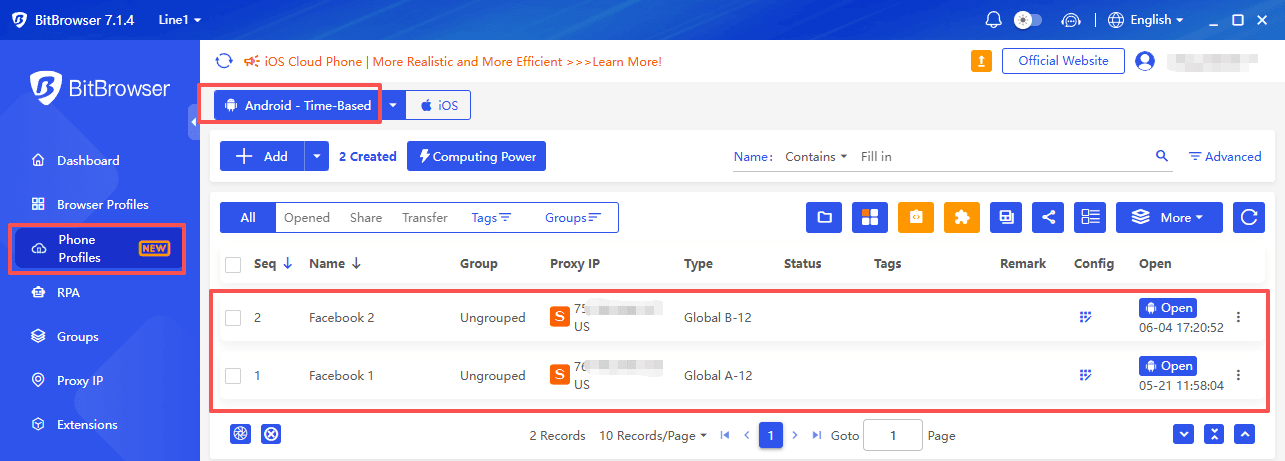
The platform also supports proxy IP configuration for each cloud phone. This means your second Facebook account can appear to be in a different country or region from your first one, adding another layer of isolation.
Step-by-Step Guide: How to Create a Second Facebook Account on BitCloudPhone
Now let us get into the actual process. Here is how to create a second Facebook account using BitCloudPhone.
Step 1: Set Up Your BitCloudPhone Account
Start by downloading the BitBrowser client and signing up for a BitCloudPhone account.
Once your account is active, you can access the cloud phone dashboard from your browser on Windows or Mac.
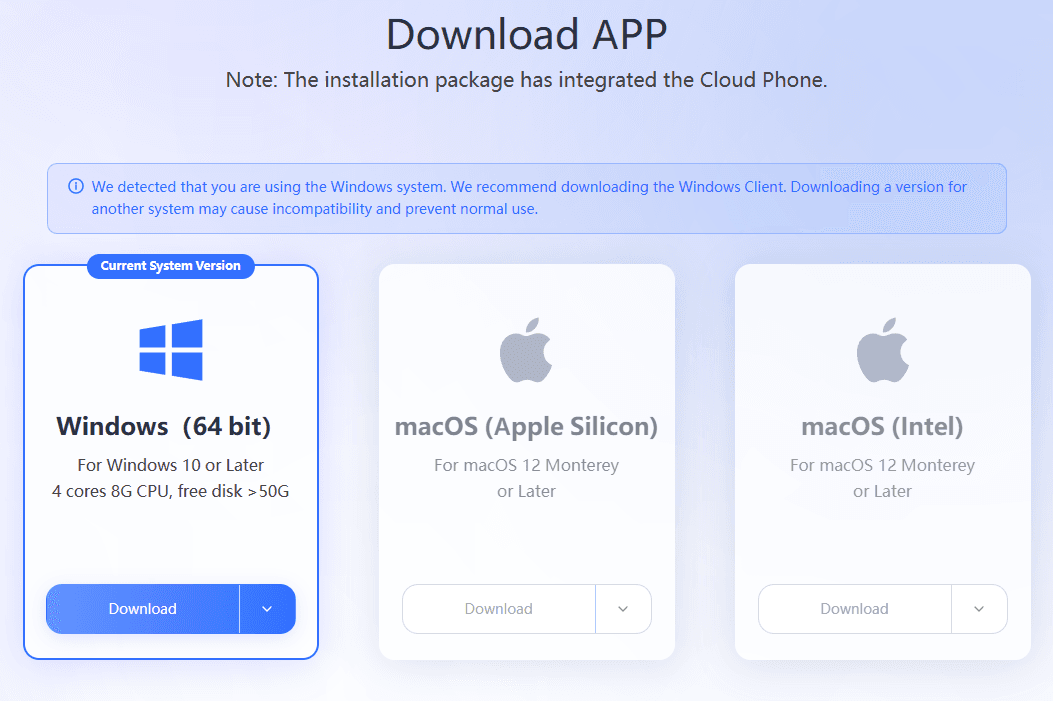
BitCloudPhone offers flexible pricing options, including pay-as-you-go models that start at a very low cost per day.
BitCloudPhone offers trial credits and discount codes to every new user, and you can also participate in additional coupon promotions.
Step 2: Create Your First Cloud Phone Instance for the Second Account
To create a second Facebook account, you need a new cloud phone instance. In the BitCloudPhone dashboard, navigate to the phone profiles section and click to add a new device.
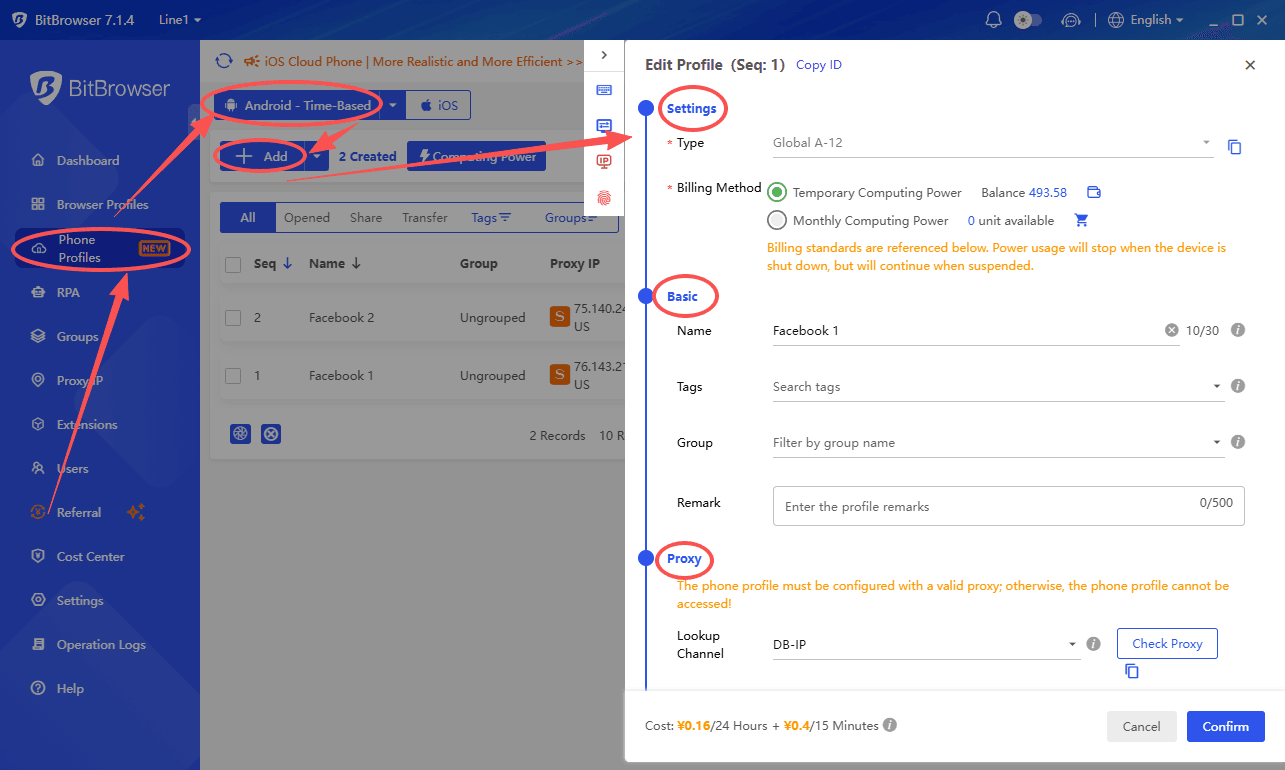
When creating the instance, you will have options to configure:
· Device model and specifications
· Operating system version
· Regional settings
The system can automatically match real phone parameters like language, time zone, and carrier based on your configuration.
Step 3: Configure a Dedicated Proxy IP
This is one of the most important steps. Each cloud phone instance should have its own proxy IP to ensure complete network isolation. BitCloudPhone supports SOCKS5 proxy configuration.
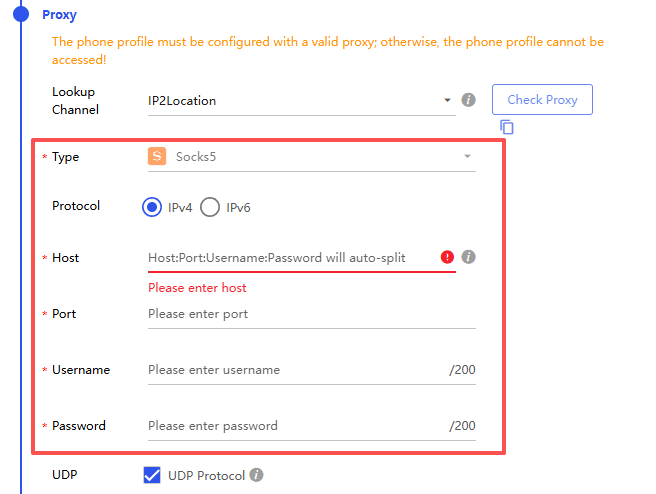
When you set up your cloud phone for the second Facebook account, go to the proxy settings and enter your proxy information. The system will check the proxy to make sure it works properly. Once configured, your cloud phone will have a completely different IP address from your primary device.
Step 4: Install the Facebook App
With your cloud phone instance created and proxy configured, you can now install Facebook.
BitCloudPhone allows you to install apps directly from the Google Play Store or by uploading APK files.
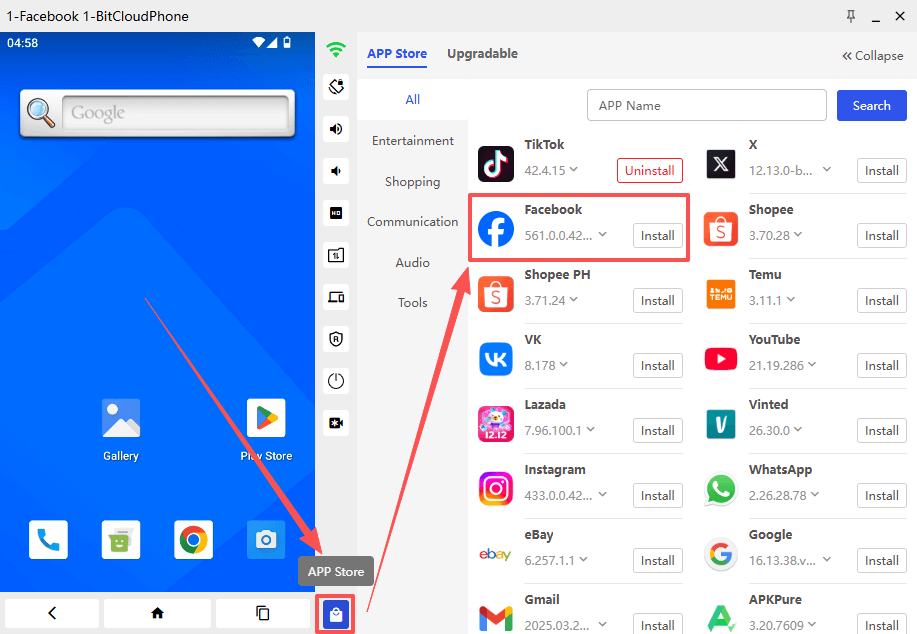
Simply open the Google Play Store within your cloud phone, search for Facebook, and install it just like you would on a real Android device.
Step 5: Create Your Second Facebook Account
Now you are ready to create another Facebook account. Open the Facebook app on your cloud phone and select the option to create a new account. Use a different email address or phone number than your primary account.
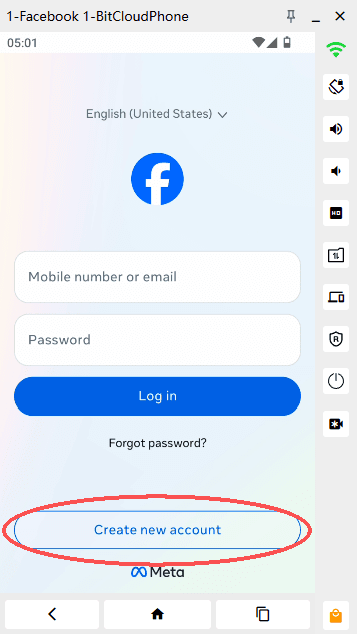
Fill in the required information and complete the registration process. Because you are using a completely isolated cloud phone with a unique device fingerprint and proxy IP, Facebook will treat this as a new user on a new device.
Step 6: Warm Up Your New Account
Once you create a second Facebook account, do not start aggressive activities right away. Facebook’s algorithms are sensitive to new accounts that behave like bots. Spend some time browsing, liking a few posts, and adding a profile picture. This account warming process helps establish your account as legitimate.
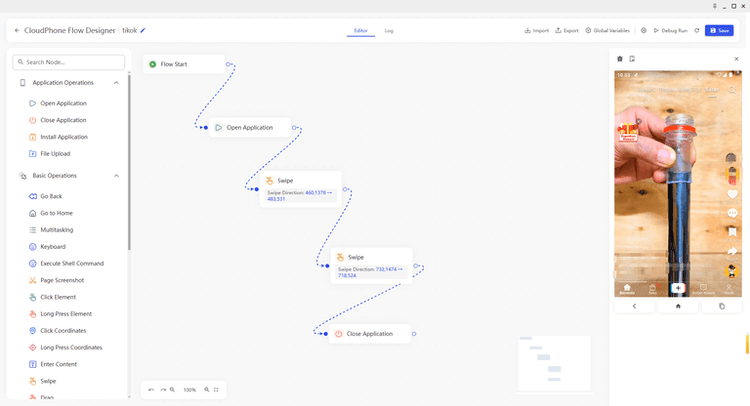
BitCloudPhone even offers RPA automation features that can help with account warming by simulating natural user behavior. You can set up automated actions like scrolling, tapping, and typing to keep your accounts active without manual effort.
Advanced Features for Managing Multiple Facebook Accounts
Once you know how to create a second Facebook account, you might want to manage even more. BitCloudPhone offers several powerful features for this.
Real-Time Synchronizer
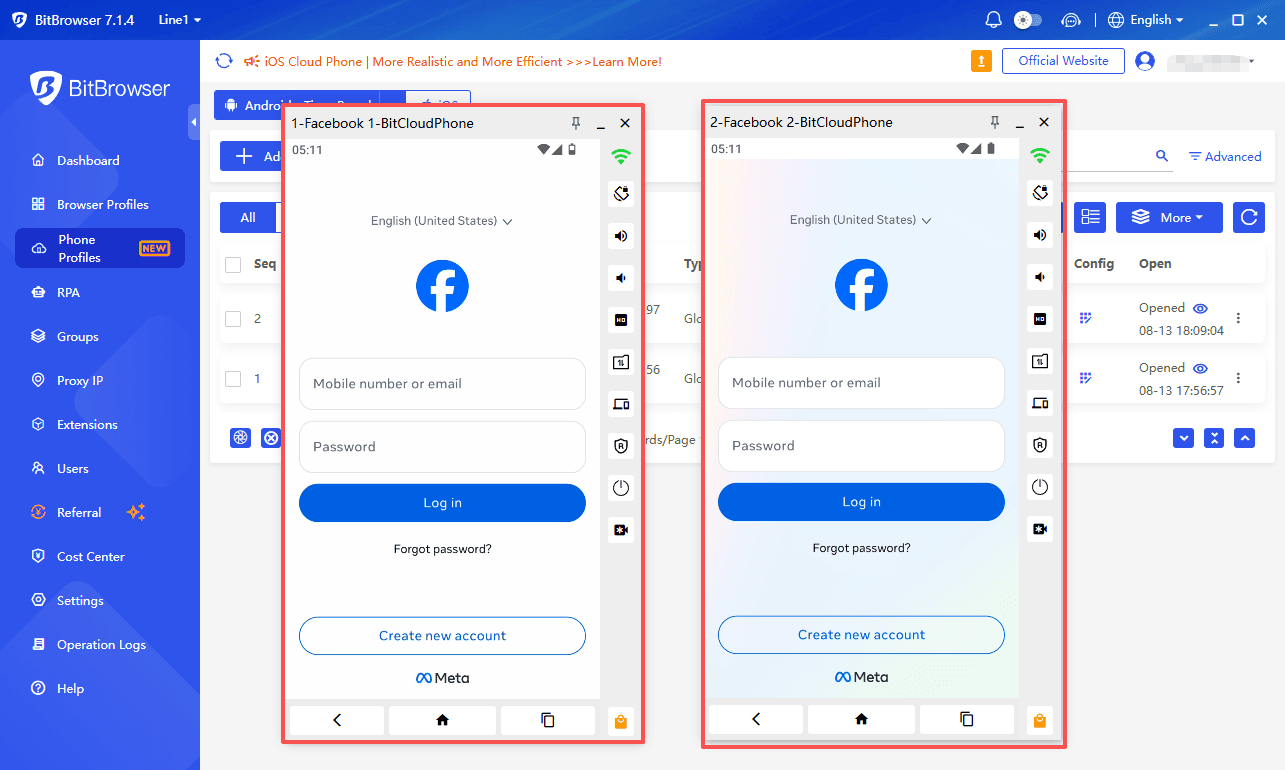
The built-in synchronizer lets you control multiple Facebook accounts in real time. Tap, type, or swipe on one cloud phone instance, and the actions instantly replicate across all selected devices. This is perfect for posting the same content across multiple accounts or running coordinated engagement campaigns.
RPA Automation
For those managing multiple Facebook accounts at scale, BitCloudPhone’s RPA (Robotic Process Automation) feature is a game changer. You can set up a workflow once and run it across many cloud phones simultaneously. Common uses include automated posting, friend requests, and Messenger replies.
How to Use the BitCloudPhone RPA Automation Features
Team Collaboration
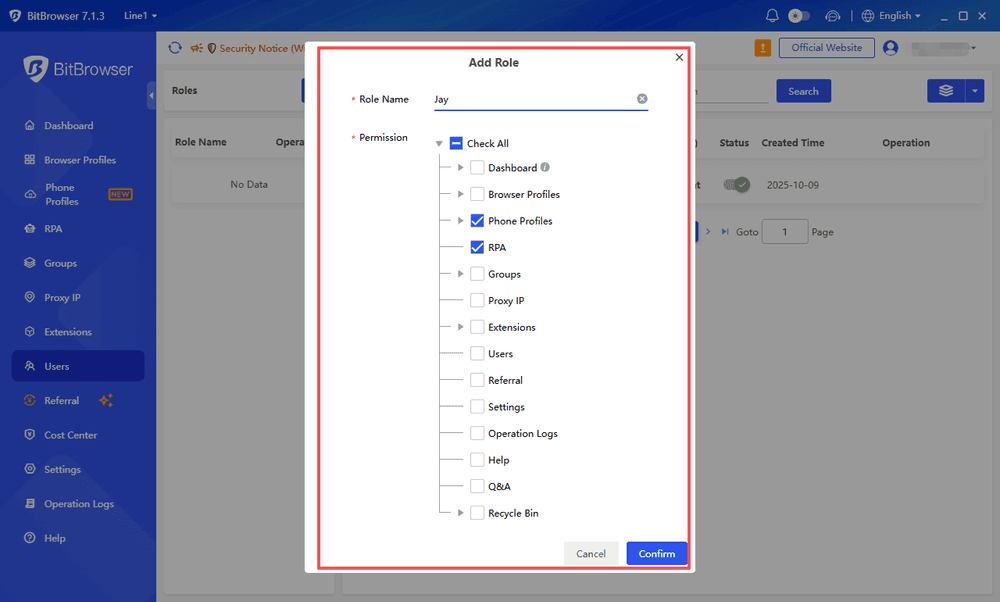
If you are working with a team, BitCloudPhone allows you to assign different access levels to team members. Team members can operate accounts without ever touching passwords, and when someone leaves, you can simply revoke their access.
Final Thoughts
Creating a second Facebook account is simple, but managing multiple accounts efficiently requires a good organization method.
With BitCloudPhone, users can create separate cloud phone environments for different Facebook accounts, making daily Facebook account management easier and more flexible.
Whether you are managing business Pages, handling marketing tasks, or simply keeping different accounts separate, BitCloudPhone provides a practical way to organize your Facebook activities in 2026.
If you want to run multiple iPhone apps on your computer, try our newly launched iOS cloud phone.
Frequently Asked Questions
Can I create a second Facebook account on BitCloudPhone?
Yes. You can create a second Facebook account by setting up a separate BitCloudPhone instance and completing the normal Facebook registration process inside that environment.
How many Facebook accounts can I manage with BitCloudPhone?
The number depends on your BitCloudPhone plan and available cloud phone resources. Users can create multiple cloud phone instances and assign different accounts to each environment.
Can BitCloudPhone help manage multiple Facebook accounts?
Yes. BitCloudPhone provides separate Android environments that help users organize and manage multiple Facebook accounts more efficiently.
Is BitCloudPhone only for Facebook accounts?
No. BitCloudPhone can also be used for other Android applications, including social media apps, business tools, and mobile workflows that require separate environments.

 Multi-Account Management
 Prevent Account Association
 Multi-Employee Management
Recommended
See More