BitCloudPhone iOS App Library: Popular Apps and How to Install Them
 2026.11.06 07:20
 YT.Shi
From TikTok and Instagram to Amazon and ChatGPT, BitCloudPhone iOS offers a built-in app library for installing apps directly on your cloud phone.
Open the library, find your app, and click Install. Below are some popular options and a quick guide to getting started.
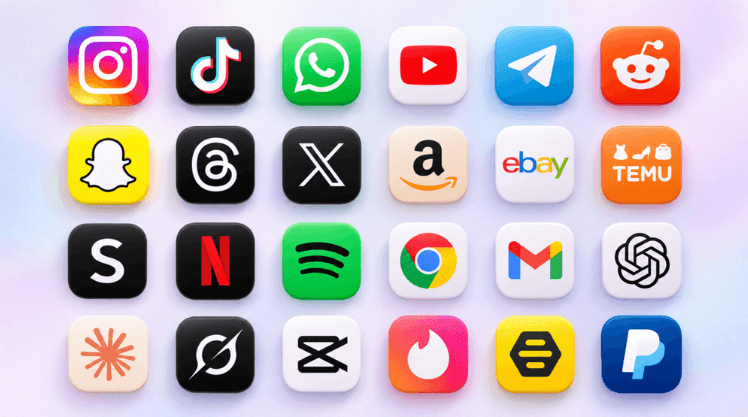
Popular Apps Available on BitCloudPhone iOS
The library is updated over time. These selections highlight familiar apps for social media, shopping, communication, entertainment, and everyday work.
Versions below were recorded on November 6, 2026. Check the library in your client for current versions and additional apps.
Social Media and Messaging
Manage social channels, keep up with communities, and stay in touch.
Shopping and Marketplaces
Browse major retailers and resale platforms from your iOS cloud phone.
AI, Browsers and Everyday Tools
Access AI assistants, check email, edit videos, and browse the web.
Entertainment and Dating
The library also includes well-known streaming and dating apps.
These are selected highlights. Open the built-in library to browse more apps and see the latest additions.
More Apps in the Library
Looking for more options? Expand the list below to see additional apps and their recorded versions.
View more apps and versions Hide additional apps
Versions recorded on November 6, 2026. Check your client for current availability and versions.
| App | Version |
|---|---|
| AE+Aerie | 26.15.0 |
| Aisle | 12.72 |
| AlipayHK | 7.5.7 |
| AM | 8.13.0 |
| Anthropologie | 26.8.2 |
| AppleStore | 690000 |
| Badoo | 5.467.0 |
| BanCoppel | 67.0 |
| BAND | 30.0.1 |
| Belk | 67.0.3 |
| Binance.US | 3.45.0 |
| BloFin | 3.36.0 |
| Booking.com | 69.8 |
| bunq | 31.14.0 |
| Capfit | 1.1 |
| CashApp | 5.60.0 |
| Chime | 5.345.0 |
| Chispa | 12.17.1 |
| CIMBBankPH | 4.7 |
| CMB | 10.5.2 |
| Coinbase | 14.32.25 |
| Cookie-Editor | 1.13.0 |
| DoorDash | 8.33.0 |
| eharmony | 10.87.1 |
| FacebookWatch | 567.0.0 |
| Feeld | 9.11.0 |
| FreePeople | 26.8.2 |
| GRAVITY | 15.0 |
| happn | 2026.14.0 |
| HelloTalk | 6.4.0 |
| Heymandi | 8.9.0 |
| HopeGoo | 1.45.0 |
| IndonesianLovely | 2021.3.17 |
| ING | 5.22.0 |
| Jaumo | 202605.1.1 |
| Jdate | 7.7.1 |
| KakaoTalk | 26.6.4 |
| Lazada | 908.1.0 |
| LINE | 26.9.0 |
| LOCA | 3.4.0 |
| LOVELY | 30.0.6300 |
| LOVOO | 229.1 |
| MEEFF | 6.7.1 |
| MeetMe | 231.0 |
| Mercari | 9.38.0 |
| Mistplay | 4.9.0 |
| Moji | 3.18.0 |
| NatWest | 7.70.0 |
| NaverSeries | 3.63.0 |
| OfficialAccount | 7.1.1 |
| OldSchoolRuneScape | 240.3 |
| Omi | 7.67.0 |
| Omiai | 11.52.0 |
| OurTime | 26.11.01 |
| PayPal | 8.107.2 |
| PEXX | 3.6.0 |
| PicPay | 12.32.0 |
| Pikabu | 6.7.0 |
| Polymarket | 2.8.9 |
| QuackQuack | 7.4.3 |
| QVC | 7.11.1 |
| RedBook | 9.42 |
| Remitly | 6.72 |
| Revolut | 10.148 |
| RuneScape | 949.4.1 |
| Shopper+ | 9.1.4 |
| SumUpBusiness | 3.108.0 |
| SuncorpBank | 29.0.0 |
| SweetRing | 4.4.2 |
| Talkatone | 7.1.6 |
| TenPayGo | 1.0.6 |
| TextMe | 3.52.4 |
| TextNow | 26.26.0 |
| TheLeague | 3.0.6 |
| Tilt | 1.238.0 |
| Trip.com | 8.53.0 |
| Trust | 26.36.21 |
| TurboTax | 12.16 |
| ubank | 11.409.4 |
| Uber | 3.736.10002 |
| UberDriver | 4.573.10000 |
| UberEats | 6.329.10001 |
| Unicaja | 6.8.4 |
| Upward | 12.17.1 |
| Venmo | 26.17.0 |
| VestiaireCollective | 5.290.0 |
| VFeed | 1.11.5 |
| Viber | 28.2.2 |
| WireNest | 1.2 |
| Wish | 26.6.17 |
| WooPlus | 9.9.2 |
| Zalo | 260801 |
| 客路旅行 | 7.48.1 |
| 探探 | 7.2.8 |
| 滴滴国际版 | 7.6.76 |
| 번개장터 | 13.3.0 |
How to Install Apps on BitCloudPhone iOS
1. Open Your iOS Cloud Phone
In the BitBrowser client, find your iOS cloud phone in the phone profiles list and click Open. Wait for the home screen to load.
For first-time setup, see the BitCloudPhone iOS setup guide.
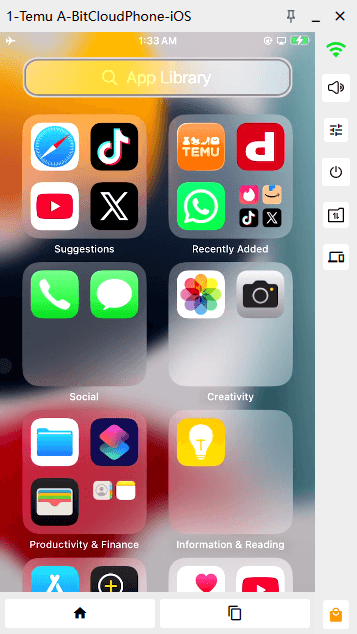
2. Open the Built-In App Library
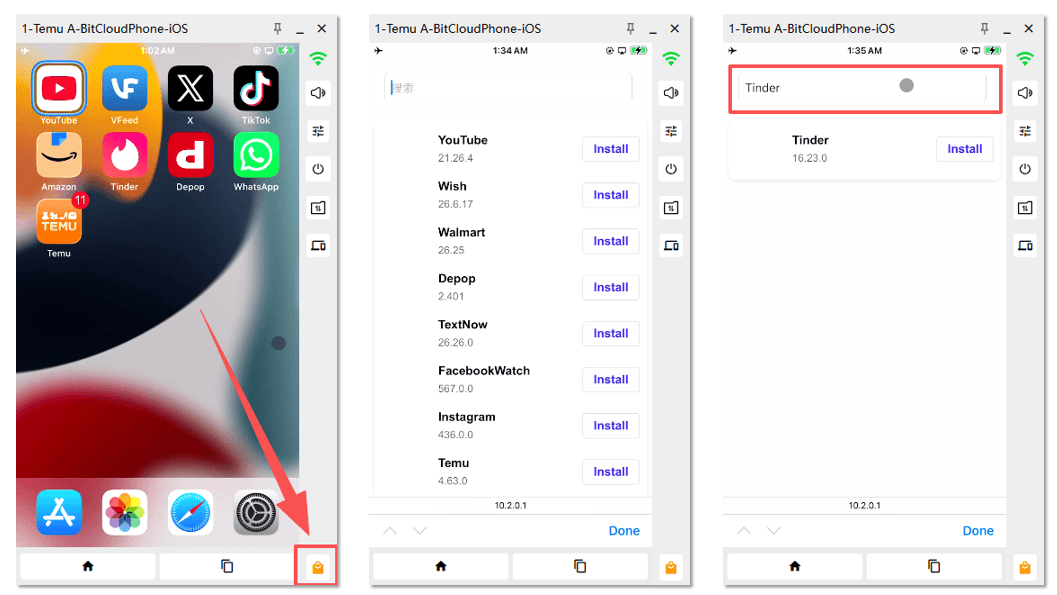
Click the orange shopping bag icon in the bottom-right corner of the cloud phone window.
This is the entrance to BitCloudPhone’s built-in app library, separate from the Apple App Store icon on the phone’s home screen.
3. Find Your App
Use the search box or browse the list. Each entry shows the app’s name, available version, and an Install button.
4. Install and Launch
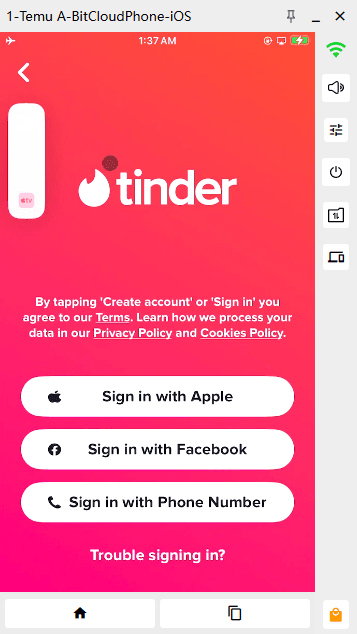
Click Install next to your chosen app. Once installation finishes, return to the home screen and open it.
Sign in or complete the app’s setup as needed.
Looking for Another App?
Search the built-in library for the current selection. If you cannot find what you need, contact technical support on Telegram or WhatsApp with the app’s name and, if available, its App Store link.
If a particular app or feature is essential to your work, confirm support before purchasing.
Frequently Asked Questions
Are these apps preinstalled?
The tables show apps available for installation. Open the built-in library and click Install to add an app to your cloud phone.
Can I find apps that are not listed in this article?
Yes. This article highlights selected popular apps. Browse or search the library in your client for more options.
Which app version will be installed?
Check the version displayed below the app’s name in the library. It may differ from the version recorded in this article.
What if an app fails to install or open?
Check the cloud phone’s network connection. If the issue continues, send technical support the app name, version, and a screenshot of the error.
Your iPhone in the Cloud, Ready on Your Computer
Run iOS apps on real iPhones hosted in the cloud. With BitCloudPhone iOS, you can install popular apps from the built-in library and manage multiple devices from one computer.

 Multi-Account Management
 Prevent Account Association
 Multi-Employee Management
Recommended
See More