VMOS Cloud Review 2025: Is It a Viable Android Cloud Phone Alternative?
 2025.12.01 15:19
 YT.Shi
Cloud phone in 2025 has become an essential tool for anyone managing multiple accounts, running cross-border e-commerce operations, or coordinating global social media campaigns. You no longer need a drawer full of physical devices or a powerful computer to run multiple Android instances. App testers can spin up various device configurations in seconds, while remote workers access their virtual Android environments from any device with an internet connection.

VMOS Cloud is designed for social media managers handling multiple accounts, cross-border e-commerce sellers, and app testers needing varied device environments. It provides cloud-based Android phones with root access, broad device compatibility, and flexible pricing plans.
This review examines whether VMOS Cloud delivers on these functions and how it compares with alternatives such as BitCloudPhone and other cloud phone services available in 2025. You will find an overview of its key features, typical use cases, pricing, and its position relative to competing platforms to help determine whether it meets your operational needs.
Product Positioning and Core Features
VMOS Cloud is a cloud-based solution that allows you to run Android phones without the need for physical devices or powerful local hardware. Instead, everything operates on remote servers, and you can access fully functional Android environments through your browser or a dedicated client. All processing takes place in the cloud, making it possible to use real Android systems remotely with the features of a physical smartphone.
Here are some key features of VMOS Cloud:
1. Broad Software and Hardware Compatibility
The platform supports multiple Android versions and is compatible with mainstream device brands. It is officially stated to support Android versions up to Android 15 and device models from major manufacturers such as Samsung, Google, Xiaomi, Vivo, and Oppo.
2. Multi-Instance & Multi-Account Management
The platform supports running and managing multiple independent virtual Android devices from a single console. Each instance operates in an isolated environment with a unique device fingerprint, facilitating tasks like batch operations, social media management, or parallel application testing.
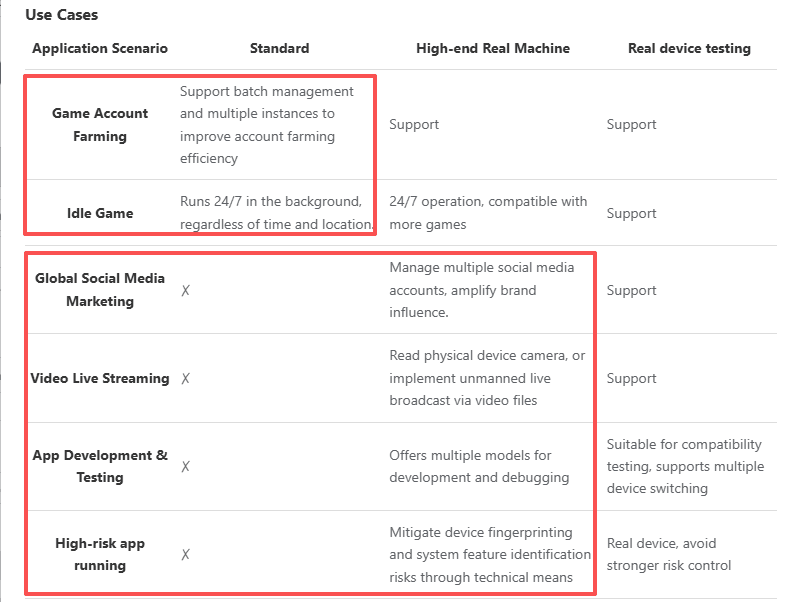
Important Notes: VMOS Cloud offers two types of device models: Standard and High-end Real Machine. The latter option is more expensive. The Standard model only supports Game Account Farming. Features such as Global Social Media Marketing, Video Live Streaming, and App Development & Testing are exclusively available on the High-end Real Machine model.
The official information is as follows:
3. Root Access by Default
Virtual devices are provisioned with pre-enabled root permissions. This provides immediate system-level control for installing specific modules, running automation scripts, or performing deep customization without complex procedures on a physical device.
4. Automation & batch operations
VMOS Cloud mentions batch, multi-instance, and automated tasks; actual applicability depends on platform and script compatibility.
5. Google Mobile Services (GMS) Integration
The virtual devices come with full Google Play Services and Store pre-installed. This ensures broad compatibility with the Android app ecosystem, allowing for normal installation, updates, and functionality of apps dependent on GMS.
Pricing Plans & Rental Models Explained
Understanding VMOS Cloud pricing plans requires recognizing the platform's unique approach to billing and device access. The service structures its offerings around flexibility, allowing you to pay only for what you actually use rather than committing to fixed monthly subscriptions.
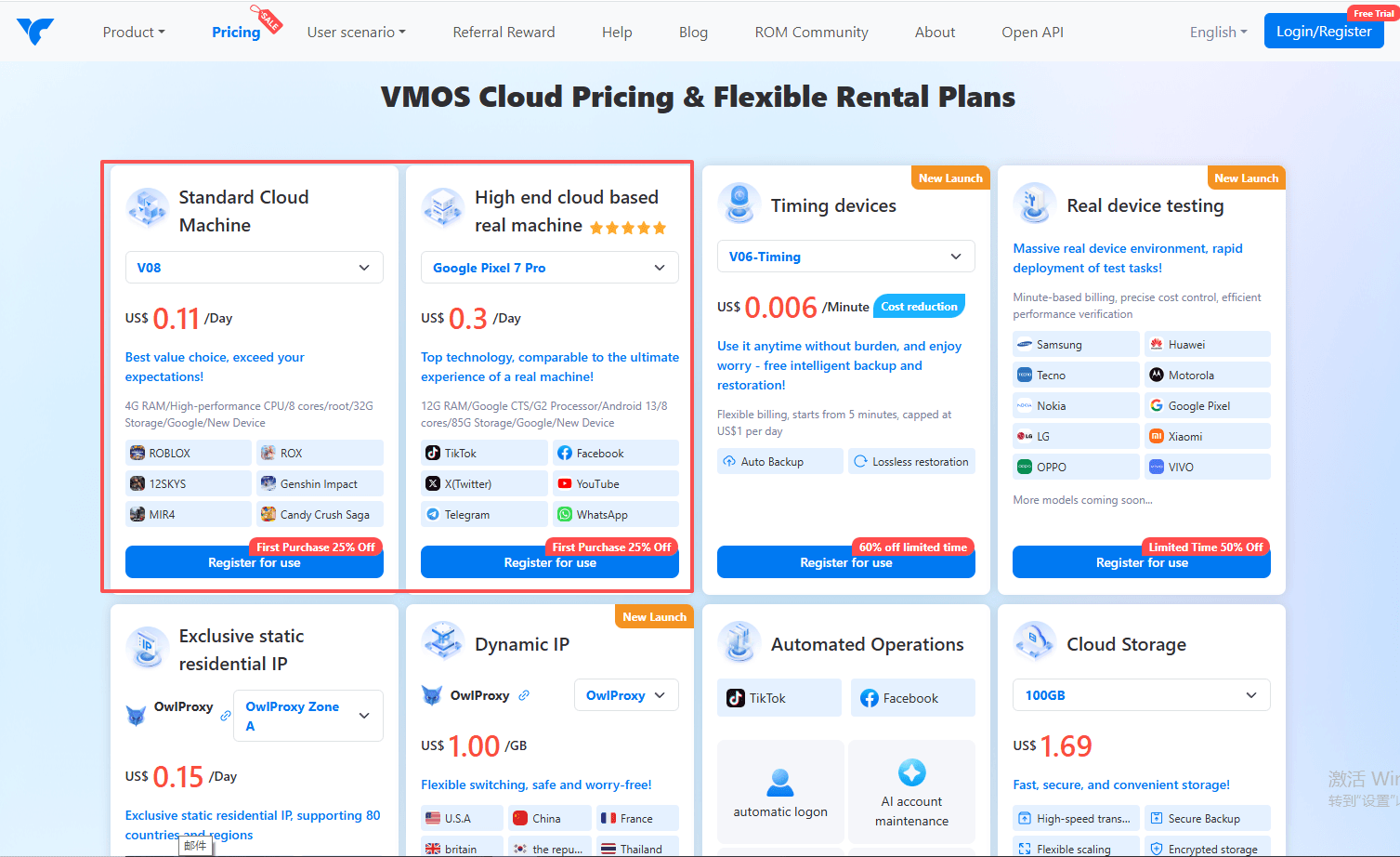
1. Complex Cloud Phone Rental Options
VMOS Cloud does not offer a permanent free plan. Its pricing page is highly detailed, providing different pricing schemes based on device model, cloud phone specifications, and duration. However, for first-time visitors, the page can appear overwhelming.
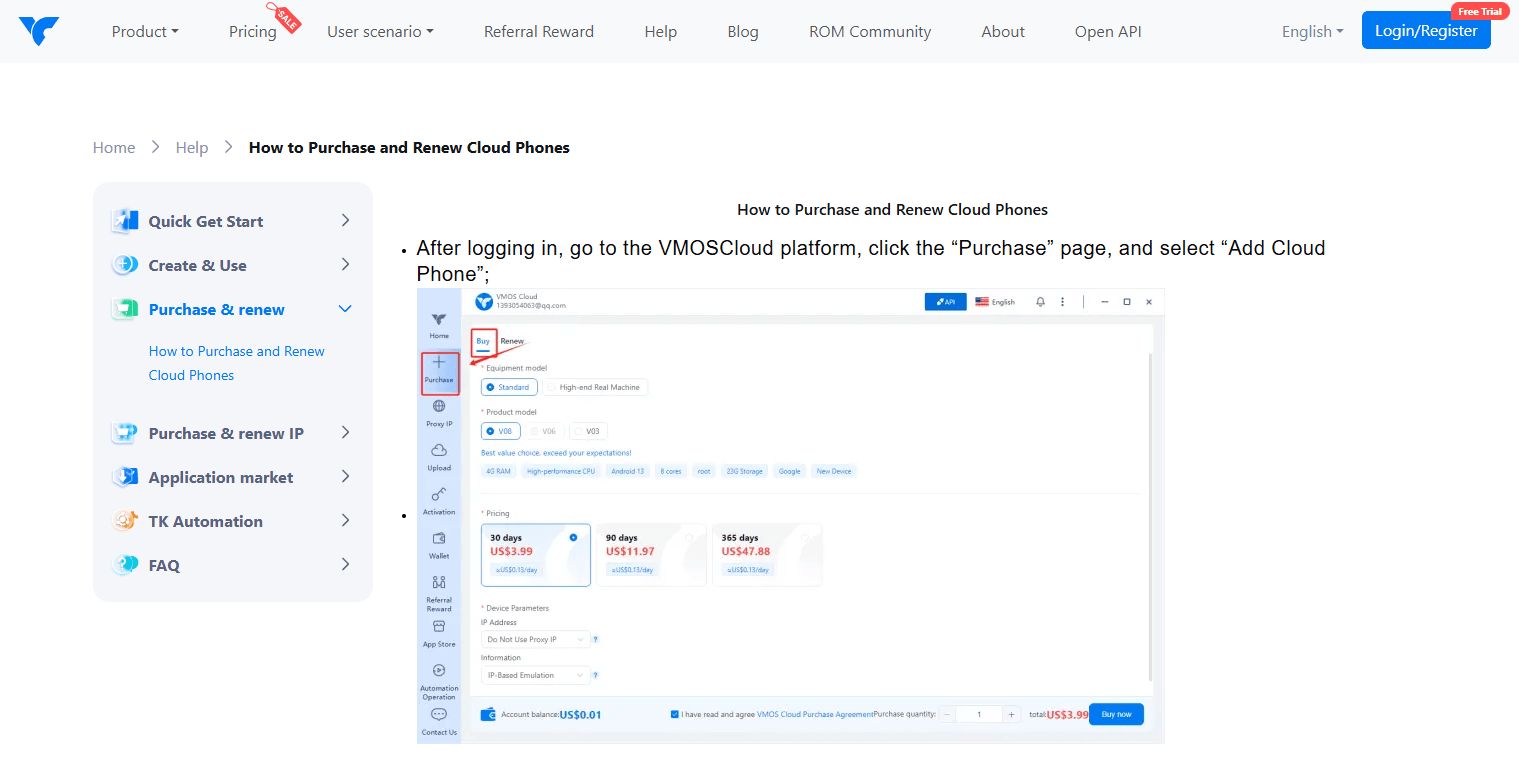
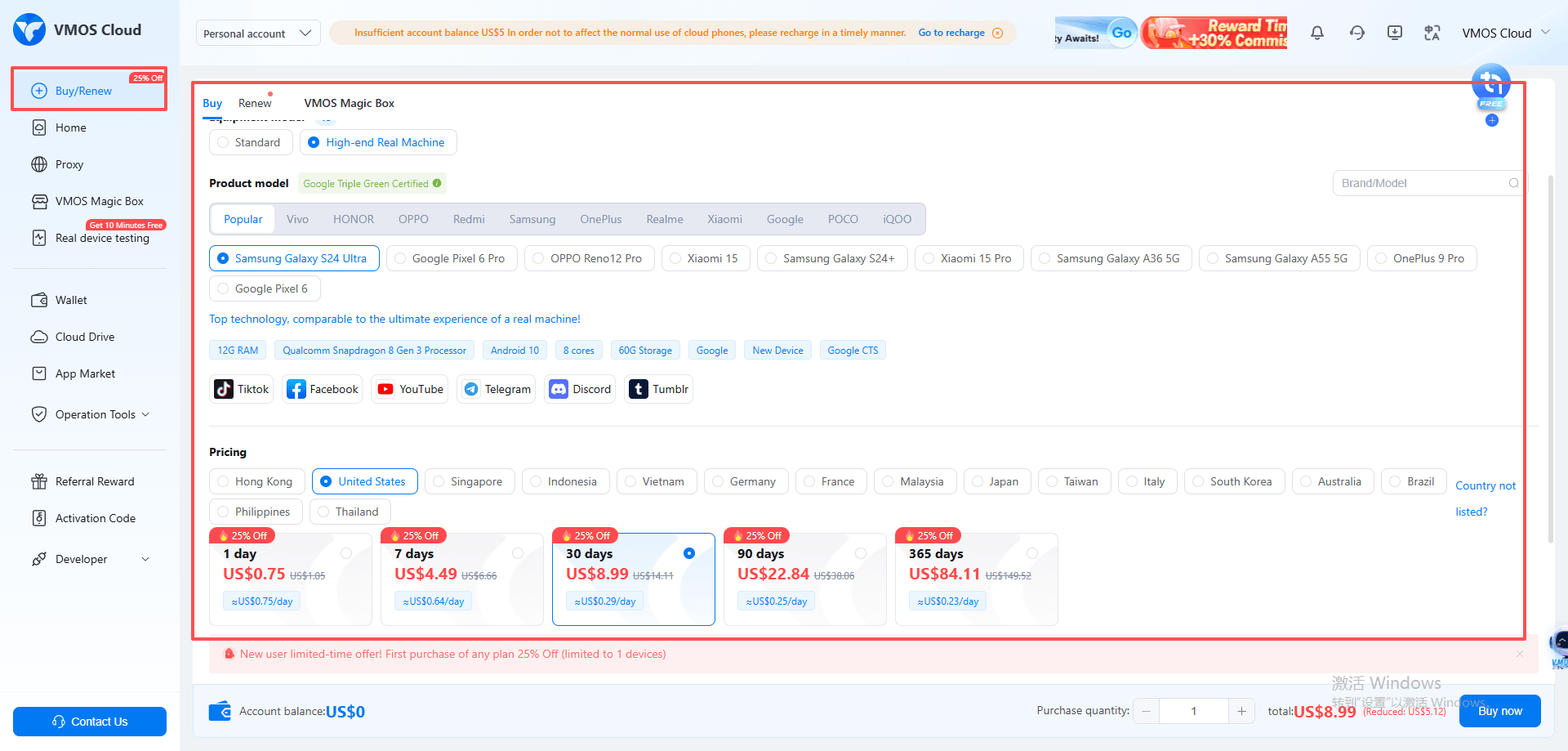
The help center lacks detailed pricing guidance and necessary explanations, offering only simple steps for purchasing and renewal. Similarly, the numerous options on the "Buy/Renew" page within the cloud phone control panel can be confusing for beginners, making it difficult to select the most suitable purchase plan.
2. Device and Region-Specific Billing Model
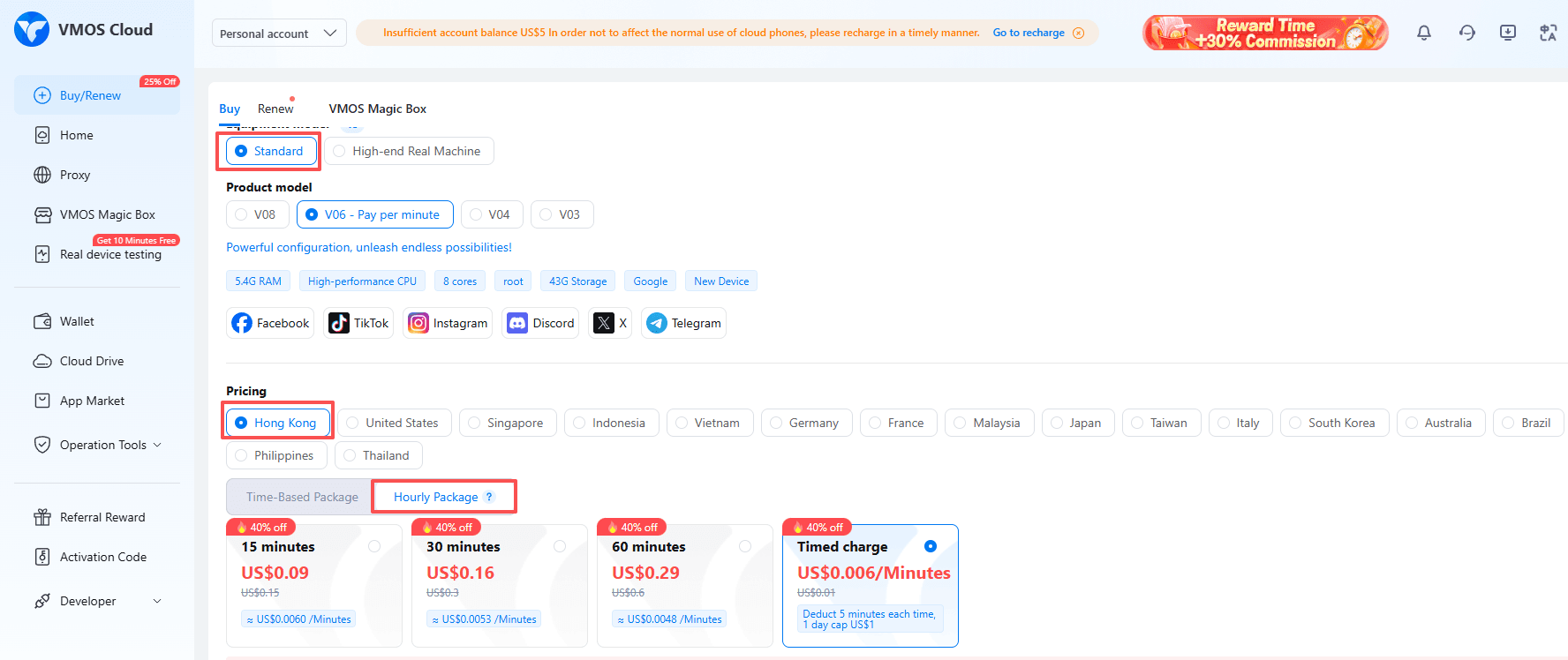
The platform states that it uses a usage-based billing model, typically charging by the actual minutes or hours a device is running, which can offer cost advantages for intermittent workloads such as testing or variable task demands.
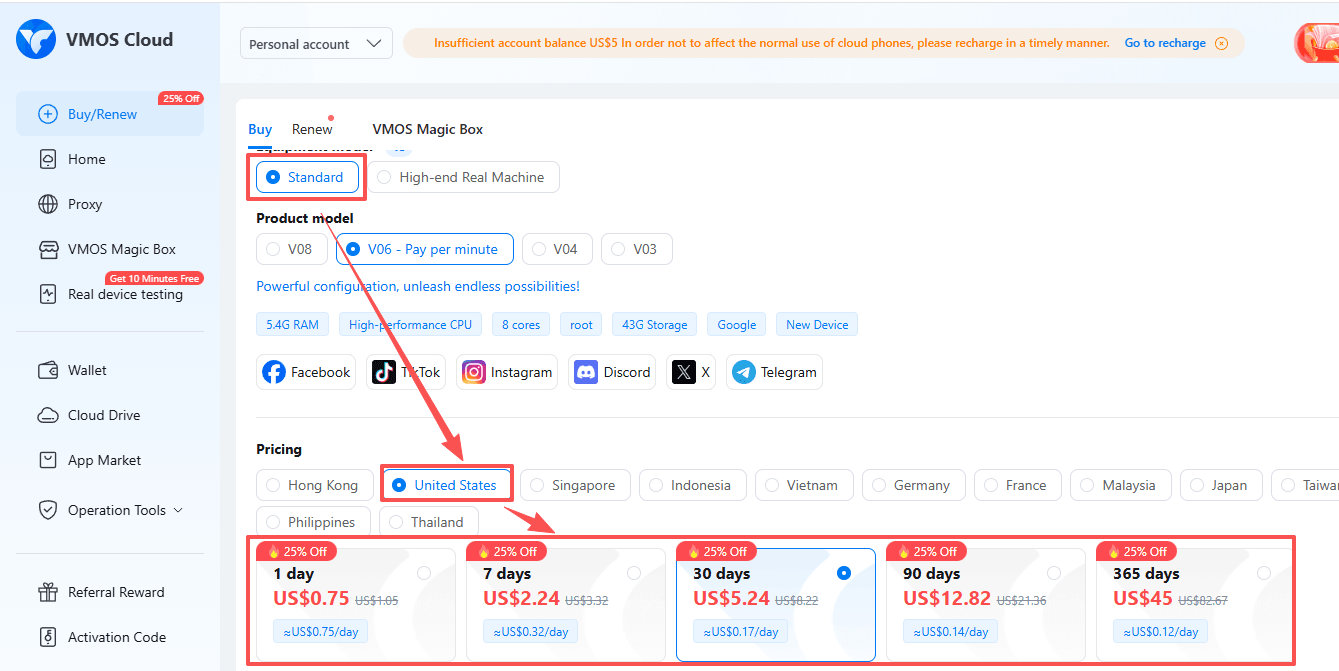
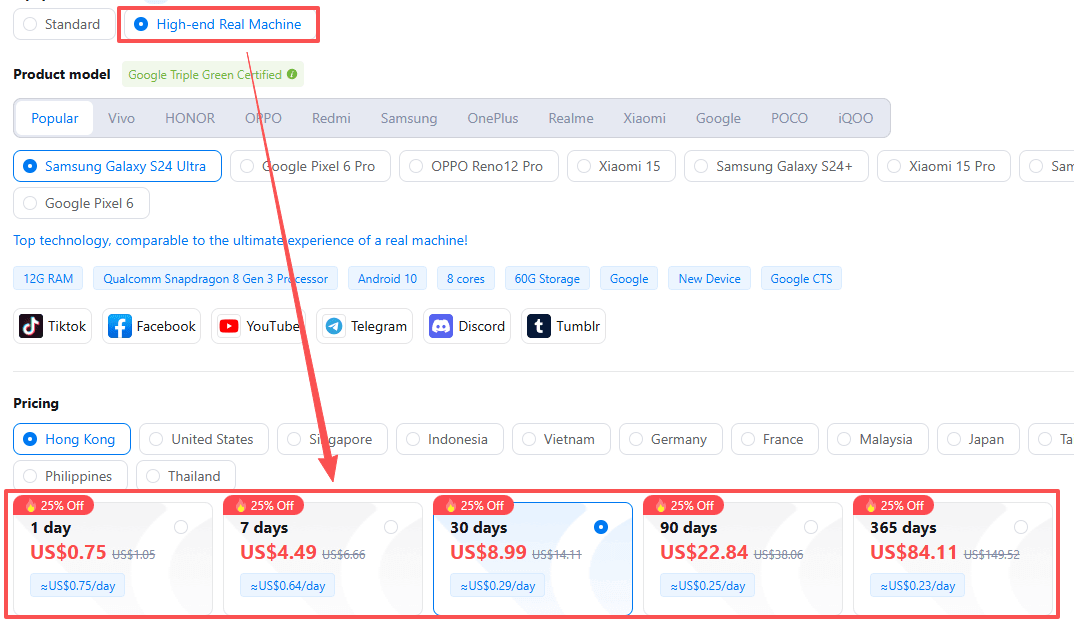
However, in practice, per-minute or per-hour billing is only available for the “Standard” model in the Hong Kong region. For the “Standard” model in other regions, as well as all regions under the “High-end Real Machine” category, the available billing options are limited to 1-day, 7-day, 1-month, 3-month, and 1-year plans.
Proxy Integration
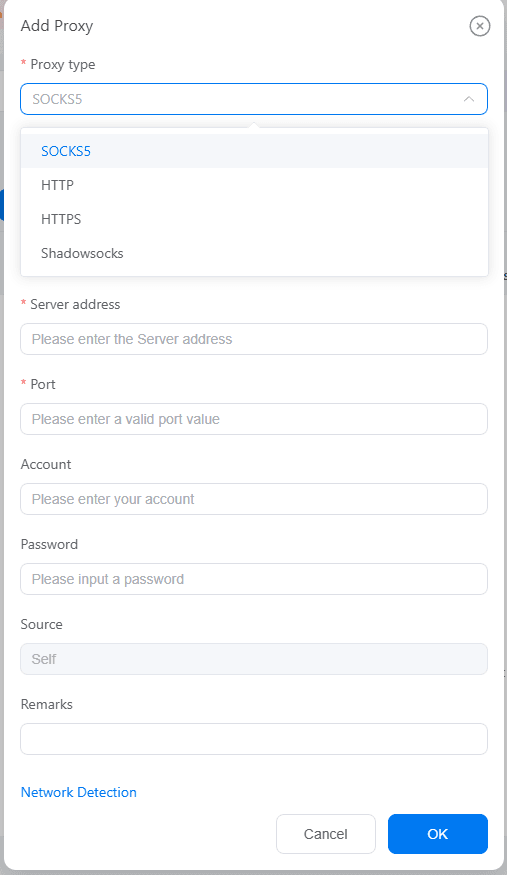
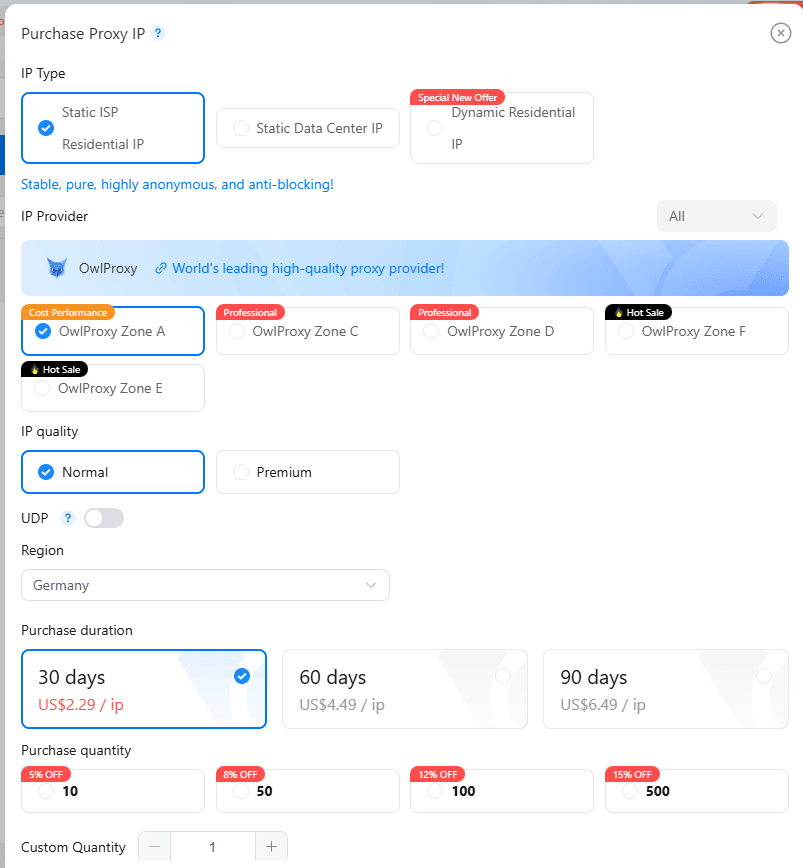
VMOS Cloud's proxy integration feature is designed for multi-account management scenarios, allowing users to assign a unique proxy IP to each cloud phone.
The platform offers two primary methods to obtain proxies: manually adding a proxy or directly purchasing a proxy service.
However, it is important to note that the purchased proxy IPs are exclusively usable within this platform, and detailed specifications of the proxies are not provided.
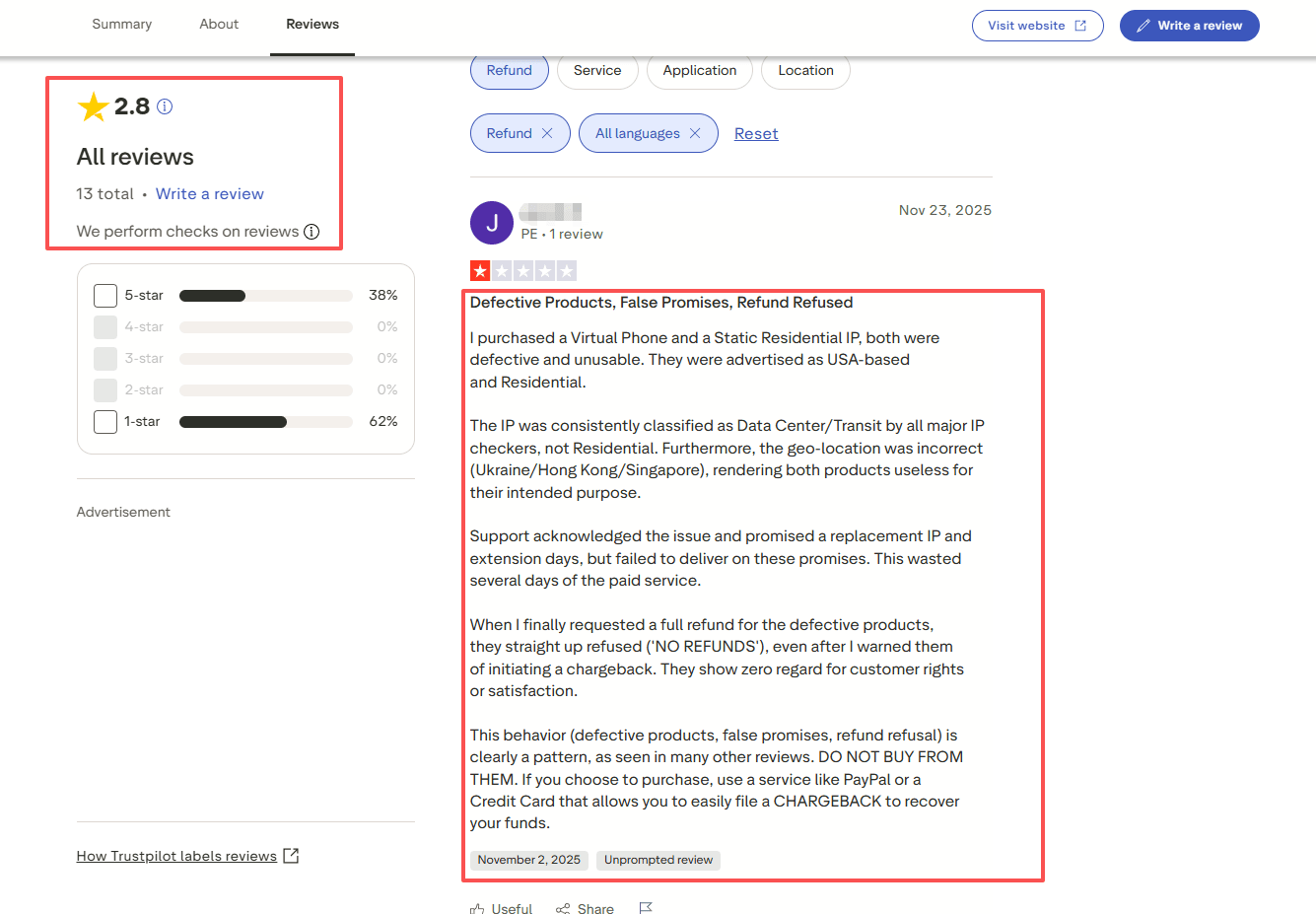
Important Security Advisory:
VMOS Cloud holds a rating of only 2.8 on TrustPilot. The most recent user feedback for the platform highlights quality issues with its purchasable static residential proxies, with reports that customer service refused to issue a refund. Therefore, a careful evaluation of their quality and usability is strongly recommended before purchasing its proxy services.
For guidance on selecting a proxy, you may refer to this article: 《How to Choose a Proxy in 2025: Expert Guide》
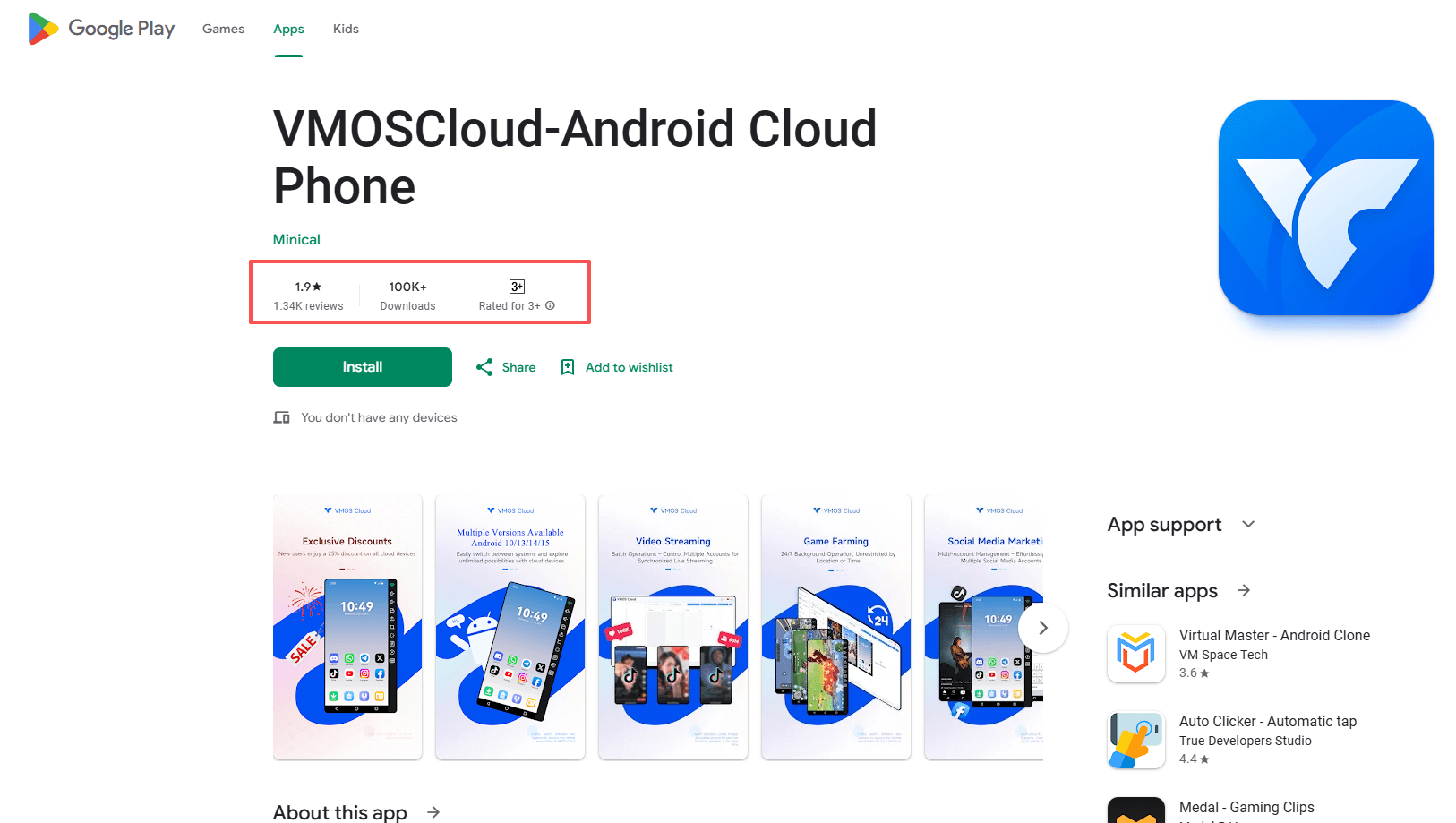
Furthermore, VMOS Cloud has a notably low reputation score of just 1.9 on Google Play.
Pros and Cons of Using VMOS Cloud in 2025
Every cloud phone solution comes with its own set of strengths and limitations. Understanding the VMOS Cloud pros and cons helps you make an informed decision about whether this platform fits your specific requirements.
1. Advantages That Set VMOS Cloud Apart
Complete Cloud Phone Solution: Provides fully functional Android environments running on remote servers, accessible via a browser or client. Eliminates the need for powerful local hardware and offers flexibility for remote access.
Powerful Multi-Instance & Isolation: Allows simultaneous operation and management of multiple independent virtual Android devices from a single console. Each instance has a unique device fingerprint, which is crucial for account isolation in scenarios like social media management and multi-account e-commerce.
Default Root Access & Deep Control: Virtual devices come with pre-enabled root permissions, granting immediate system-level control for modifications, automation scripts, and installing custom modules without complex jailbreaking procedures.
Broad Software/Hardware Compatibility: Officially supports Android versions up to Android 15 and device models from major manufacturers (e.g., Samsung, Google, Xiaomi). Full Google Mobile Services (GMS) are pre-installed, ensuring wide app compatibility.
Integrated Proxy Functionality: Features built-in proxy integration, supporting the assignment of a unique IP address to each cloud phone ("one device, one IP"). This is key for managing multiple accounts and avoiding bans due to association.
2. Limitations to Consider
Complex & Non-Transparent Pricing:
· The pricing page is cluttered with options and lacks clear guidance, making it difficult for beginners.
· The advertised "pay-by-the-minute" model has limited applicability (only for the "Standard" model in Hong Kong). In most other cases, users must purchase fixed-duration packages, reducing the claimed flexibility.
Features Tied to Device Tiers: Core functionalities such as "Global Social Media Marketing" and "App Development & Testing" are exclusively available on the more expensive "High-end Real Machine" tier. The cheaper "Standard" model only supports "Game Account Farming," which limits its utility.
Proxy Quality & Reputation Risks:
· User feedback highlights quality issues with its purchasable static residential proxies and reports of refused refunds by customer service.
· The platform has a low rating of 2.8 on TrustPilot and an extremely low score of 1.9 on Google Play, indicating poor user satisfaction and trustworthiness.
Poor User Experience & Support:
· The help center offers minimal documentation, lacking detailed explanations on pricing and features.
· The "Buy/Renew" page within the control panel is overly complex, complicating the purchase decision process.
Summary: Is VMOS Cloud the Best Choice for Multi-Account Management?
VMOS Cloud positions itself as a technically capable cloud Android platform designed for power users. Its core value lies in providing default root access, true multi-instance management with device fingerprint isolation, and integrated “one-IP-per-device” proxy support. These features make it a theoretically strong choice for professional multi-account operations, automation, and testing that require deep system control and account security.
However, its practical utility is significantly undermined by critical operational flaws. These include overly complex and non-transparent pricing, key features locked behind expensive device tiers, and substantial concerns regarding service quality—most notably its proxy services and customer support, as reflected in its very low user ratings (2.8 on TrustPilot, 1.9 on Google Play).
Recommendation: Considering BitCloudPhone as an Alternative
For users who find VMOS Cloud's complexities or reputation concerning, BitCloudPhone emerges as a compelling alternative to evaluate in 2025. Based on its stated offerings, it addresses several of the pain points identified with VMOS Cloud.
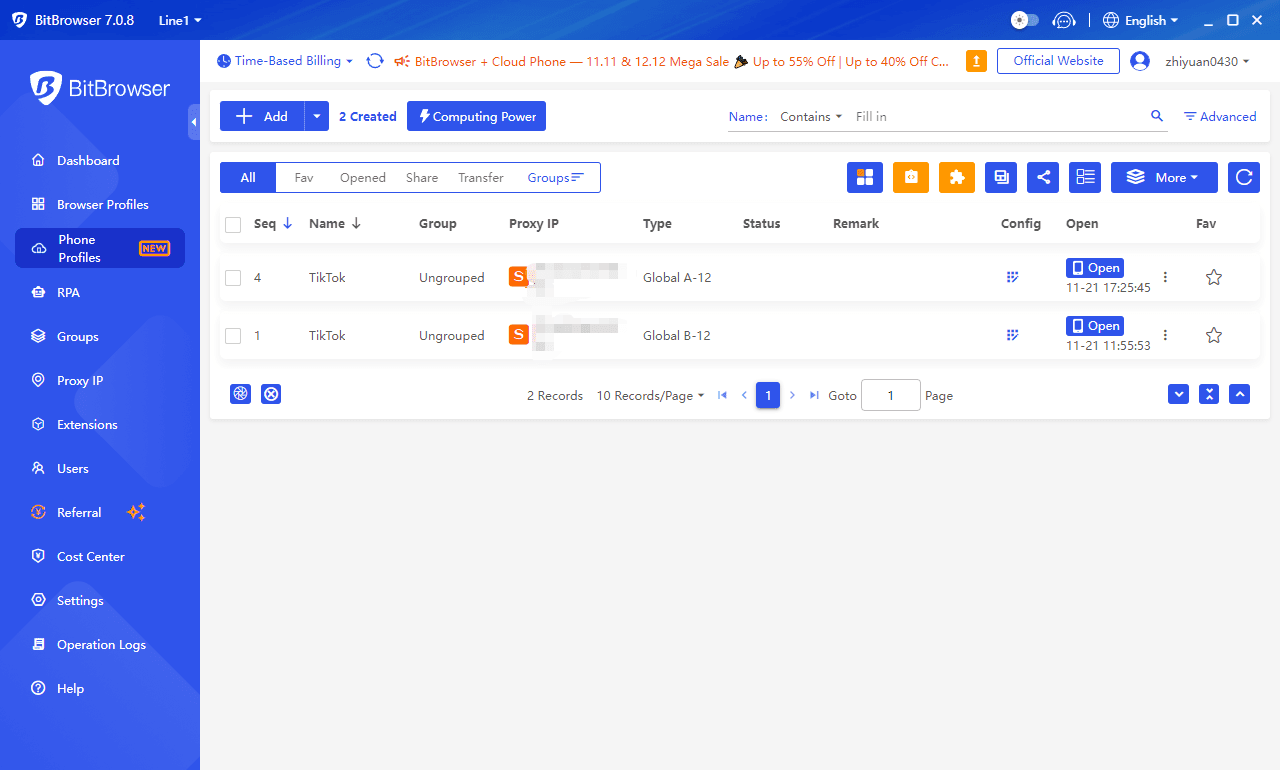
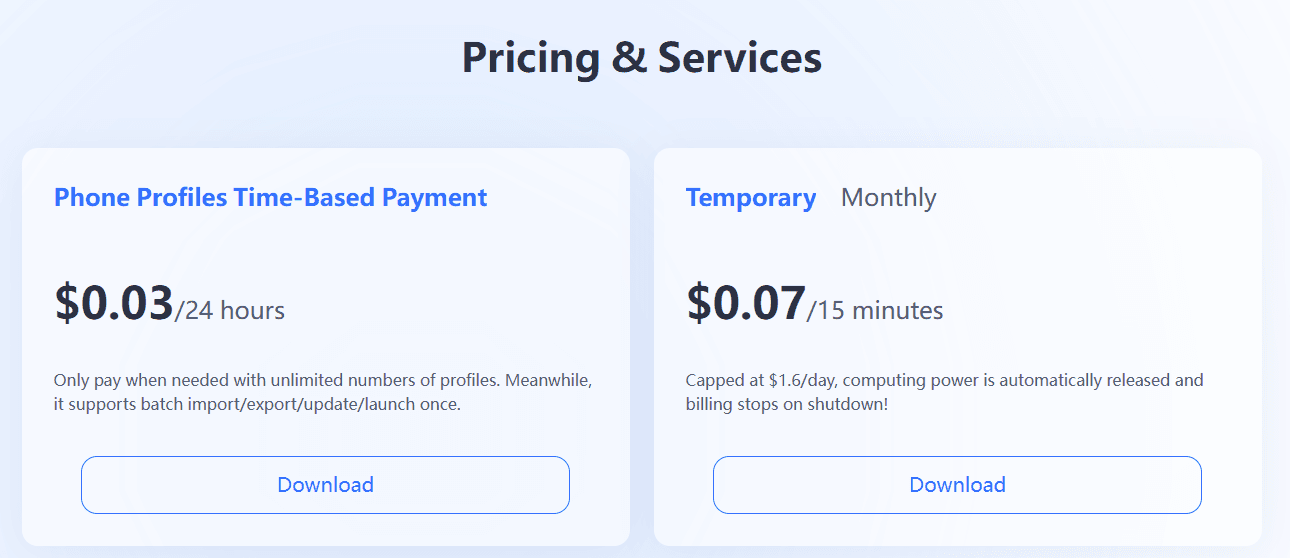
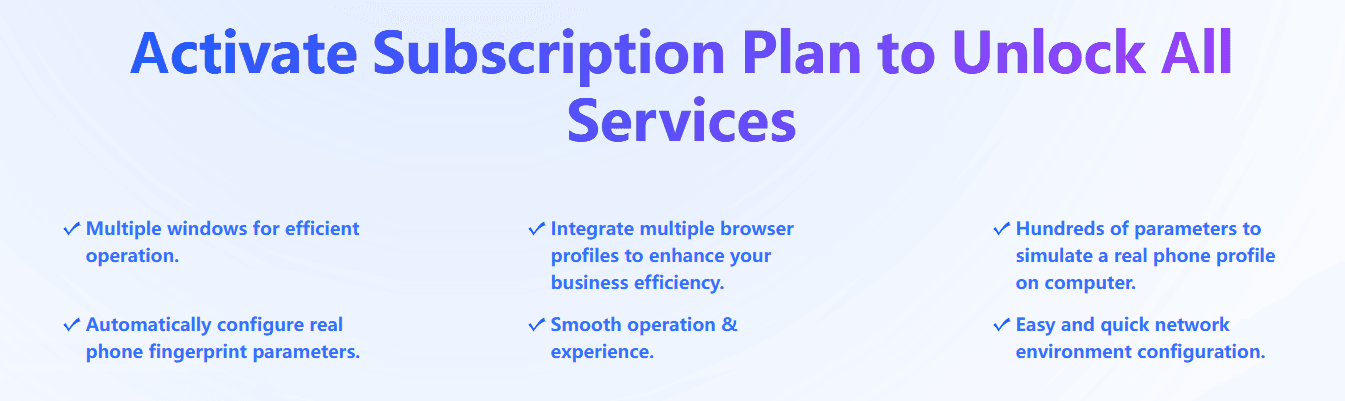
The table below provides a direct comparison between BitCloudPhone and VMOS Cloud based on this review criteria:
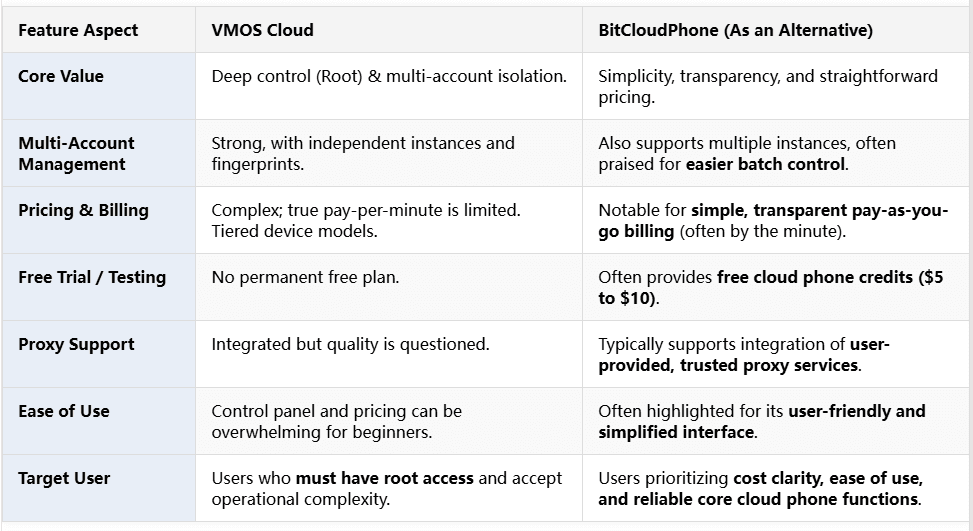
Final Recommendation
Choose VMOS Cloud if: Your project has an absolute, non-negotiable requirement for default root access within the cloud environment, and you are prepared to navigate its complex pricing and independently verify the quality of its bundled services like proxies.
Consider BitCloudPhone if: Your priority is a transparent, user-friendly cloud phone service for multi-account management, social media, or e-commerce, where root access is less critical than predictable costs and operational simplicity. Its model of letting you use your own proxies can also be an advantage for those with existing provider relationships.
Suggestion: The best choice depends entirely on your specific technical needs and tolerance for operational risk. Utilizing BitCloudPhone's free trial to test its performance for your workflows is highly recommended before making a commitment.
FAQs (Frequently Asked Questions)
1. What is a cloud phone and why is it essential in 2025?
A cloud phone is a virtual Android device hosted on remote servers. In 2025, it has become essential for users managing multiple accounts, cross-border e-commerce operations, global social media campaigns, and app testing. It eliminates the need for physical device farms, offering scalable, hardware-free Android environments accessible from any device with internet access.
2. Who is VMOS Cloud best suited for?
VMOS Cloud is primarily designed for social media managers, cross-border e-commerce operators, and app testers who require default root access and deep system control. It supports multi-instance operations and diverse Android configurations. However, many advanced features—such as social media marketing and app testing—are limited to the expensive High-end Real Machine tier.
3. What are the main limitations of VMOS Cloud according to this review?
Key limitations include its complex and non-transparent pricing, feature restrictions tied to device tiers, questionable quality of its static residential proxies, and very low user satisfaction ratings on TrustPilot (2.8) and Google Play (1.9). The platform’s help center and purchasing workflows also lack clarity, which may frustrate beginners and non-technical users.
4. How does VMOS Cloud compare with BitCloudPhone?
VMOS Cloud offers strong technical capabilities, especially root access, yet struggles with usability and service reliability.
BitCloudPhone, by contrast, emphasizes transparent pricing, a fully unlocked feature set under one subscription, stable performance, and the flexibility to use your own proxies. For users who prioritize cost-effectiveness, simplicity, and safer long-term operations, BitCloudPhone is often the more practical choice.
5. Should beginners or small businesses choose VMOS Cloud or BitCloudPhone?
Beginners and small teams may find VMOS Cloud overwhelming due to its complex purchase options and tier-locked features. BitCloudPhone is generally the better option, offering predictable costs, easier onboarding, no device-tier limitations, and strong support for multi-account operations. Testing BitCloudPhone’s free trial is recommended before committing to a long-term cloud phone solution.

 Multi-Account Management
 Prevent Account Association
 Multi-Employee Management
Recommended
See More