What Is a Proxy Browser? How It Works and What It's Used For
 2026.10.13 05:39
 YT.Shi
A proxy browser routes web traffic through a proxy server instead of connecting directly to a website. This can change the IP address that a website sees and help users access the web through different network locations.
Proxy browsers can be useful for checking localized website content, conducting market research, testing websites, and managing multiple social accounts at once.
In this guide, we will explain what a proxy browser is, how it works, how it differs from a browser proxy and a web proxy, and what to consider when choosing one.
What Is a Proxy Browser?
A proxy browser is a web browser or browser environment configured to route browsing traffic through a proxy server. The proxy acts as an intermediary between the browser and the websites it visits, forwarding requests and returning responses.
When a browser connects to a website through a typical forward proxy, the destination website generally sees the proxy server's IP address as the source of the connection rather than the user's public IP address. The exact information visible to the website depends on the proxy configuration and how the connection is handled.
The term can refer to several different setups:
▸ A regular browser configured with a proxy: Chrome, Firefox, or another browser uses proxy settings to route supported traffic through a specified server.
▸ An online web proxy: A web service fetches or relays website content through its own interface. You typically enter a URL on the service's website to start browsing.
▸ A browser with proxy and profile management: A dedicated browser lets users configure proxies for separate browser profiles and manage different browsing sessions from one interface.
An online web proxy website may be convenient for occasional browsing, while a browser with configurable proxy settings offers more control over how connections are routed. A multi-profile browser can also help keep different browsing sessions and their associated settings separate.
A proxy does not automatically change a browser's fingerprint, isolate cookies, encrypt all internet traffic, or prevent websites from identifying a user through other signals. Those capabilities depend on the browser, the proxy service, and the configuration being used.
How Does a Proxy Browser Work?
A proxy browser works by sending supported browsing requests through an intermediary server. Instead of establishing a direct connection to the destination website, the browser uses the proxy to handle the connection.

1. You open a website. You enter a URL or click a link in your browser, just as you normally would.
2. The browser sends the request to the proxy server. If the browser is configured to use a proxy, the request is routed through that server instead of following the usual direct connection path.
3. The proxy connects to the destination website. The website receives a connection from the proxy's network address, subject to the proxy protocol and configuration.
4. The response returns through the proxy. The proxy relays the website's response to your browser, where the page is displayed.
A proxy changes your network connection, but websites can still identify browsers through cookies, account activity, and browser fingerprints. An anti-detect browser provides additional control over browser fingerprints and profile isolation, helping you manage separate browsing environments.
Proxy Browser vs. Browser Proxy vs. Web Proxy
These terms are closely related, but they do not always refer to the same thing. Understanding the difference makes it easier to choose the right tool for a particular task.
| Type | How It Works | Main Purpose | Best For |
|---|---|---|---|
| Browser Proxy | Routes browser traffic through a configured proxy server. | Changes the network route and apparent IP address. | Browsing with custom proxy settings. |
| Web Proxy | Relays website requests through an online proxy service. | Accesses supported websites without manual browser configuration. | Occasional, simple browsing. |
| Proxy Browser | A browser or service that uses proxies, sometimes with profile management. | Proxy-based browsing and, depending on the tool, separate browser profiles. | Users who need proxy configuration or independent browser profiles. |
What Is a Browser Proxy?
A browser proxy usually refers to a proxy configured for a web browser. Instead of using the browser's normal direct connection, supported requests pass through the selected proxy server.
For example, you might configure a proxy in your browser or use a browser extension that manages proxy connections. Depending on the setup, the configuration may apply to the browser as a whole or only to selected traffic. It does not necessarily change how other applications on your computer connect to the internet.
What Is a Web Proxy?
A web proxy is commonly a website that lets you enter another website's address and access its content through an intermediary service. This is often the simplest option for occasional browsing because it may not require installing software or changing browser settings.
However, web proxies can have limitations. Some websites may not load properly, and certain interactive features, sign-in flows, or media content may not work as expected. You should also review the provider's privacy policy before sending sensitive information through the service.
What Is a Proxy Browser?
A proxy browser is a broader term that can describe a browser using a proxy, an online proxy browsing service, or a specialized browser with proxy management features.
If you only need to open a website through an intermediary, a web proxy may be sufficient. If you need to manage different proxies, browser profiles, and account sessions, a dedicated browser with profile-level proxy settings may be more practical.
What Is a Proxy Browser Used For?
A proxy browser can help you view websites through different IP addresses, test how pages appear in different regions, and manage browsing sessions. Common uses include:
Checking Websites in Different Regions
A proxy lets you check how a website appears when accessed from another IP location. You can compare regional content, local search results, language versions, and product prices.
Keep in mind that websites may also use cookies, account settings, and browser language to determine what you see. Changing your IP alone may not show the full local experience.

Market and Competitor Research
A proxy browser can help you compare product listings, prices, and landing pages from different locations. This is useful for checking how competitors present their products in different markets.
Website Testing
Developers and testers can use proxies to check whether a website works properly from different network locations. This can help identify regional loading issues, connection errors, and differences in page content.
Managing Multiple Accounts
If you manage several social media, shopping, or work accounts, a browser with separate profiles and proxy settings can help keep each session organized.
Changing the proxy alone does not separate accounts. Cookies, login sessions, and other browser data also need to be kept separate. A multi-account browser can help manage these settings in individual profiles.
Web Automation and Data Collection
Proxies can be used in browser automation to test websites, check pages from different locations, and collect publicly available data where permitted. However, a proxy does not guarantee uninterrupted access or prevent detection. Always follow the website's rules and applicable data protection requirements.
Common Types of Proxies Used With Browsers
Proxies can be grouped by protocol, IP source, and IP behavior. These categories can overlap. For example, a residential proxy can use SOCKS5 and rotate IP addresses.
1. Proxy Protocols
HTTP and HTTPS Proxies
HTTP proxies handle web traffic. They can also forward HTTPS connections through a secure tunnel to the website. The proxy itself does not automatically encrypt all traffic.
SOCKS5 Proxies
SOCKS5 supports different types of network traffic, depending on the application. It is a flexible option for browser proxy settings but does not encrypt traffic by itself.
2. Proxy IP Sources
Datacenter Proxies
Use IP addresses from data centers or hosting providers. They usually offer fast, stable connections, but some websites may recognize them as datacenter IPs.
Residential Proxies
Use IP addresses associated with residential internet connections. They are useful for checking localized content and testing websites from residential network locations.
Mobile Proxies
Use IP addresses from mobile networks. They are useful for testing websites and services through mobile connections. Speed and stability vary by provider.
ISP Proxies
ISP Proxies use IP addresses registered to internet service providers, but the proxy servers are often hosted in data centers. They typically offer stable IP addresses and are sometimes marketed as static residential proxies.
ISP Proxies vs Residential Proxies
3. IP Address Behavior
Static Proxies
Keep the same IP address over time. They are useful for tasks that require a consistent connection or location.
Rotating Proxies
Change IP addresses automatically based on the provider's settings. They can be useful for research involving multiple requests.
Some providers also offer sticky sessions, which keep the same IP for a set period before changing it.
The right choice depends on your task. Use a static IP when consistency matters and rotating IPs when your workflow requires address changes.
Proxy Browser vs. VPN: What Is the Difference?
A proxy browser and a VPN can both change the network path used to reach online services, but they operate differently and are intended for different configurations.
▸ Proxy browser: Routes supported browser traffic through a proxy server. The scope depends on the browser and how the proxy is configured.
▸ VPN: Creates an encrypted connection between the device or configured application and a VPN server. Depending on the setup, it can route traffic from multiple applications through that connection.
A VPN is often a better fit when you want broader network-level protection on a device or across several applications. A browser proxy may be more appropriate when you only need to route selected browser traffic through a particular proxy server.
Neither option guarantees complete anonymity. A VPN's encryption protects the connection between your device and the VPN server, but it does not make you invisible to websites. Websites can still use account information, cookies, browser characteristics, and other signals. For more on network-level privacy, see our guide to browsing anonymously online.
Benefits and Limitations of Proxy Browsers
A proxy browser can be useful, but its actual benefits depend on the service, the proxy source, and the way you use it.
Potential Benefits
▸ Different apparent IP location: A proxy can make a destination website see the proxy's IP address instead of your usual public IP address.
▸ Flexible connection settings: Proxy configuration can help with regional testing, troubleshooting, and workflows that require different network endpoints.
▸ Profile-level control: Some dedicated browsers let users assign different proxies to separate browser profiles, making it easier to organize independent sessions.
Important Limitations
▸ No automatic encryption: A proxy is not the same as a VPN. HTTPS protects data in transit between the browser and the destination website, while the protection provided by the proxy connection depends on its protocol and configuration.
▸ Variable performance: Connection speed and reliability depend on the proxy server, network conditions, provider capacity, and destination website.
▸ No automatic anonymity: Websites may still recognize a logged-in account or use cookies and browser characteristics to distinguish sessions.
Need More Than a Proxy Browser? Try BitBrowser
A proxy browser lets you connect through different IP addresses, but changing your IP alone may not be enough to keep browser sessions separate.
BitBrowser is an anti-detect browser that supports HTTP, HTTPS, SOCKS5, and other proxy configurations. You can assign a proxy to each browser profile and customize its browser fingerprint, including settings such as the user agent and other fingerprint parameters.
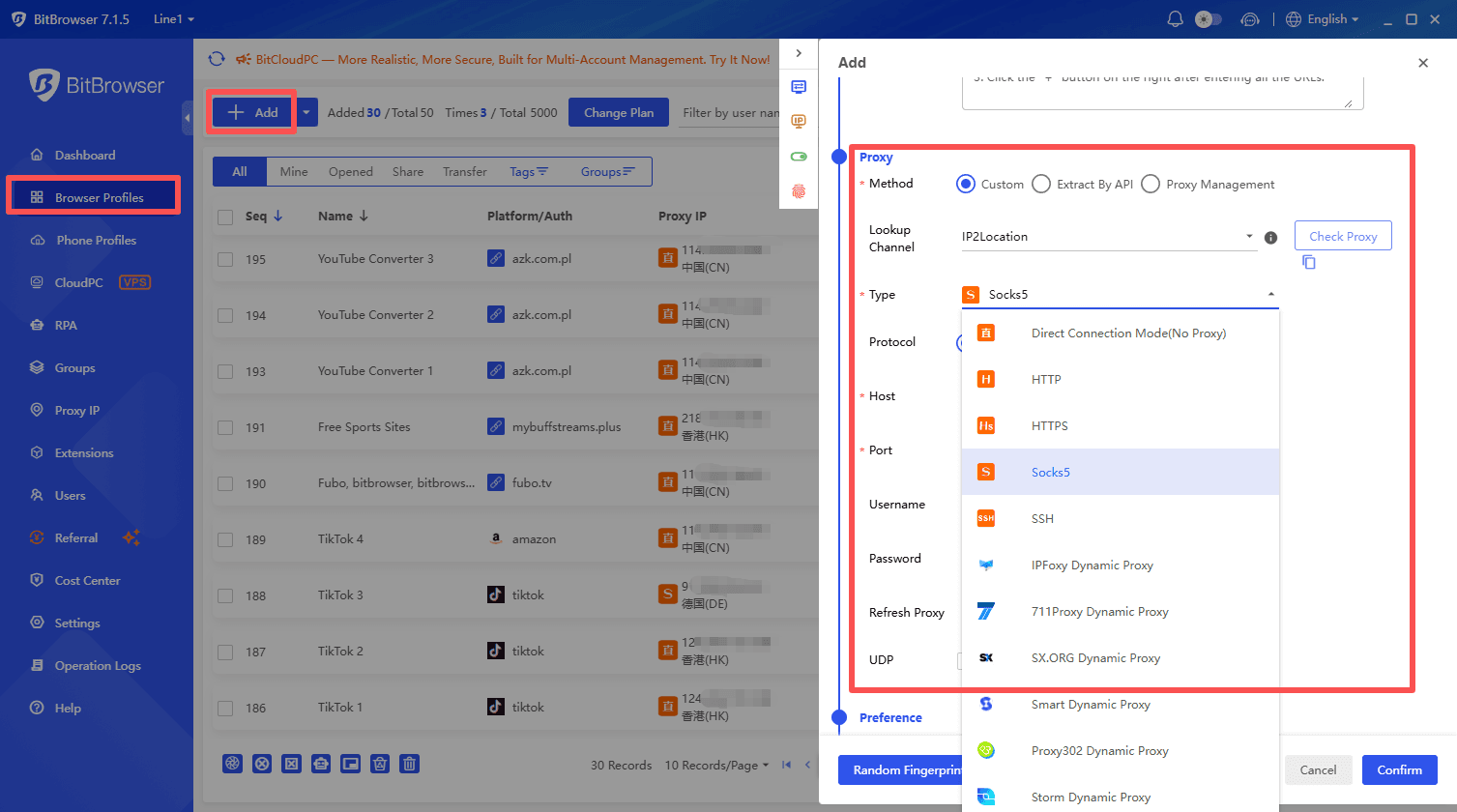
BitBrowser also makes proxy management easier. You can configure, test, and manage proxies alongside your browser profiles, keeping different browsing environments organized in one place.
Taking the RoundProxies setup tutorial as an example, BitBrowser's proxy integration supports one-click pasting, manual entry, proxy verification, batch configuration, and proxy import.
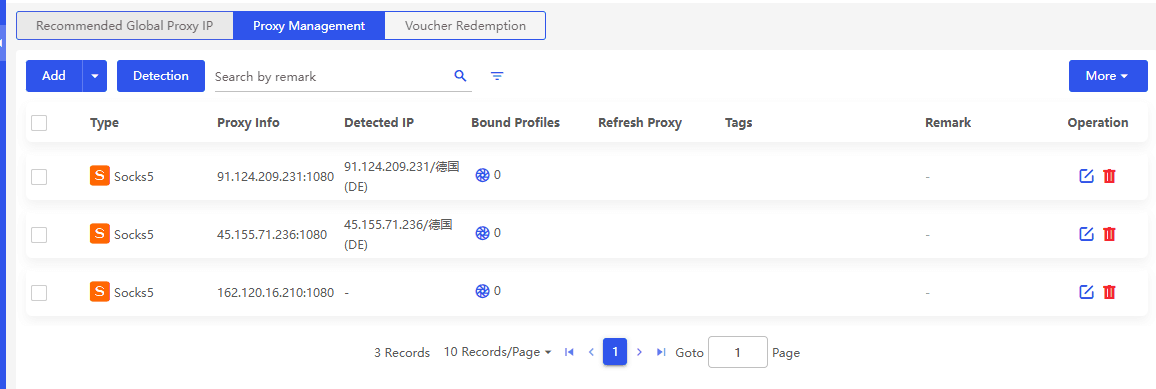
For users managing multiple accounts, BitBrowser lets you assign a different proxy to each browser profile. Each profile can also have its own browser fingerprint settings, cookies, and local storage. This helps keep account sessions separate and reduces the chance of accounts being linked through shared browser data.
Get 10 Free Browser Profiles Forever
The Bottom Line
A proxy browser helps you browse through different IP addresses, test websites across regions, and manage browsing sessions. If you also need separate browser profiles and fingerprint customization for multiple accounts, BitBrowser combines proxy management and anti-detect features in one tool.
Frequently Asked Questions
What is a proxy browser?
A proxy browser is a browser or browser-based service that routes supported web traffic through a proxy server. Depending on the tool, it may offer basic proxy access, configurable proxy settings, or separate browser profiles with individual network configurations.
Does a proxy browser hide my IP address?
When traffic is successfully routed through a proxy, the destination website generally sees the proxy's IP address instead of your usual public IP address. This does not prevent every form of identification, because websites may also use account information, cookies, and browser characteristics.
Is a proxy browser safe?
Safety depends on the browser, proxy provider, connection configuration, and the information you share. Review the provider's privacy policy, use HTTPS websites, and avoid entering sensitive credentials through an untrusted proxy service. A proxy should not be treated as a complete security or anonymity solution.
What is the difference between a proxy browser and a VPN?
A proxy browser routes supported browser traffic through a proxy server. A VPN establishes an encrypted connection to a VPN server and can route traffic from multiple applications, depending on its configuration. Neither guarantees complete anonymity.
What is the difference between a proxy browser and an anti-detect browser?
A proxy browser focuses on routing browser traffic through proxy servers. An anti-detect browser adds browser fingerprint customization and profile isolation, helping users maintain separate browsing environments. BitBrowser combines both capabilities for multi-account management.

 Multi-Account Management
 Prevent Account Association
 Multi-Employee Management
Recommended
See More 



